dbt can read Apache Ossie semantic model documents natively: drop JSON files in a directory, run a compile, and the definitions land in the manifest next to dbt's own semantic models. That makes dbt Core the largest install base that speaks the interchange format today, and the setup genuinely takes minutes. What the dbt docs state but do not dwell on is that the support is pinned twice: to one dbt release line, with v2 support still pending, and to the two released spec versions, while the spec's own main branch has already moved past them. Both pins are deployment decisions someone on your team has to make on purpose. This guide walks the working setup, then the three places where a document that looks right quietly loses content.
The setup is one directory and one version string
Four steps, from an existing dbt project on the v1 line (the exact pin is in the versions section below).
First, create an osi/ directory at the project root, at the same level as dbt_project.yml. dbt scans the whole directory tree, so subdirectories are fine. If you want the documents elsewhere, set osi-paths in dbt_project.yml with directories relative to the project root.
Second, place an Ossie document inside it, as JSON. A minimal document that parses, written against the 0.1.1 spec:
{
  "version": "0.1.1",
  "semantic_model": [
    {
      "name": "revenue",
      "datasets": [
        {
          "name": "orders",
          "source": "analytics.marts.fct_orders",
          "primary_key": ["order_id"],
          "fields": [
            {
              "name": "order_date",
              "expression": {
                "dialects": [
                  { "dialect": "ANSI_SQL", "expression": "order_date" }
                ]
              },
              "dimension": { "is_time": true }
            }
          ]
        }
      ],
      "metrics": [
        {
          "name": "net_revenue",
          "description": "Net revenue after refunds.",
          "expression": {
            "dialects": [
              { "dialect": "ANSI_SQL", "expression": "SUM(orders.amount_net)" }
            ]
          }
        }
      ]
    }
  ]
}
Two shapes in there are easy to get wrong from memory. semantic_model is an array, even for one model. And every expression, on fields and on metrics alike, is an object carrying a dialects list, not a bare SQL string: each entry pairs a dialect from the spec's enum (ANSI_SQL, SNOWFLAKE, DATABRICKS, and three others) with the expression in that dialect. The format's whole bet is that the same metric can carry several renderings side by side.
Third, run dbt compile or dbt run. Parsing happens on any compile; there is no separate import command.
Fourth, read what came out. The target/ directory now holds manifest.json and semantic_manifest.json with the Ossie-sourced definitions merged in, plus osi_document.json. Ossie-sourced definitions and native dbt semantic models coexist in the same project, which is what makes a gradual migration possible in either direction.
Binding is by warehouse address, not by name
Each dataset's source must be a fully qualified location in the form database.schema.alias, like analytics.marts.fct_orders above. dbt matches it on database, schema, and model alias, and the dataset binds to the dbt model at that address. The name of the dataset is irrelevant to binding; the address is everything.
That rule has a sharp edge: the address must resolve to a model. Documents that reference dbt sources, seeds, snapshots, or external tables are not supported. Ossie files inside installed dependency packages are ignored too; only the root project's directories are scanned. So a document exported from a BI tool or a catalog, where a dataset can point at any table the warehouse holds, does not necessarily load into dbt, because dbt insists the physical object be one it builds itself. If the table behind a definition is loaded by an ingestion tool and declared as a dbt source, the definition has no home in the osi/ directory until someone wraps the source in a model.
This is worth knowing before you promise anyone round-tripping. The interchange format is symmetric on paper; the consumers are not.
The two version pins decide when you can adopt at all
The dbt pin first. The feature requires dbt v1.12 or the v1 Latest release track, and the docs say plainly that v2 support is coming soon. dbt 2.0 has been shipping since September 14, 2026, so the teams that moved fastest onto dbt's new engine are exactly the teams that cannot parse an Ossie document today. If your project is on v2, your options are to wait or to keep a v1.12 environment alongside for the semantic layer.
The spec pin second. dbt accepts documents at version 0.1.0 or 0.1.1 only; any other version string raises a parse error. The spec's main branch, meanwhile, reads 0.2.0.dev0 and is marked draft, with the schema allowed to change before release. A document written against what the spec repository currently shows can fail to parse in the tool with the best native support. Write against the released 0.1.1 tag, and treat the version key at the top of every document as a contract you chose, not boilerplate.
Neither pin is a scandal. Ossie entered the Apache Incubator in July 2026 and draft specs churn; which constructs even belong in the standard is still being argued. The practical consequence stands anyway: for the next while, "we support Ossie" is a version-specific sentence, and the version strings on both sides of every exchange deserve a line in your runbook.
A clean parse is not a faithful parse
When dbt meets a construct it does not implement, it drops the construct, emits warning event code I078, and keeps parsing. The warning appears in the CLI output and in logs/dbt.log. Everything else in the document loads.
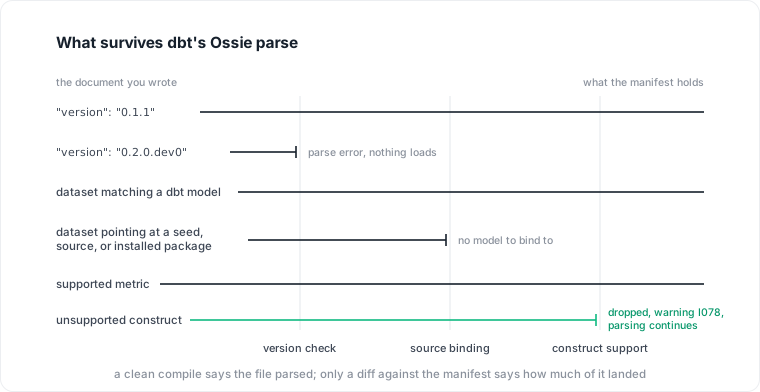
The three gates between the document you wrote and the manifest dbt holds. Only the last one lets the rest of the file through while something falls out.
For an engineering team, drop-and-continue is a defensible choice; the alternative is refusing whole documents over one unknown field. For whoever owns the definitions, it means the exit code is not the test. The producer believes it published a definition with, say, a filter the consumer never loaded, and both sides now hold a metric by the same name with different content. Nothing fails. The numbers just disagree later.
So add one verification step to the setup above and make it routine: after every compile that touches osi/, grep the log for the warning code, and diff what you shipped against target/osi_document.json to see the document as dbt retained it. Five minutes, and it converts a silent divergence into a visible one. The same discipline applies to any pair of tools exchanging Ossie documents, because the spec permits consumers to differ in what they implement, and a definition both sides merely name the same is not governed.
One caution on scope: loading a definition into dbt puts it in the manifest; it does not enforce anything at query time, and it says nothing about whether the definition was right. A parsed metric with a stale filter parses beautifully.
Datapace is building the context layer between your databases and your AI: resolved meaning validated by the people who own the data, the workload evidence beside it (cost, performance, usage and freshness, lineage), and a policy gate over what an agent may do and access, served over MCP. Interchange formats move definitions between tools; the resolution work underneath is what makes them worth moving. If that half is the one you are missing, book a call.
Sources
- dbt Developer Hub, "Apache Ossie semantic layer documents" (version requirements, osi/ directory, binding rules, I078 behavior).
- Apache Ossie, Core Metadata Specification 0.1.1 (tag osi-0.1.1-rc1: document structure, expression dialects, dataset schema).
- Apache Ossie, Core Metadata Specification, main branch (version 0.2.0.dev0, draft).
- Apache Ossie project, "Apache Ossie (Incubating): The New Name for Open Semantic Interchange", July 10, 2026.