TL;DR. The Postgres 14 to 18 upgrade is one pg_upgrade run, and the run itself is the easy part. What decides how the day goes is settled before any command executes: the transfer mode, which is really a decision about whether a bootable 14 still exists afterwards, and the checksum settings, which 18's initdb default will silently set wrong for most 14 estates. Rehearse the whole sequence against a restored copy, use
--checkas a gate rather than a formality, and script the first hour, because that is when the planner is working from whatever statistics survived the crossing.
Postgres 14 stops receiving fixes on November 12, 2026, which puts the Postgres 14 to 18 upgrade at the top of many database teams' migration queues. We have already written about what the four-major jump changes underneath you: the removals that fail loudly, and the quieter behavior shifts that surface weeks after cutover. This piece is the other half: the runbook. The commands, the order they run in, the two decisions to make before the first one, and what to verify at each step. pg_upgrade supports source clusters back to 9.2, so the width of the jump does not change the procedure; it changes how much you should trust a first attempt.
One scope note before the sequence: pg_upgrade does not cover logical replication clusters, and it executes code chosen by the source cluster's superusers, so the docs' warning to trust those superusers is not boilerplate if your 14 cluster has had a long administrative history.
Decision one: the transfer mode is your rollback plan
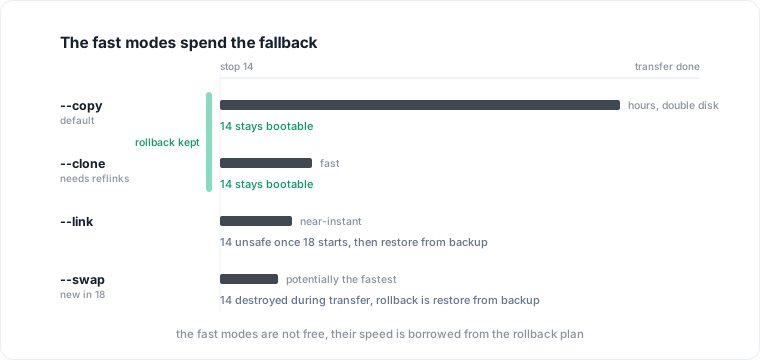
pg_upgrade moves data between clusters in one of several modes, and the right way to read the list is not as a speed ranking but as a price list for your fallback.
--copy, the default, duplicates every file. It is the slowest mode and doubles disk for the duration, and in exchange the 14 cluster is untouched: if anything goes wrong at any point, you restart it. --clone uses filesystem reflinks where the filesystem supports them (Btrfs or XFS with reflinks on Linux, APFS on macOS) and gets link-like speed while still leaving the old cluster intact; if the filesystem cannot do it, the run errors rather than degrading. --link hard-links files, which makes transfer nearly instant, but the moment the new cluster starts, the old one is no longer safe to use. --swap moves the data directories outright, is "potentially the fastest" in the release notes' words, and destructively modifies the old cluster from the start of transfer, not from first startup.
So the honest framing of mode choice is: how do you get back to 14 if the soak finds a problem on day three? With copy or clone, you start the old cluster. With link after the new cluster has run, or with swap at all, you restore from backup. On a four-major jump, where the surprise surface is at its widest, paying the copy-mode hours to keep a bootable 14 is often the right trade, and if your window cannot afford them, clone is the mode worth qualifying your filesystem for.
Decision two: checksums, settled at initdb
Postgres 18 changed the initdb default to enable data checksums, and pg_upgrade requires the old and new clusters' checksum settings to match. A 14 cluster initialized years ago, with checksums off, meets an 18 cluster initialized today, with checksums on by default, and the upgrade refuses to run. The release notes name the escape hatch directly: initialize the new cluster with --no-data-checksums to carry your old setting forward. The alternative, bringing 14 up to checksums first with pg_checksums, is a separate offline operation on the old cluster, which is why this decision belongs in the plan and not in the error output at 2 a.m.
Make the choice explicit in the runbook, either way. The initdb flags you use here must also mirror the old cluster's compile-time compatible settings; pg_upgrade reads pg_controldata from both sides and checks compatibility before doing anything.
Rehearse on a restored copy, then gate on --check
Everything above is theory until it has run once against your actual data. Restore a production backup to a scratch host, and run the entire sequence there: same binaries, same initdb flags, same extension list, same mode. The rehearsal is what turns the docs' unverifiable caveats into checked boxes. pg_upgrade cannot verify that your external modules are binary compatible with 18; the rehearsal can. It is also where the long tail surfaces: columns of the reg* types pg_upgrade does not support (regproc, regoperator, regconfig and friends; regclass, regrole and regtype are fine), and extensions whose 18 builds exist but behave differently. We made the same ordering argument about major upgrades in general: rehearse against a copy, and spend the saved attention on the changes that do not error.
On the production pair, --check is the gate:
# old server may still be running for this; ports must differ
/usr/lib/postgresql/18/bin/pg_upgrade \
  --old-datadir /var/lib/postgresql/14/main \
  --new-datadir /var/lib/postgresql/18/main \
  --old-bindir  /usr/lib/postgresql/14/bin \
  --new-bindir  /usr/lib/postgresql/18/bin \
  --check --link
Two details the docs are specific about: always run the new version's pg_upgrade binary, and pass your real transfer mode alongside --check, because some checks are mode-specific and a bare --check will not run them.
The cutover
With the rehearsal clean and --check passing, the production sequence is short. Install the 18 extension shared objects before the run, but do not CREATE EXTENSION anything in the new cluster; the definitions come across from 14, and pg_upgrade will tell you which extensions have updates available and generate a script for them. Then:
# 1. stop both clusters
pg_ctlcluster 14 main stop
pg_ctlcluster 18 main stop

# 2. the real pass: same command as --check, minus --check
/usr/lib/postgresql/18/bin/pg_upgrade \
  --old-datadir /var/lib/postgresql/14/main \
  --new-datadir /var/lib/postgresql/18/main \
  --old-bindir  /usr/lib/postgresql/14/bin \
  --new-bindir  /usr/lib/postgresql/18/bin \
  --link --jobs 8
--jobs parallelizes across databases and tablespaces, and the docs' starting suggestion is the machine's CPU core count. On an estate with many databases it is the difference between a coffee and a lunch.
If the run aborts partway: with copy or clone, or before link ever started the new cluster, the old cluster is unmodified; in the link case, remove the .old suffix pg_upgrade appended to pg_control and 14 starts again. That narrow recovery window is exactly what the mode decision in step one was pricing.
The first hour
pg_upgrade finishing is not the upgrade finishing. Three things stand between the completed run and open traffic.
First, the generated scripts. pg_upgrade emits per-cluster scripts the administrator must run, and the docs are blunt that tables referenced in rebuild scripts are unsafe to touch until those scripts complete. Run them before anything else connects.
Second, statistics. Landing on 18 is the first time pg_upgrade preserves most optimizer statistics, which removes the worst version of the post-upgrade hour: a planner guessing against production traffic. What it does not carry is extended statistics and a few other categories, so the docs prescribe a two-pass close:
vacuumdb --all --analyze-in-stages --missing-stats-only
vacuumdb --all --analyze-only
Both passes take --jobs, and setting PGOPTIONS='-c vacuum_cost_delay=0' speeds them up if the window allows. Only after the first pass is the estate out of the guessing zone.
Third, the old cluster's disposal. pg_upgrade leaves a deletion script for the old data directories; run it only once the soak is over and you have decided you are not going back. If you kept a bootable 14, it is your rollback until that moment, and deleting it early converts every later problem into a restore-from-backup problem.
A last word on waiting: teams sometimes read the calendar and consider skipping to 19, whose release cycle is landing around the same deadline. The support clock does not care. The 14 end-of-life date is fixed, 18 is supported through November 2030, and 19's new tooling will still be there for a later, single-major hop made from a supported version.
Where Datapace fits
Every unverifiable caveat in this runbook is a question about what your estate contains: which extensions at which versions, which columns use the unsupported types, which databases carry user-defined tablespaces that change the disposal step. Teams that can answer those from documentation run the rehearsal once; teams that cannot, run it as discovery. Datapace builds the context layer that keeps those answers current: resolved, owner-validated meaning about your databases with the workload evidence alongside, served to people and AI agents over MCP with a policy gate on what agents may do. An upgrade is a stress test of how well you know your own estate; that knowledge is buildable in advance. If that is the project after this project, book a call.
Sources
- PostgreSQL Documentation, pg_upgrade (supported source versions, procedure, --check and mode-specific checks, transfer modes and rollback behavior, --jobs, extension handling, unsupported reg* types, generated scripts, vacuumdb sequence, superuser trust warning).
- PostgreSQL, Release 18 notes (initdb data checksum default and --no-data-checksums, pg_upgrade checksum matching requirement, optimizer statistics preservation and the extended-statistics exception, --swap, parallel checks under --jobs).
- PostgreSQL, Versioning Policy (Postgres 14 final release on November 12, 2026; support windows for 15 through 18).