An N+1 cascade is the most common database performance problem in a modern web application, and it is almost always invisible to the tool most teams reach for first. EXPLAIN ANALYZE plans one query at a time. An N+1 storm is a hundred queries, each fast on its own, that together make a page slow. Each of those queries looks correct in isolation. The damage is in the call count, not the per-call latency. This post describes why the cascade is invisible to EXPLAIN ANALYZE, what catches it in practice, and the shape the fix takes.
Why EXPLAIN ANALYZE cannot see the cascade
The Postgres query planner operates on a single statement. You hand it one SQL string, it returns one plan. EXPLAIN ANALYZE executes that plan and prints real timing. Nothing in that pipeline has any knowledge of the code path that called the query.
Consider a dashboard that lists 20 projects. The application issues one query to load the projects, then for each project it issues three more to load the most recent task, the project owner, and the active member count. Twenty projects times three related queries is sixty round trips, plus the original one. Sixty-one queries per page paint.
Every one of those 61 queries plans cleanly. The parent query is a primary-key lookup. The child queries are indexed point reads. Each finishes in well under a millisecond. If you take any single query from the set and run EXPLAIN ANALYZE on it, the plan is a boring Index Scan with a two-digit microsecond execution time. There is nothing to optimize on that individual query.
The planner does not know about the loop. The planner has never seen the loop. The loop lives in application code that the database will never read. The cost of a fan-out pattern is entirely in the count of round trips, and count is not an argument EXPLAIN ANALYZE takes.
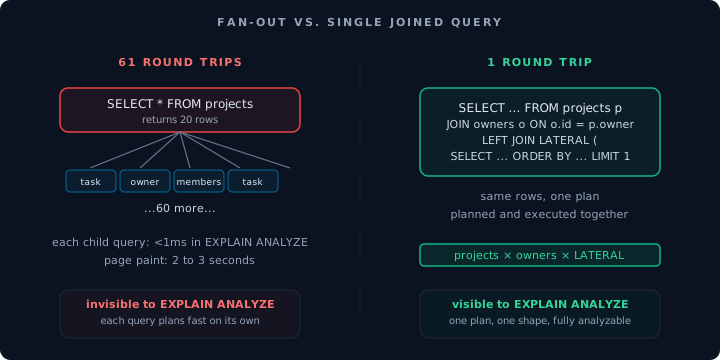
The pattern on the left is invisible to EXPLAIN ANALYZE. The pattern on the right is one plan that a database engineer can reason about.
What pg_stat_statements sees
The right signal for an N+1 cascade is not execution time. It is call count. pg_stat_statements keeps a running tally of how many times each normalized query has been executed, along with total and mean execution time. An N+1 query leaves a signature that is hard to miss: a simple SELECT with calls in the hundreds of thousands or millions and mean_exec_time under a millisecond.
A query that takes 3 seconds to run ten thousand times a day draws attention. A query that takes 0.4 milliseconds to run forty million times a day draws none, because the top-queries view in most tools is sorted by either total time or mean time, and this query is middle-of-the-pack on total time and near-zero on mean. The signature reveals itself only when you sort by calls.
A concrete lookup that finds these patterns:
SELECT
  substring(query, 1, 80) AS query_snippet,
  calls,
  round(mean_exec_time::numeric, 3) AS mean_ms,
  round(total_exec_time::numeric / 1000, 1) AS total_sec
FROM pg_stat_statements
WHERE calls > 10000
  AND mean_exec_time < 2
ORDER BY calls DESC
LIMIT 20;
A result that points at an N+1 looks like this:
         query_snippet            |   calls   | mean_ms | total_sec
----------------------------------+-----------+---------+-----------
 SELECT * FROM tasks WHERE proj.. |  2,147,883 |   0.412 |    885.2
 SELECT name FROM users WHERE i.. |  2,147,883 |   0.318 |    683.1
 SELECT count(*) FROM members W.. |  2,147,883 |   0.401 |    861.2
 SELECT * FROM projects WHERE u.. |    107,394 |   1.204 |    129.3
Three queries with the same call count, each running twenty times per call of the query above them. That is the fan-out. The math is obvious once you see it: 107,394 dashboard loads times 20 projects per dashboard is 2,147,880. The first three rows are the children. The fourth row is the parent. The parent is not slow. The children are not slow. The dashboard is slow because it issues every row individually.
The shape of the fix: JOIN plus LATERAL
The fix is to ask Postgres one question instead of sixty-one. Replace the loop with a join. For the members count and the owner name, a plain JOIN is enough. For the most recent task per project, the right tool is a LATERAL join, which lets a subquery reference the outer row and is the idiomatic Postgres pattern for "get the top-N rows per group."
SELECT
  p.id,
  p.name,
  o.full_name AS owner_name,
  (SELECT count(*) FROM members m WHERE m.project_id = p.id AND m.active) AS member_count,
  latest_task.title AS latest_task_title,
  latest_task.created_at AS latest_task_created_at
FROM projects p
JOIN users o ON o.id = p.owner_id
LEFT JOIN LATERAL (
  SELECT title, created_at
  FROM tasks t
  WHERE t.project_id = p.id
  ORDER BY t.created_at DESC
  LIMIT 1
) AS latest_task ON true
WHERE p.user_id = $1
ORDER BY p.updated_at DESC;
One statement. One plan. Postgres chooses the join order, pushes down the filter on user_id, and executes the LATERAL once per project row it has already materialized. The resulting plan is legible in EXPLAIN ANALYZE, has a single number to optimize, and the page paint drops from two or three seconds to well under a hundred milliseconds.
If the application is using Supabase, the same query runs as a Postgres function exposed as an RPC. The call site collapses from sixty-one round trips to one.
What CI should see
An N+1 cascade rarely lands in production as a single commit. It shows up when a new component is added to an existing page, or when a list grows, or when a well-meaning refactor breaks a previous join into a "cleaner" per-row lookup. The pattern is latent in the code and only becomes expensive at scale.
The place to catch it before it becomes a paging incident is at deploy time, not at page-load time. The signal is a sudden change in calls for a given normalized query after a deploy, correlated with the Git SHA of that deploy. An agent watching pg_stat_statements across deploys can flag this as a call-count regression and attribute it to the commit that introduced it.
What that looks like as a PR comment, for a hypothetical 340x jump in call count:
# datapace-agent, deploy correlation

  Commit      abc1234 (feat: add member avatars to project card)
  Window      post-deploy 15 min vs. preceding 60 min

  Query       SELECT name FROM users WHERE id = $1
  Call rate   1,200/min -> 408,000/min (340x)
  Mean time   0.31 ms (unchanged)
  Total time  6.2 sec/min -> 2,105 sec/min

  Verdict     call-count regression likely from a new per-row lookup
  Next        grep for the introduced SELECT pattern in the diff
This is not static analysis of the application. The agent does not read JavaScript or Python. It reads the database's own statistics, compares them across a deploy boundary, and surfaces the delta. The attribution from "this query is now running 340 times more often" to "this commit introduced it" is probabilistic, based on timing, not deterministic. A second deploy within the window can confuse the signal. A slow warm-up can trigger a false positive. Used with a team review, it is the right filter to cut the fan-out problem from "discovered at scale" to "discovered at PR time."
A useful caveat
Not every fan-out pattern is a bug. Some lists genuinely have per-row work that cannot be pre-joined: a permissions check that depends on the caller's session, a cross-service lookup that cannot live in the database, a vector similarity that has to run against a different index. The test is not "is there a loop." The test is "does the loop do work that a single join could have done." For the common dashboard shape, the answer is almost always yes.
Closing note
The reason N+1 cascades persist across good teams is that the tool most engineers reach for, EXPLAIN ANALYZE, is constitutionally blind to them. The database planner answers questions about one query. N+1 is a property of a call graph the planner never sees. The signal is calls, not time, and the right place to watch that signal is at the deploy boundary, not on a dashboard that the engineer only checks after someone complains. Datapace is the context layer and security gateway that lets teams run AI operations on production databases safely, with DBAs in control: it knows what's there, what it means, how it connects, and a call-count jump across a deploy is part of that context. If you want that boundary watched for you, talk to us about catching regressions at PR time.
Frequently asked questions
Why does EXPLAIN ANALYZE not flag an N+1 problem?
The Postgres planner evaluates one statement at a time. It has no visibility into the code path that issues the statement. Each query in an N+1 cascade is individually correct and fast, typically an indexed lookup under a millisecond. The cost is in the call count, which is not part of any plan the planner produces.
What should I look at instead?
pg_stat_statements. Sort by calls descending, filter to queries with low mean_exec_time. A query that appears with call counts far higher than any user-facing endpoint could justify, at near-zero mean time, is the signature. The parent query typically sits a few rows below with roughly 1/N of the child query's call count.
Is LATERAL the right fix for every N+1?
No. LATERAL is the idiomatic fix when the per-row lookup is "top-N per group," for example the most recent task per project. A plain JOIN handles one-to-one child lookups like the project owner's name. For counts or aggregates, a correlated subquery in the SELECT list is often cleaner than a GROUP BY join. Match the join shape to the question the loop was asking.
Does Datapace read my application code to find N+1 patterns?
No. The Datapace agent reads the database's own statistics (on Postgres: pg_stat_statements, pg_locks, pg_stat_activity) and compares them across deploy boundaries identified by commit SHA. It surfaces call-count regressions and attributes them to the deploy that introduced them. It does not parse application source code. Attribution is based on timing correlation and is probabilistic, not deterministic.
Does pg_stat_statements ship enabled by default?
On Supabase: yes, enabled by default on all projects. On self-hosted Postgres: no. It requires adding pg_stat_statements to shared_preload_libraries and restarting the server, then running CREATE EXTENSION pg_stat_statements in the target database. Most managed providers enable it by default; verify with SHOW shared_preload_libraries;.
Sources
- PostgreSQL documentation, pg_stat_statements
- PostgreSQL documentation, LATERAL subqueries
- Supabase documentation, pg_stat_statements