TL;DR. Oracle's support for MySQL 8.0 ended on April 30, 2026. What that means depends on who runs the server: a self-managed 8.0 has gone six months without fixes, RDS has billed Extended Support since August 1, Cloud SQL and Azure stop free support around the turn of the year, DigitalOcean starts forced upgrades on October 30, 2026, and Aurora MySQL 3 runs free until April 2028. The target is 8.4 LTS, supported through April 2032. Three things bite on the way: accounts on
mysql_native_passwordstop connecting, the old replication statements are syntax errors, and 8.4 ships InnoDB defaults tuned for NVMe that an in-place upgrade applies to whatever storage you actually have.
MySQL 8.0 end of life arrived on April 30, 2026. That is the date Oracle's support window for the 8.0 line closed; the final community release, 8.0.46, had shipped nine days earlier on April 21, and the mysql.com end-of-life notice now says "Users are encouraged to upgrade to MySQL 8.4 LTS or 9.7 LTS." The cohort it leaves behind is the largest MySQL has ever retired at once: 8.0 was the current line from April 2018 until 8.4 LTS shipped in April 2024, and Percona telemetry reported by The Register last October still showed 58% of the MySQL and MariaDB instances it could see on 8.0. Six months on, the useful question is which of six different clocks your instances are on, and what the 8.4 jump actually changes.
Every provider runs a different clock
Community end of life is one date. The moment it starts costing you is a different date per provider.
| Where 8.0 runs | Free support ends | Then | Provider-scheduled end |
|---|---|---|---|
| Self-managed, community build | April 30, 2026 | No further fixes | Not applicable |
| Percona Server for MySQL 8.0 | April 1, 2026 | Post-EOL builds for Percona customers | Not applicable |
| DigitalOcean Managed MySQL | October 30, 2026 | Forced upgrade to 8.4 in the maintenance window | Same date |
| Amazon RDS for MySQL | July 31, 2026 | Extended Support, $0.100 per vCPU-hour, doubles August 1, 2028 | July 31, 2029 |
| Google Cloud SQL for MySQL | January 1, 2027 | Extended support, charged | July 1, 2029 |
| Azure Database for MySQL | January 31, 2027 | Extended Support, billed per vCore-hour | May 31, 2029 |
| Amazon Aurora MySQL version 3 | April 30, 2028 | Extended Support from May 1, 2028 | July 31, 2029 |
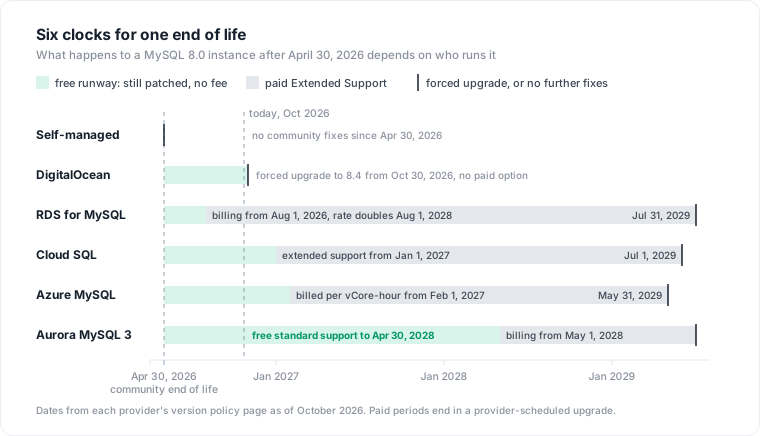
Three rows deserve a second look. DigitalOcean has no paid option: from October 30, every remaining 8.0 cluster is upgraded to 8.4 during its maintenance window, so the days before October 30 are the last chance to pick when that window falls. Aurora is the anomaly in the other direction: Aurora MySQL 3 keeps standard support for two full years past community end of life, runway an RDS fleet on the same engine does not have. And the RDS row is already a line item: enrollment is automatic, the fee is metered per vCPU-hour beside the instance, and the pricing mechanics, including the flag that silently re-arms after an upgrade, are worth reading before you decide to pay.
What paid support buys is concrete. The RDS Extended Support build for 8.0.46 released on September 23, 2026 carried fixes for 31 CVEs. A self-managed community 8.0 got none of them. Peter Zaitsev's line in The Register is the whole argument against staying: "Every piece of complex software has bugs which may not have been found yet."
8.4 is the target, and 9.7 LTS is the question people ask next
Since 2023 MySQL has shipped two tracks: long-term support lines, and innovation releases that arrive often and are retired quickly. 8.4 LTS shipped on April 30, 2024, and 9.7 LTS followed on April 21, 2026, nine days before 8.0's end of life, which invites the question of skipping 8.4 entirely. For a managed fleet the answer is no, for two reasons.
The first is the upgrade rule. The 8.4 manual's upgrade paths page states it plainly: "A bugfix or LTS series cannot be skipped." By that rule 8.0 lands on 8.4 before anything later. The second is availability. As of October 2026 RDS offers 9.7 only in its Database Preview environment, where instances are deleted after 60 days, and Azure's newest offering is a 9.5 innovation preview with a 30-day server lifecycle and no path to general availability. The supported, managed, production destination for an 8.0 fleet today is 8.4, and it is a long runway: the published lifecycle tables put Oracle's support for 8.4 at April 30, 2032, Percona's 8.4 lifecycle ends the same day, RDS standard support for 8.4 runs through July 31, 2029, and Aurora's 8.4 calendar shows April 2032. A move to 9.7 can happen from 8.4 later, as its own project, once the managed services carry it.
The loud pile: what errors on day one
A single-major upgrade still collects removals, and almost all of them fail fast, which makes them cheap. The grep is quick, and the failures land in automation rather than in the database.
The replication vocabulary changed, and the old statements are gone rather than deprecated. START SLAVE, STOP SLAVE, SHOW SLAVE STATUS, CHANGE MASTER TO, RESET MASTER and SHOW MASTER STATUS all return a syntax error on 8.4; the replacements are START REPLICA, SHOW REPLICA STATUS, CHANGE REPLICATION SOURCE TO, RESET BINARY LOGS AND GTIDS and SHOW BINARY LOG STATUS. Every failover script, backup job and monitoring check written in the old vocabulary fails on first run against the upgraded server, and those scripts live in places the application test suite never touches.
Configuration follows the same pattern. expire_logs_days gives way to binlog_expire_logs_seconds, default_authentication_plugin to authentication_policy, the mysql_upgrade and mysqlpump binaries are gone, and obsolete values left in sql_mode "prevent MySQL 8.4 from starting." A removed server option has the same effect, so on a self-managed host the configuration goes through the checker before the binaries change.
Foreign keys that reference a non-unique or partial index are the one schema-level change. 8.4 adds restrict_fk_on_non_standard_key, on by default, which rejects any new CREATE TABLE or ALTER TABLE that builds such a key. Existing tables upgrade, with warnings naming each affected key, so the failure arrives later, when a migration touches one of those tables and a statement that worked on 8.0 is refused. The upgrade checker reports them under foreignKeyReferences.
The authentication trap has no in-place fix
mysql_native_password was deprecated in 8.0.34, is disabled by default in 8.4, and was removed in 9.0. The 8.4 manual describes the consequence without softening it: "Defined user accounts that authenticate with mysql_native_password encounter an error when they attempt to connect." Finding the exposure takes one query.
SELECT user, host, plugin
FROM mysql.user
WHERE plugin = 'mysql_native_password';
The trap is in the migration. Switching an account's plugin discards its credential. The ALTER USER reference states that IDENTIFIED WITH auth_plugin "clears the credentials to the empty string (the credentials are associated with the old authentication plugin, not the new one)" and marks the password expired, and that combining a plugin change with RETAIN CURRENT PASSWORD fails. There is no hash conversion. Every migrated account needs a new password set in the same statement, which means every application secret attached to that account rotates in the same change.
ALTER USER 'app'@'10.0.%'
  IDENTIFIED WITH caching_sha2_password BY 'new-secret';
Two more properties shape the rollout. The first connection for a caching_sha2_password account after a password change must arrive over TLS, a Unix socket, or RSA key exchange; a plain TCP connection without the server's public key fails with "Authentication requires secure connection." And client libraries that predate 8.0 do not speak the plugin at all. So the order is: migrate accounts on 8.0, where caching_sha2_password is already the default, one service at a time, with the client upgrade and the secret rotation in the same change window, and leave the engine upgrade for last. Providers differ here in a way that matters. Azure documents that mysql_native_password stays enabled on all its versions including 8.4, so an Azure fleet can upgrade first and migrate accounts after. A self-managed 8.4 can set mysql_native_password=ON in [mysqld] as a bridge. Both bridges end at 9.x, where the plugin no longer exists.
The quiet pile: 8.4 defaults assume NVMe, not your volume
This is the change that does not error and that the end-of-life guides skip. 8.4 changed about twenty InnoDB defaults at once. An in-place upgrade keeps every value your configuration sets explicitly and flips every value it does not, and the flipped set is precisely the list most 8.0 configurations never touched.
| Variable | 8.0 default | 8.4 default |
|---|---|---|
innodb_io_capacity | 200 | 10000 |
innodb_adaptive_hash_index | ON | OFF |
innodb_change_buffering | all | none |
innodb_log_buffer_size | 16 MiB | 64 MiB |
innodb_flush_method (Linux) | fsync | O_DIRECT if supported |
innodb_doublewrite_pages | value of innodb_write_io_threads | 128 |
innodb_purge_threads | 4 | 1 on 16 or fewer CPUs |
innodb_buffer_pool_instances | 8 | derived from pool size and CPU count |
Take innodb_io_capacity first, because it is the one with a cost attached. It sets the I/O budget InnoDB spends on background work, mainly flushing dirty pages, and the manual says it "should be set to approximately the number of I/O operations that the system can perform per second." The old default of 200 was low for SSDs, which is why Oracle raised it; Frédéric Descamps, writing about the new defaults in May 2024, put it as "the default I/O capacity was too low." The new default of 10000 is a budget for local NVMe. A gp3 volume on AWS delivers a baseline of 3,000 IOPS, and gp2 delivers 3 IOPS per GiB. Hand InnoDB a 10,000-IOPS flushing budget on a 3,000-IOPS volume and background flushing competes with the foreground reads and redo writes your queries are waiting on. The manual's own warning is the mechanism in one sentence: "If the value is too high, data is removed from the buffer pool and change buffer too quickly for caching to provide a significant benefit." Percona's 8.4 tuning guidance says the same from the other side: re-evaluate against your storage type and observed latency, and expect older storage to need a lower value.
Change buffering is the second one with an I/O story. The change buffer caches modifications to secondary index pages that are not in the buffer pool and merges them later, and the manual is specific about who benefits: it "is most valuable for workloads that are I/O-bound; for example, applications with a high volume of DML operations such as bulk inserts." With the default now none, an insert-heavy table whose secondary indexes do not fit in memory pays a synchronous page read per index change that 8.0 deferred. Oracle's reasoning, again from Descamps: "on most recent hardware, random I/O is not a problem anymore." On a network-attached cloud volume that sentence is doing a lot of work.
The adaptive hash index flip cuts both ways. The manual notes that it "can sometimes become a source of contention under heavy workloads, such as multiple concurrent joins," which is why off is the more predictable default, and a read-heavy workload built on hot point lookups can lose real throughput when it disappears. The manual's advice is the honest one: benchmark with it enabled and disabled.
None of these are defects. They are better defaults for the hardware Oracle benchmarks on, and the 8.4 upgrade guide recommends you "evaluate all the new defaults and use as many as you can." The cost shows up when the hardware is a network volume with a few thousand IOPS. There are two ways to reconcile the defaults with the disk: buy the volume the defaults assume, which is provisioned IOPS and a permanently higher storage line, or set three variables to match the volume you have, which is free. The second is correct for most fleets. The first is the one you pick by accident, usually after a week of unexplained latency on the upgraded instance. On a managed service the same logic runs through parameter groups: a major version upgrade moves the instance to a new parameter group family, and whatever that group holds is what the engine runs with.
A pre-upgrade sequence that works on any provider
The order matters more than the tooling. Each step closes a class of failure before the next one can hide it.
Run the MySQL Shell upgrade checker against production, with the exact target minor. One pass covers removed system variables, changed defaults, authentication plugins in use, non-standard foreign keys and new reserved words.
mysqlsh -- util check-for-server-upgrade app@prod-8-0:3306 \
  --target-version=8.4.11 --output-format=JSON \
  --config-path=/etc/mysql/my.cnf
Migrate every mysql_native_password account on 8.0, one service per change, rotating the secret and upgrading the client library together.
Grep every repository that can issue SQL at the server, not only the application, for the removed vocabulary.
grep -rniE 'START SLAVE|STOP SLAVE|SHOW SLAVE|CHANGE MASTER|RESET MASTER|SHOW MASTER|expire_logs_days|default_authentication_plugin' .
Rehearse on a clone. On RDS the documented path is snapshot, restore, upgrade the restored instance; on a self-managed host, shut down cleanly with innodb_fast_shutdown=0 first, because the upgrade will not run against a crashed data directory.
Diff SHOW GLOBAL VARIABLES between the clone and production, and set innodb_io_capacity, innodb_change_buffering and innodb_adaptive_hash_index explicitly against your storage and workload before the soak begins.
Soak with production-shaped writes and compare tail latency and dirty page flushing, the same discipline a multi-major Postgres jump demands, applied to a single-major upgrade whose quiet changes all live in the storage engine.
When paying is the right answer
Extended Support buys months, and the months have a price. One db.r6g.xlarge Multi-AZ on RDS is 8 billed vCPUs: 8 × $0.100 × roughly 730 hours is about $584 per month, doubling from August 2028, for an upgrade that is one major wide and mostly mechanical. Paying is defensible when a client you cannot upgrade this quarter still depends on mysql_native_password, or when a schema full of non-standard foreign keys needs its own migration project first. It is a poor default, because the clock keeps running: on RDS the enrollment flag survives the upgrade and re-arms when 8.4 reaches its own end of standard support in 2029. The one fleet that can genuinely wait is Aurora MySQL 3, and the right use of its two free years is to do the account migration and the script rewrite now, so the engine upgrade is the boring part.
Where Datapace fits
An end-of-life exit is an inventory problem before it is an upgrade problem: which accounts use which plugin, which jobs still speak the old replication vocabulary, which instances sit on which provider's clock, which workloads will feel change buffering disappear. Datapace is building the context layer between your databases and your AI: resolved meaning about the estate, validated by the people who own it, with the workload evidence beside it (cost, performance, usage and freshness, lineage), and a policy gate over what an agent may do and access, served over MCP. If your fleet spans more than one of the rows in the table above, book a call and bring the list.
Sources
- MySQL, End-of-Life Notices, April 21, 2026 entry (8.0 under Oracle Lifetime Sustaining Support, upgrade guidance to 8.4 LTS or 9.7 LTS).
- MySQL 8.4 Reference Manual, What Is New in MySQL 8.4 since MySQL 8.0 (removed replication statements, removed options and binaries,
restrict_fk_on_non_standard_key, the table of changed InnoDB defaults). - MySQL 8.4 Reference Manual, Upgrade Paths (LTS series cannot be skipped).
- MySQL 8.4 Reference Manual, Preparing Your Installation for Upgrade (obsolete
sql_modevalues prevent startup, clean shutdown requirement, upgrade checker). - MySQL 8.4 Reference Manual, Changes in MySQL 8.4 (changed server defaults table and the recommendation to evaluate the new defaults).
- MySQL 8.4 Reference Manual, Native Pluggable Authentication (deprecated 8.0.34, disabled by default in 8.4, removed in 9.0, connect error,
mysql_native_password=ON). - MySQL 8.4 Reference Manual, Caching SHA-2 Pluggable Authentication (secure first connection requirement, default plugin via
authentication_policy). - MySQL 8.4 Reference Manual, ALTER USER Statement (plugin change clears credentials and expires the password,
RETAIN CURRENT PASSWORDincompatibility). - MySQL 8.4 Reference Manual, Configuring InnoDB I/O Capacity (default 10000, IOPS guidance, too-high warning).
- MySQL 8.4 Reference Manual, Change Buffer (default
none, I/O-bound workload guidance). - MySQL 8.4 Reference Manual, Adaptive Hash Index (contention under concurrent joins, benchmark both ways).
- MySQL 8.4 Release Notes, Changes in MySQL 8.4.0 (
mysql_native_passworddisabled by default,restrict_fk_on_non_standard_key, InnoDB defaults change). - MySQL 9.7 Release Notes, Changes in MySQL 9.7.0, April 21, 2026 (release date).
- MySQL Shell 8.4, Upgrade Checker Utility (
targetVersion, command-line form, check names). - AWS, MySQL on Amazon RDS versions (8.0 and 8.4 support calendar, 8.0.46-RDS.20260908 CVE list, 9.7 in the Database Preview environment, snapshot-restore-upgrade rehearsal).
- AWS, Amazon RDS Extended Support charges (charges begin the day after end of standard support, Multi-AZ standbys billed, charges restart on the target version, disable behavior).
- AWS, Release calendars for Amazon Aurora MySQL (Aurora MySQL version 3 end of standard support April 30, 2028, Extended Support May 1, 2028 to July 31, 2029, Aurora MySQL 8.4 to April 2032).
- Microsoft Learn, Version support policy, Azure Database for MySQL (8.0 standard support to January 31, 2027, Extended Support February 1, 2027 to May 31, 2029, per vCore-hour billing,
mysql_native_passwordkept enabled, 9.5 innovation preview). - Google Cloud, Database versions and version policies, Cloud SQL for MySQL (8.0 extended support from January 1, 2027, deprecation July 1, 2029, extended support charged).
- DigitalOcean, MySQL 8.0 End of Life and Forced Upgrades Beginning 30 October 2026.
- Percona, Percona Software Support Lifecycle (Percona Server for MySQL 8.0 end of life April 1, 2026; 8.4 end of life April 30, 2032).
- Percona Server for MySQL 8.4 documentation, Defaults and tuning guidance for 8.4 (reusing an 8.0 configuration, storage-dependent
innodb_io_capacity). - Frédéric Descamps, MySQL 8.4 LTS: new production ready defaults for InnoDB, May 1, 2024 (stated rationale for each changed default).
- The Register, The clock's ticking for MySQL 8.0 as end of life looms, October 31, 2025 (Percona telemetry share on 8.0, Peter Zaitsev quotes).
- endoflife.date, MySQL (published lifecycle dates for 8.0, 8.4 and 9.7 LTS).
- AWS, Amazon EBS General Purpose SSD volumes (gp3 baseline 3,000 IOPS, gp2 3 IOPS per GiB).