
TL;DR. Odoo's own documentation is explicit: an upgrade does not cover migrating from another ERP to Odoo. The vendor automates version to version and leaves the legacy move to you, which is the direction that carries the risk. The reason is the target model. Odoo keeps companies, contacts, and their addresses in one
res.partnerwhose parent overwrites some of their fields, every invoice type in oneaccount.movethat refuses an unbalanced entry, taxes and the chart of accounts that arrive with the localization rather than from your legacy, and stock on hand as a computed result. Every legacy row has to be restated in those terms, and each restatement is a decision about meaning. Then the clock restarts: standard support runs three years per major version, and Odoo 17.0 reached the end of its standard support in September 2026.
Search "Odoo data migration" and the advice is uniform: audit your data, clean it, map it, phase the rollout, test before go-live. All true, and none of it explains why the phase overruns. The overruns come from the target, because Odoo has strong opinions about how a business is shaped, and those opinions are enforced in code rather than written down in a modeling guide.
Odoo automates the easy direction
Odoo's upgrade page lists what an upgrade covers and, more usefully, what it does not: downgrading to a previous version, switching editions, changing hosting type, and migrating from another ERP to Odoo. The platform moves an Odoo database between versions. It has no view on the system you are leaving.
The cadence around that service still shapes your project. Odoo provides standard support for three years per major version, covering helpdesk, bug fixing, and security updates; beyond that, extended support is subject to a mandatory additional fee and covers helpdesk and bug fixes as feasible. Odoo 17.0, released in November 2023, reached the end of standard support in September 2026; 18.0 runs to September 2027 and 19.0 to September 2028, both of which Odoo's own table still marks as planned. Odoo 16.0 and 17.0 have both fallen out. Upgrades are only possible to supported versions, with the last unsupported version usable as a target for up to six months past its end of life.
How binding that is depends on where the database runs. On Odoo Online a major-version upgrade is mandatory every two years. On Odoo.sh you get the three years plus two more to complete the move. On-premise you may stay where you are indefinitely, which the documentation does not recommend and which is how databases end up eight versions behind.
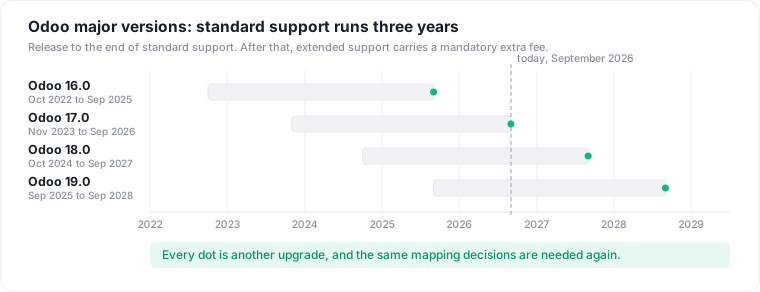
A migration into Odoo is not a one-time event. Every bar ends, and the questions answered during the first mapping come back at each ending.
Odoo has no table shaped like your customer file
The legacy system almost certainly separates customers from suppliers, and separates both from the addresses attached to them. Odoo does not. A company, an individual, a delivery address, and an invoicing address are all rows in res.partner, told apart by a parent_id hierarchy and a type field with four values: contact, invoice address, delivery address, other address. There is also a company_type field that renders as Individual or Company, which the source annotates as an interface field, not to be used in business logic.
The trap sits one level deeper. Odoo designates the closest company ancestor of a partner as its commercial entity, and a set of fields belongs to that entity rather than to the record itself. In the current source, _commercial_fields() returns vat, company_registry, and industry_id. Those values are synced down from the commercial parent to its children, and pushed to descendants when the parent changes.
Now import a legacy contact row that carries its own VAT number, as a child of the company it belongs to, which is how ship-to sites with their own tax registration arrive from many legacy systems. The import succeeds. The mapping line looks correct in the spreadsheet, the load runs green, and the VAT number you imported is replaced by the parent's. This is the characteristic failure of the whole discipline, which we have written about in the context of the data reprise: a wrong result that is syntactically indistinguishable from a right one, discovered by an accountant, after go-live.
Which means the legacy question "is this row a customer, a site, or a billing address?" stops being a lookup and becomes a structural decision in the target: own partner or child, and which type. The answer changes what the system does with it for the next decade.
One journal model, and it will refuse your history
account.move is the single model behind customer invoices, customer credit notes, vendor bills, vendor credit notes, sales receipts, purchase receipts, and plain journal entries. All seven are values of move_type, a field that is both required and readonly at the field definition, as is state with its draft, posted, and cancelled values. You do not write those columns. You call the methods that set them.
And the model enforces the accounting. _check_balanced asserts that debit equals credit on every move, raising "The entry is not balanced." for a single offender and listing them by name for a batch.
That collides with legacy reality, because many legacy systems store invoices as document tables with their own totals and keep the ledger somewhere else, or nowhere. History that was never balanced cannot be loaded as journal entries as it stands. Every project faces the same fork: bring the documents in and let Odoo generate the accounting, or load opening balances and park the detail outside the ERP. Both are legitimate, both carry audit consequences, and the choice gets taken per company, per fiscal year, per journal, which is why "migrate the invoices" is never one line in a plan.
Taxes and accounts arrive with the localization, and your codes have to land on them
The country chosen when the database is created decides which fiscal localization package installs, and that package brings the chart of accounts, configured to the country's regulations, and the tax rates, most of them created inactive with only the main rate switched on. Two consequences follow. The legacy chart does not survive as itself: every legacy account code has to land on an account in the installed chart or be created beside it, and once a transaction is recorded on an account it can no longer be deleted, only deprecated. And the localization is fixed from the first posted journal entry onward.
Taxes are where the wrong-VAT-code story becomes mechanical. A legacy tax code is a number in a column. An account.tax is a computation: a type (sale, purchase, or none), an amount_type (a percentage, a fixed amount, a tax-included percentage, or a group of taxes), and a name that must be unique per company, type, scope, and country. The default tax on a product applies to every line it appears on and can be overridden only by a fiscal position, the rule set that swaps taxes and income or expense accounts according to the partner's country and VAT number, automatically when auto_apply is set. So an intra-community customer who carried the domestic code in the legacy system needs a fiscal position in Odoo, and the fix is a rule rather than a value. Mapping codes to rates gets that wrong, silently.
Stock on hand is a result, not a value you set
The same pattern runs through inventory. On stock.quant, inventory_quantity is labelled Counted Quantity, and inventory_diff_quantity is documented as the gap between the product's theoretical quantity and its counted quantity. Applying it goes through action_apply_inventory. You tell Odoo what you counted, and Odoo works out the difference and records the movement that closes it.
So an opening stock file enters as a count, which becomes an adjustment, which becomes moves. Get the units wrong and you have posted a real movement that valuation will act on, which is a harder thing to unwind than a wrong number in a column.
Two things around stock lock early. A product's unit of measure can be set once: with stock moves on the product, Odoo refuses the change and the error tells you to archive the product and create a new one. Changing a unit's ratio is refused the same way once anything has moved or is reserved in it, and a product's default and purchase units must share a category. And a legacy SKU list with size or colour baked into the code has to be read as either product.template rows with variants generated from attribute lines, or as separate templates, before the first receipt, because the moves that follow pin the choice.
The import path has opinions about identity
Odoo's import documentation gives three mechanisms for pointing an imported record at another: display name, Database ID, or External ID, and exactly one per field. The External ID is the one that matters for a migration, because it can be the unique identifier from the previous software. Set it and the same file can be imported repeatedly to update rather than duplicate, and other files can reference those records with a Field/External ID column. Two records sharing one External ID produce a conflict.
That single convention decides whether your migration is re-runnable. Teams that skip it discover the cost on the second load, when a corrected customer file creates a second copy of every partner, and the deduplication work begins before the project has cut over. It is also why bypassing the ORM and writing rows straight into Postgres is a false shortcut: direct SQL skips the balance check, the delegated field sync, the stored computed fields, and the ir.model.data rows that make the import repeatable.
None of this is hard to learn, and none of it is where projects die. It sets the price of being wrong: in a model this enforcing, the decisions have to be right before the load, which puts the burden back on analysis.
Custom modules make the next upgrade another migration
Whatever legacy meaning does not fit the standard model becomes a custom field, a custom module, or a Studio customization. That is normal, and it carries a standing cost.
Odoo's documentation is direct about it: a database containing custom modules cannot be upgraded until a version of those modules is available for the target version, and when a change in a new release breaks a customization, making it compatible is the responsibility of the module's maintainer. For Community deployments, the OCA's OpenUpgrade project maintains the framework and the migration scripts for Odoo's own modules, with branches tracking each version up to 19.0.
Read that against the three-year clock: each customization you add during the migration travels across every bar ending in the figure. Decisions made in week six of a reprise become maintenance for the life of the system.
The decisions are the asset, and they are usually thrown away
By cutover, a migration team has produced the most complete statement of what the legacy data meant that will ever exist: thousands of ratified judgments about which field held what, which codes were overloaded, which conventions were real and which were documentation fiction. In most projects that knowledge lives in a spreadsheet that stops being updated the week after go-live, alongside a source-to-target mapping document nobody opens again.
Then the same questions come back. When the client returns for phase two, a second entity, or a new country. When a custom field has to be justified or retired at the next upgrade. When someone points an AI agent at the Odoo database and it needs to know that x_studio_code_client means the old regional account reference, not the current customer code. The work was done once and the record of it was discarded, so it gets redone from memory by whoever is still there.
Keeping it is not exotic. Read the batch against the target instance and those questions become a picture: which source columns reach which Odoo fields, where the problems sit, and which records must exist before anything loads.
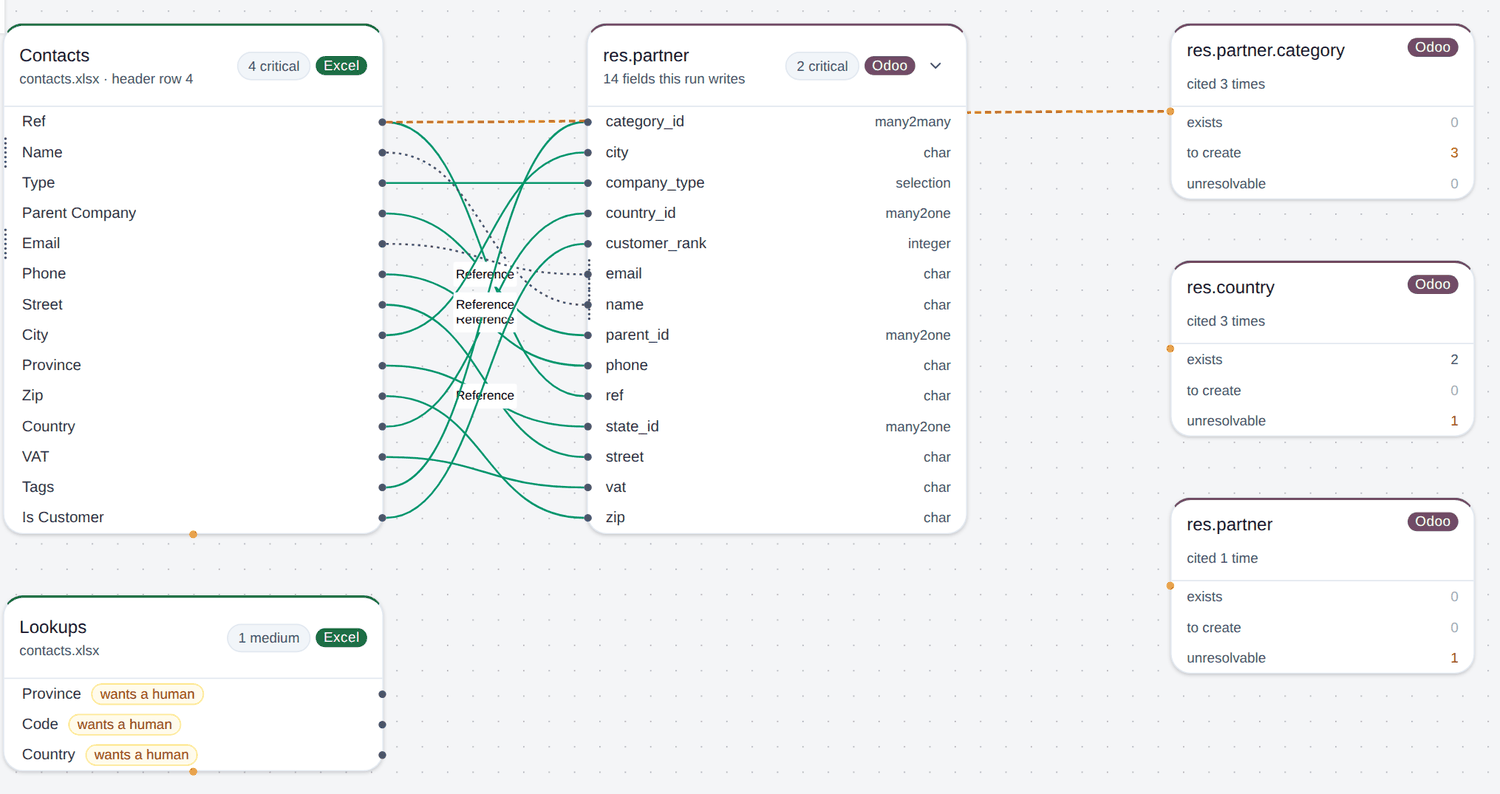
A prototype run on a demo workbook, not a customer's data. The sheet is read from header row 4, three partner categories have to be created before the batch loads, and one country value resolves to nothing.
Where Datapace sits
Datapace maps what your platform holds, what it costs, and what it’s used for, so you can cut waste without compromising performance or reliability. Each saving becomes a business case your team approves, then ships as a pull request your team merges, or as a statement of work for a bigger change. See the data cost map or book a call.
In the prototype, the artifact that comes out of that loop is a mapping proposal: one row per source column, each carrying its target, its mapping type, what proposed it, and how confident that proposal is.
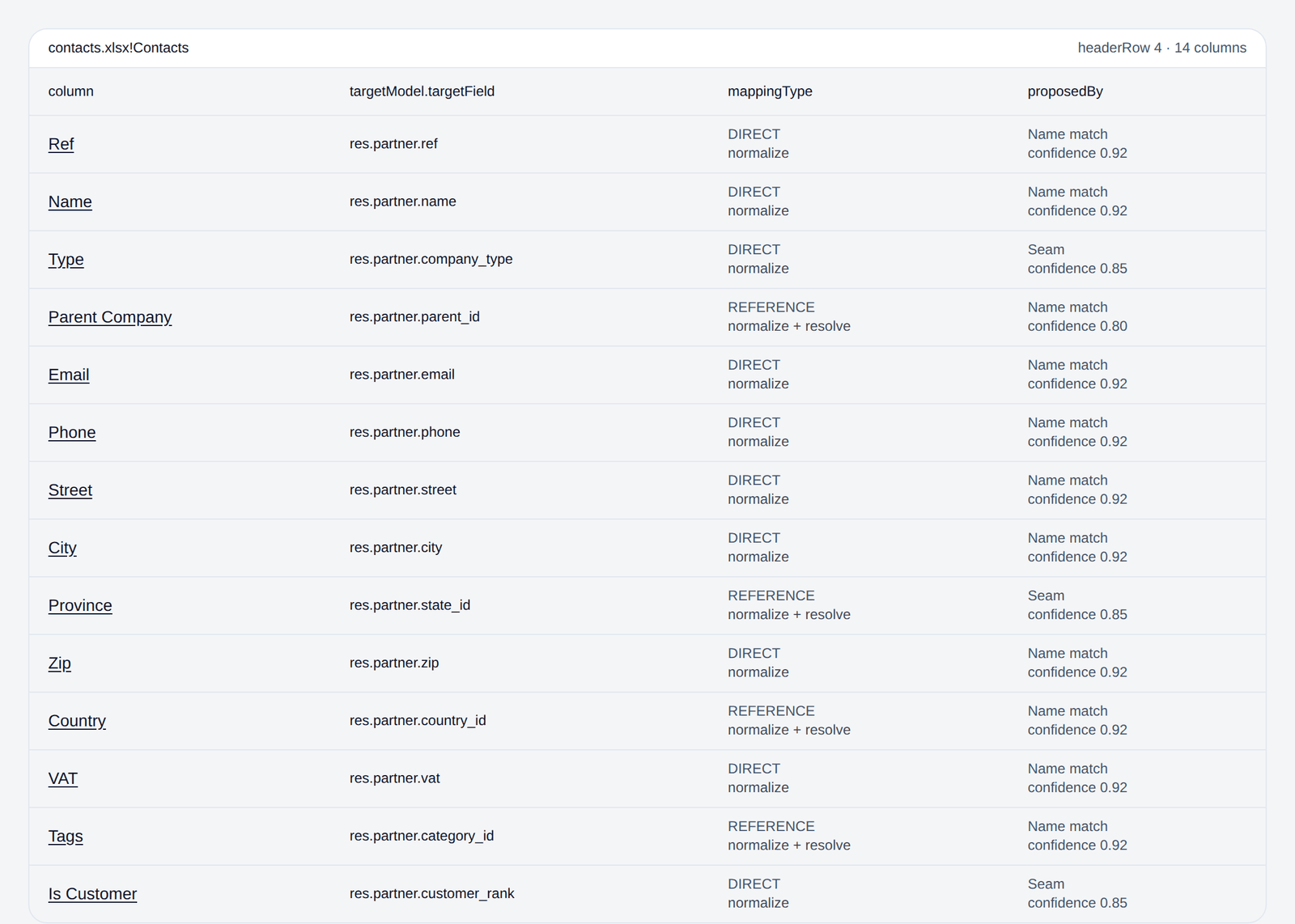
The same run as the thing a reviewer signs. Note the third row: Type is proposed against company_type, not the identically named type, which is the distinction the partner section above is about.
No tool removes the need for a domain expert, and none of this makes the target model less opinionated. The point is to spend scarce expert time on judgment instead of excavation. If the reprise is the phase of your Odoo projects that worries you, book a call and bring your ugliest source schema.
Sources
- Odoo documentation source, Standard and extended support, on the three-year support window, extended support fees, and the version release and end-of-support table.
- Odoo documentation source, Upgrade, on what an upgrade does not cover, mandatory upgrade cadence by hosting type, and custom modules blocking an upgrade.
- Odoo documentation source, Export and import data, on External IDs and the three mechanisms for importing relation fields.
- Odoo source,
res_partner.py, on the addresstypefield,company_type, and_commercial_fieldsdelegation and sync. - Odoo source,
account_move.py, onmove_type,state, and the_check_balancedconstraint. - Odoo source,
stock_quant.py, on counted quantity, inventory difference, andaction_apply_inventory. - Odoo Community Association, OpenUpgrade, the community upgrade framework and migration scripts, branch 19.0.
- Odoo documentation source, Chart of accounts, on the localization installing the chart, the localization lock after a posted entry, and deprecating rather than deleting accounts.
- Odoo documentation source, Taxes and Fiscal positions, on localization-created taxes, default taxes on products, and tax and account mapping.
- Odoo source,
account_tax.pyandpartner.py, ontype_tax_use,amount_type, the tax name constraint, and the fiscal position model withauto_apply. - Odoo source,
stock/models/product.pyandproduct_template.py, on the unit-of-measure change guards and product variants.