TL;DR. BigQuery on-demand vs editions is a question about the shape of your queries, not the size of your bill. On-demand charges $6.25 per TiB scanned and lends you up to 2,000 slots for free. Editions charge $0.04 to $0.10 per slot-hour and ignore bytes. The two are equal when a workload spends 6.25 divided by the slot-hour price in slot-hours per TiB scanned: about 104 slot-hours per TiB on Enterprise pay-as-you-go. Below that ratio editions are cheaper, above it on-demand is. Then discount the editions side by autoscaler utilization, because reservations bill scaled capacity, not the slot-milliseconds in
INFORMATION_SCHEMA.JOBS.
BigQuery on-demand vs editions is usually framed as a volume threshold: scan more than some number of TiB a month and move to slots. The rules of thumb that circulate disagree by a factor of two because the threshold is not a volume. On-demand meters bytes processed; editions meter slot capacity over time. A query that scans a wide table once and filters it spends few slot-seconds per byte; a query that joins five tables and sorts the result spends many. The decision variable is the ratio between the two meters, and BigQuery records both for every job.
What each model meters
US list prices from the BigQuery pricing page, October 2026:
| Meter | On-demand | Standard | Enterprise | Enterprise Plus |
|---|---|---|---|---|
| Compute | $6.25 per TiB processed | $0.04 per slot-hour | $0.06 per slot-hour | $0.10 per slot-hour |
| Free allowance | First 1 TiB per month | none | none | none |
| Capacity commitments | none | none | 1 year $0.048, 3 years $0.036 | 1 year $0.08, 3 years $0.06 |
| Slots available | Up to 2,000 per project, 20,000 per organization | Autoscaled, 1,600 per reservation | Baseline plus autoscaled | Baseline plus autoscaled |
| Billing granularity | Rounded up to the nearest MB, 10 MB minimum per table and per query | Per second, 1 minute minimum | Per second, 1 minute minimum | Per second, 1 minute minimum |
On-demand is the default. Every project without a reservation assignment bills bytes processed, with a quota of 2,000 concurrent slots per project that BigQuery "will temporarily burst beyond" to speed up small queries. Those slots are not on the invoice. Bytes are counted at logical, uncompressed size, and a query's cost can be known before it runs with a dry run. The slot-hours it will consume cannot.
Editions invert this. Capacity pricing, Google's documentation says, makes it "not possible to estimate the exact cost of an individual query before execution with precise accuracy," because the slots a query gets depend on its complexity, on what else is running in the reservation, and on the autoscaler. You pay for a reservation's capacity over time: a baseline you always hold, plus autoscaled slots added in multiples of 50 up to a maximum you set. Flat-rate slot purchases stopped being offered on July 5, 2023. The two models coexist per project, which turns the decision from one switch into a routing problem.
The break-even is a ratio, not a volume
Write B for the TiB a workload scans in a month and H for the slot-hours it uses. On-demand costs 6.25B, ignoring the free TiB. Editions cost at least pH, where p is the slot-hour price. The two are equal when:
H / B = 6.25 / p
At Enterprise pay-as-you-go, p = 0.06 and the break-even is 104 slot-hours per TiB. At Standard it is 156, at Enterprise Plus 62.5, and at Enterprise on a three-year commitment, $0.036, it is 174. Read it as an implied slot price: on-demand charges your workload $6.25 divided by its slot-hours per TiB for each slot-hour. A workload at 20 slot-hours per TiB pays an implied $0.31 per slot-hour on-demand, five times the Enterprise rate. A workload at 300 slot-hours per TiB pays an implied $0.021, below any edition price including the three-year commitment, because on-demand hands it 2,000 slots and charges only for the bytes.
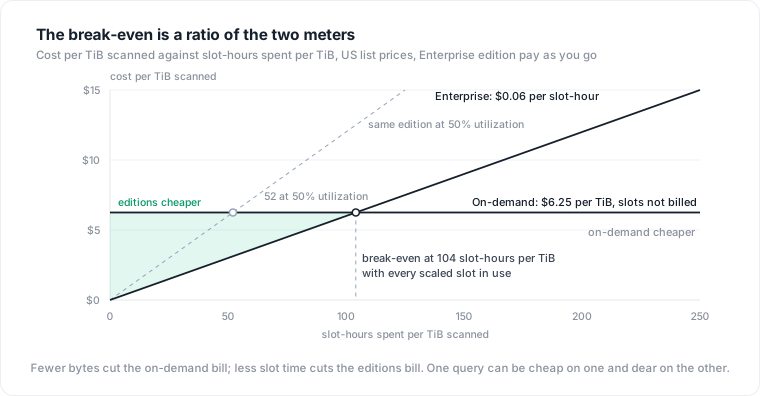
This is why the published thresholds disagree. "100 slots running all month equals about 700 TiB on-demand" assumes 100 slots fully busy: 73,000 slot-hours against 700 TiB, which is 104 slot-hours per TiB, the Enterprise break-even restated as a volume for one workload shape. A workload with half that intensity breaks even at twice the volume.
The ratio also explains why the two models reward opposite optimizations. Partitioning and clustering cut bytes scanned and leave slot time alone, or raise it, since clustered writes sort data: a direct saving on-demand, close to nothing on editions. Rewriting a join or removing a sort cuts slot time and leaves bytes alone: the saving on editions, a latency improvement with no effect on the on-demand bill.
Compute both prices for every job
INFORMATION_SCHEMA.JOBS keeps 180 days of job history with both meters on each row: total_bytes_billed for the on-demand side and total_slot_ms for the editions side. One query prices the last 30 days both ways and reports the ratio:
DECLARE on_demand_per_tib FLOAT64 DEFAULT 6.25;
DECLARE slot_hour_price  FLOAT64 DEFAULT 0.06;   -- Enterprise pay as you go

SELECT
  DATE(creation_time)                                         AS day,
  COUNT(*)                                                    AS jobs,
  ROUND(SUM(total_bytes_billed) / POW(1024, 4), 2)            AS tib_billed,
  ROUND(SUM(total_slot_ms) / 3.6e6, 1)                        AS slot_hours_used,
  ROUND(SAFE_DIVIDE(SUM(total_slot_ms) / 3.6e6,
                    SUM(total_bytes_billed) / POW(1024, 4)), 1) AS slot_hours_per_tib,
  ROUND(SUM(total_bytes_billed) / POW(1024, 4) * on_demand_per_tib, 2) AS on_demand_dollars,
  ROUND(SUM(total_slot_ms) / 3.6e6 * slot_hour_price, 2)      AS editions_floor_dollars
FROM `region-us`.INFORMATION_SCHEMA.JOBS
WHERE creation_time >= TIMESTAMP_SUB(CURRENT_TIMESTAMP(), INTERVAL 30 DAY)
  AND job_type = 'QUERY'
  AND statement_type != 'SCRIPT'
  AND NOT IFNULL(cache_hit, FALSE)
GROUP BY day
ORDER BY day;
Two details in the filter matter. Multi-statement jobs appear twice, once as the parent with statement_type = 'SCRIPT' and once per child, so the parent is excluded or total_slot_ms is double counted. Cache hits bill no bytes and use no meaningful slot time, so they are dropped from both sides. Group the same query by user_email, by the query text, or by a label, and the ratio column becomes a routing table: scheduled transforms that scan a fact table and aggregate it land low and belong in a reservation, analyst notebooks with ad hoc joins land high and belong on-demand, where their slot appetite is free.
Why the editions column is a floor
The last column is a floor because total_slot_ms is what the queries used, and a reservation bills what it scaled. Google's autoscaling documentation is direct about it: "You are charged for the number of scaled slots, not the number of slots used," and "don't use the jobs information schema to match the billing."
The gap comes from three rules. Capacity scales in multiples of 50 slots, rounded up from actual demand. Any new peak is retained for at least 60 seconds, the scale-down window. And by default capacity is billed per second with a one-minute minimum. The scale-up is charged even if the job that triggered it fails.
Take a two-second query that runs at 300 slots. It uses 600 slot-seconds, which is 0.17 slot-hours and one cent at Enterprise rates. A reservation that was idle scales to 300 slots, holds them for the 60-second window, and bills 18,000 slot-seconds: 5 slot-hours and 30 cents. If that query scanned 10 GB, on-demand would have charged about 6 cents. One query, three prices, and the one you pay under editions is thirty times the one INFORMATION_SCHEMA.JOBS shows. On a busy reservation where the slots were already scaled for other jobs, the marginal cost falls back toward the floor. Utilization, used slot-seconds divided by billed slot-seconds, decides where between the two you land.
Two tools close the gap. The first is Google's slot recommender, which reads 30 days of an on-demand project's history and estimates the cost of running it in an Enterprise reservation sized to cover P99 slot usage; it "models autoscaler usage with a one-minute minimum duration by default." The second is INFORMATION_SCHEMA.JOBS_TIMELINE, which has one row per job per second of execution. Joining it to a spine of every second in the window and applying the 50-slot and 60-second rules gives a utilization estimate you control:
WITH seconds AS (
  SELECT s AS period_start
  FROM UNNEST(GENERATE_TIMESTAMP_ARRAY(
    TIMESTAMP_SUB(TIMESTAMP_TRUNC(CURRENT_TIMESTAMP(), SECOND), INTERVAL 7 DAY),
    TIMESTAMP_TRUNC(CURRENT_TIMESTAMP(), SECOND), INTERVAL 1 SECOND)) AS s
),
used AS (
  SELECT period_start, SUM(period_slot_ms) / 1000 AS slots_used
  FROM `region-us`.INFORMATION_SCHEMA.JOBS_TIMELINE
  WHERE job_creation_time >= TIMESTAMP_SUB(CURRENT_TIMESTAMP(), INTERVAL 8 DAY)
    AND period_start >= TIMESTAMP_SUB(CURRENT_TIMESTAMP(), INTERVAL 7 DAY)
    AND job_type = 'QUERY'
    AND (statement_type IS NULL OR statement_type != 'SCRIPT')
  GROUP BY period_start
),
modeled AS (
  SELECT s.period_start,
         IFNULL(u.slots_used, 0) AS slots_used,
         CEIL(MAX(IFNULL(u.slots_used, 0)) OVER (
           ORDER BY UNIX_SECONDS(s.period_start)
           RANGE BETWEEN 59 PRECEDING AND CURRENT ROW) / 50) * 50 AS slots_billed
  FROM seconds s
  LEFT JOIN used u USING (period_start)
)
SELECT ROUND(SUM(slots_used) / 3600, 1)                         AS slot_hours_used,
       ROUND(SUM(slots_billed) / 3600, 1)                       AS slot_hours_billed_estimate,
       ROUND(SAFE_DIVIDE(SUM(slots_used), SUM(slots_billed)), 2) AS utilization
FROM modeled;
The model approximates the autoscaler rather than replaying it, but it is close enough to turn the break-even into a workload-specific number. Multiply 104 slot-hours per TiB by the utilization it reports. At 0.5, a project needs to be below 52 slot-hours per TiB before Enterprise pay-as-you-go beats on-demand. At 0.9, which steady pipelines on a well-sized baseline can reach, the threshold is 94.
Fluid scaling changes the arithmetic for bursty projects. Enabled per reservation, it "removes the one-minute minimum duration required by standard autoscaling" and bills per second, while keeping the 50-slot increments. The 60-second window in the query above becomes a one-second window, and the two-second query from earlier bills 600 slot-seconds, the same as its floor. For short queries at irregular intervals this is the difference between editions being a poor fit and a reasonable one, and it should be on before any comparison is run.
When each model is the wrong answer
On-demand fails on two kinds of workload. The first is the scan-heavy pipeline: a nightly job that reads a multi-TiB fact table with a simple aggregation spends few slot-hours per TiB and pays the full $6.25 for each. The second is anything that needs more than 2,000 concurrent slots, or needs them reliably. Under regional contention BigQuery serves "Enterprise Plus and Enterprise edition baselines and committed capacity" first, their autoscaled capacity next, and "Standard edition and on-demand capacity" last. A pipeline with a deadline on an on-demand project has no priority to buy.
Editions fail in the mirror image. A baseline held for analysts who query in bursts "will always be allocated to the reservation, and you will always be charged for" it. Alessandro Marrella's write-up from running both models notes that the autoscaler "is very eager to use as many slots as it can to run the query as quickly as possible, but scaling down takes time (that you are billed for)," and that time spent waiting for slots in an undersized reservation is billed too. A join-heavy exploratory workload on a reservation pays twice: once for the slots it uses and once for the slots scaled around it.
Two constraints decide specific cases. Standard edition caps a reservation at 1,600 slots and offers neither commitments nor idle slot sharing between reservations, so the cheapest slot price comes without the mechanisms that raise utilization. And the capacity commitment discounts, 20% for one year and 40% for three, buy slots you pay for whether or not they run anything: a 500-slot commitment at 30% utilization costs more per used slot-hour than pay-as-you-go autoscaling at 90%. Spend-based committed use discounts, 10% for one year and 20% for three, apply to pay-as-you-go slot SKUs in a region and not to on-demand, so they move only the editions side of the break-even.
Both models need a guard. On-demand it is maximum_bytes_billed, which estimates bytes before execution and fails the query without charge if the estimate is over the limit; since October 2025, new projects also carry a default on-demand quota of 200 TiB of query usage per day. On editions it is the maximum reservation size, which caps the bill and queues the work instead.
Decision criteria
Run the first query per project over 30 days and read the ratio column. Projects well below 104 slot-hours per TiB, with steady hour-to-hour usage, go to an Enterprise reservation with a baseline near their floor and a capped maximum; measure utilization after a month and commit only the part of the baseline that never idles. Projects well above the ratio stay on-demand, with maximum_bytes_billed enforced, and are tuned for bytes. Projects near the line get the second query first: if modeled utilization is below 0.6, stay on-demand or enable fluid scaling before trying a reservation. Re-run the comparison each quarter, because query mixes drift and the drift is in the ratio, not the volume. The same shape of decision applies to Aurora I/O-Optimized vs Standard, where the moving meter is I/O, and to autoscaled Postgres, where a regression is billed as capacity instead of surfaced as a page.
Where Datapace fits
The arithmetic is simple for one project and hard across an estate, because the ratio is a property of a workload, and workloads are spread across projects, owners and schedules that no billing export names. Datapace is building the context layer between your databases and your AI: resolved meaning about the estate, validated by the people who own the data, with the workload evidence beside it (cost, performance, usage and freshness, lineage), and a policy gate over what an agent may do and access, served over MCP. Pricing each workload under both models, with the queries and tables that drive the ratio attributed to the teams that own them, is the database cost management use case.
Sources
- Google Cloud, BigQuery pricing (on-demand and edition prices, 1 TiB free allowance, 10 MB minimums, one-minute minimum billing, fluid scaling opt-in, commitment terms, flat-rate no longer offered as of July 5, 2023).
- Google Cloud, Quotas and limits: query jobs (2,000 concurrent slots per project and 20,000 per organization for on-demand pricing).
- Google Cloud, Introduction to slots (on-demand burst behaviour, queuing when demand exceeds slots, capacity prioritization order under regional contention).
- Google Cloud, Introduction to slots autoscaling (50-slot multiples, charged for scaled not used slots, the 60-second scale-down window, fluid scaling, baseline always charged).
- Google Cloud, Introduction to BigQuery editions (feature table: Standard 1,600-slot reservation maximum, no commitments or idle sharing, 20% and 40% commitment discounts, per-project coexistence with on-demand).
- Google Cloud, Estimate and control costs (why capacity cost cannot be estimated per query before execution, logical bytes used for on-demand,
maximum_bytes_billedbehaviour). - Google Cloud, JOBS view (
total_slot_ms,total_bytes_billed,cache_hit, 180-day retention, excludingSCRIPTparents to avoid double counting). - Google Cloud, JOBS_TIMELINE view (one row per job per second,
period_slot_ms, partitioned byjob_creation_time). - Google Cloud, View edition slot recommendations (30-day window, P99 sizing, one-minute minimum modeling, on-demand to Enterprise estimates).
- Google Cloud, Committed use discounts for BigQuery (spend-based CUDs: 10% and 20%, apply to pay-as-you-go slot SKUs per region, not to storage or on-demand).
- Google Cloud, BigQuery release notes, October 8, 2025 (default
QueryUsagePerDaylimit of 200 TiB for new on-demand projects). - Alessandro Marrella, BigQuery Editions vs On Demand, September 2024 (practitioner account: autoscaler eagerness, wait time billed, pricing both models from
INFORMATION_SCHEMA). - DoiT, BigQuery cost optimization (consultancy guidance: the 100-slot, 700 TiB rule of thumb discussed above).