TL;DR. Aurora I/O-Optimized vs Standard is a pricing decision about one line on the bill. Standard charges $0.20 per million I/O requests on top of compute and storage; I/O-Optimized deletes that line and charges 30% more for every instance hour or ACU-hour and 2.25 times more per GB-month of storage. The switch pays when the I/O charge is larger than that premium, which for a compute-heavy cluster is close to AWS's 25%-of-spend rule and for a storage-heavy one is well above it. Before switching, price the I/O per query with
pg_stat_statements: a large share of billed I/O on Postgres clusters is bloat and cache misses, which the switch caps but a repack removes.
Aurora I/O-Optimized vs Standard sounds like a storage question and is a billing one: the two configurations run on the same hardware with the same cluster volume, and switching between them changes nothing about the engine. What changes is which meter runs. Aurora Standard bills every page read from the cluster volume and every 4 KB unit of log written to it, at $0.20 per million requests in US East. Aurora I/O-Optimized, launched in May 2023, sets that meter to zero and raises the two other meters instead: instance hours and Serverless ACU-hours cost 30% more, and storage costs $0.225 per GB-month instead of $0.10. AWS's guidance is that I/O-Optimized "is the best choice when your I/O spending is 25% or more of your total Aurora database spending." That rule is right for the cluster AWS had in mind and wrong for others, and the arithmetic behind it is short enough to run for your own.
The two prices, side by side
US East (N. Virginia) list prices, as published on the Aurora pricing page in October 2026:
| Meter | Aurora Standard | Aurora I/O-Optimized |
|---|---|---|
| db.r6i.large, on demand | $0.29 per hour | $0.377 per hour |
| Serverless v2 capacity | $0.12 per ACU-hour | $0.156 per ACU-hour |
| Storage | $0.10 per GB-month | $0.225 per GB-month |
| I/O requests | $0.20 per million | none |
| Backups, snapshots, cross-Region replication I/O | priced the same | priced the same |
Two ratios carry the whole comparison: compute is 1.3 times the Standard price, and storage is 2.25 times. Everything else on the invoice, including the I/O that replicates a Global Database across Regions, is unchanged by the switch. Engine support is broad: Aurora PostgreSQL 13.10, 14.7, 15.2, 16.1 and 17.4 and later, Aurora MySQL 3.03.1 and later.
What a billable I/O actually is
The I/O line is hard to predict because it does not measure requests from your application. It measures what the engine asked the storage layer for, and the two differ by the size of the buffer cache.
On reads, AWS's billing FAQ is precise: "Every database page read operation counts as one I/O." A page already in memory costs nothing; a page that is not is fetched from the cluster volume and billed, 8 KB at a time on Aurora PostgreSQL and 16 KB on Aurora MySQL. Billed reads are therefore buffer cache misses, a function of your working set relative to instance memory, of how well queries use indexes, and of how much dead space sits in your pages.
On writes, Aurora's architecture removes a whole category of I/O. The engine never writes dirty data pages to storage and never checkpoints. Only log records are sent, counted "in 4 KB units", and small concurrent records are batched: AWS's planning guide gives the example of "a 50-byte log record and 3,000-byte log record" combined into a single write operation. Replication to reader instances in the same Region generates no I/O at all. What does add writes is anything that generates more log: every index on a table adds to the records of every insert and update, and enabling the binary log on Aurora MySQL "increases write I/O requests by at least one for each transaction."
The billed counts are visible as two cluster-level CloudWatch metrics, VolumeReadIOPs and VolumeWriteIOPs, each reported as a count per five-minute interval and aggregated across every instance in the cluster. The instance-level ReadIOPS and WriteIOPS are different numbers and not what you are charged for. In Cost Explorer the same charge appears as the Aurora:StorageIOUsage usage type, which is the simplest way to read last month's I/O share without any arithmetic.
The break-even is a formula, not a percentage
Write C for a cluster's monthly compute bill on Standard (instance hours or ACU-hours), S for its storage bill, and I for its I/O bill. On Standard the cluster costs C + S + I. On I/O-Optimized it costs 1.3C + 2.25S. The switch saves money when:
I > 0.3 × C + 1.25 × S
Expressed as a share of the Standard bill, that threshold depends on how much storage you carry. With no storage at all, the break-even I/O share is 0.3 / 1.3, about 23%. With storage at a tenth of compute, it is about 28%. With storage at half of compute, which is common on clusters that keep years of history on a modest instance, it is 38%. AWS's 25% rule is the compute-heavy case; a storage-heavy cluster can have I/O at 30% of its bill and still lose money on the switch.
A worked example with the list prices above. A cluster with two db.r6i.large instances and 500 GB of data costs $423.40 in compute and $50 in storage per month on Standard. On I/O-Optimized the same cluster costs $550.42 and $112.50, a premium of $189.52. Divided by $0.20 per million, the switch pays once the cluster bills more than about 948 million I/O operations a month, roughly 360 per second sustained. At that point I/O is 28.6% of the Standard bill.
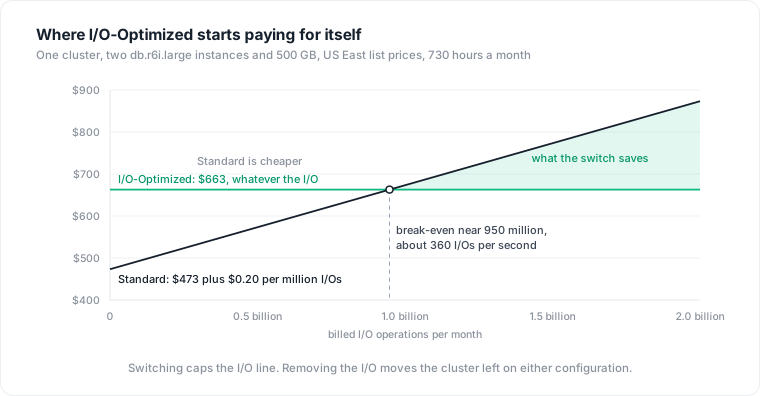
The break-even scales with the instance. Clari's case study on the AWS Database Blog put their crossover "at 4,000 IOPS", ten times the figure above, on clusters averaging 38,000 to 55,000 IOPS per node, where storage I/O "accounted for half" of database costs and the switch was reported to cut spend by 50%. Those are vendor-published customer numbers without the arithmetic, but the shape fits the formula: a bigger instance carries a bigger 30% premium, so it takes more I/O to justify.
Measure before you switch
The ordering matters because the switch is asymmetric: you can return to Standard at any time, but you can move to I/O-Optimized only once every 30 days, so a wrong switch locks a month of premium. Three sources answer the question, and they should agree.
Cost Explorer, grouped by usage type over the last three months, shows Aurora:StorageIOUsage next to the instance and storage lines. That is the I figure in the formula, already in dollars. Three months rather than one, because batch jobs, month-end processing and reindexing push I/O around.
CloudWatch gives the same number from the metrics side:
aws cloudwatch get-metric-statistics \
  --namespace AWS/RDS --metric-name VolumeReadIOPs \
  --dimensions Name=DBClusterIdentifier,Value=prod-cluster \
  --start-time 2026-09-23T00:00:00Z --end-time 2026-10-23T00:00:00Z \
  --period 2592000 --statistics Sum
Repeat for VolumeWriteIOPs, add the two sums, divide by one million and multiply by $0.20. If the result and the Cost Explorer line disagree by more than a few percent, something else is in the usage type (a Global Database secondary, a clone) and the per-cluster attribution needs another look.
AWS Compute Optimizer does this arithmetic since June 2025: it analyzes "the instance, storage, and I/O costs for each of your Aurora Standard clusters," compares them with the I/O-Optimized cost, and flags a cluster with the finding reason "DB cluster storage savings available." The default lookback is 14 days, too short for a decision this sticky; Enhanced Infrastructure Metrics extend it to 32 days free or 93 days paid, and at 93 days it also reports monthly I/O variability, the number that says whether the saving is stable. Once the numbers agree, the switch is one cluster modification:
aws rds modify-db-cluster \
  --db-cluster-identifier prod-cluster \
  --storage-type aurora-iopt1 \
  --apply-immediately
The value aurora moves it back. On non-NVMe instances, including every Serverless v2 instance, there is no downtime either way; on NVMe-based classes such as r6gd and r8gd the engine restarts.
The I/O you pay for is often I/O you could delete
The formula treats I as a fixed property of the workload. On most Postgres clusters it is not, and this is where the Aurora I/O-Optimized vs Standard decision usually goes wrong. The switch caps the cost of I/O. It does nothing about the I/O.
Gridium's write-up of their RDS-to-Aurora migration is the clearest public example. Their daily database cost "more than doubled" on arrival, and the cause was table bloat on large analytic tables with "many times more dead tuples than live tuples." Because Aurora bills per page fetched, bloat is billed directly: in their example "we might need to load six pages (48KB) of data from storage to get one page (8KB) worth of live data." They ran pg_repack on more than a dozen tables, the database shrank from 3 TB to 1 TB, and costs returned "to close to what they had been before the migration." The same bloat on I/O-Optimized would have been invisible on the bill and still present in every query's latency. Why VACUUM never shrinks an index explains the mechanism that makes this permanent until a rebuild.
The other large lever is the buffer cache. AWS's own planning guidance sets a target hit ratio of 99.98% or higher, and the BufferCacheHitRatio metric shows where you stand. A working set that just exceeds memory produces a steady stream of billed reads that a one-size-larger instance converts into a fixed charge, often a smaller one. This is the same regression-shaped problem that Postgres autoscaling cannot see: a query plan that starts touching more pages shows up as a bigger invoice rather than a page to an engineer.
Per-query attribution is where the decision gets concrete, and pg_stat_statements already holds the numbers. Its shared_blks_read column counts the blocks a statement read because they were not in shared buffers, which on Aurora PostgreSQL is a block fetched from the cluster volume, and wal_bytes counts the log the statement generated. Priced at Standard rates:
SELECT queryid,
       calls,
       shared_blks_read,
       round(shared_blks_read * 0.20 / 1e6, 2)              AS read_io_dollars,
       round(ceil(wal_bytes / 4096.0) * 0.20 / 1e6, 2)      AS write_io_dollars_max,
       left(query, 80)                                      AS query
FROM   pg_stat_statements
ORDER  BY shared_blks_read DESC
LIMIT  20;
Read the output with three caveats. First, the figures are for this instance since the last statistics reset, so a reader and a writer need summing and a short retention window under-reports the batch jobs, a problem made worse when agent-generated SQL evicts the entries you care about. Second, the write estimate is an upper bound: Aurora batches small log records, so real billed writes are lower than one per 4 KB. Third, on instances with Optimized Reads, shared_blks_read includes pages served from the local NVMe tiered cache, which the EXPLAIN output distinguishes as aurora_orcache_hit and which are not billed. With those in mind, a query that reads 10,000 uncached pages a thousand times a day costs about $60 a month in I/O at Standard rates, and either an index or a smaller working set removes it on both configurations.
When the switch is the wrong move
The premium is charged on hours, not on I/O, which produces the failure mode in the other direction. Ahmed Shendy's write-up for AWS Community Builders describes a team that had enabled I/O-Optimized on every Serverless v2 cluster for the free I/O, costed them with ten days of Cost Explorer ACU billing and CloudWatch volume metrics, and found "we were overpaying on every single cluster." A cluster that idles at its minimum ACU pays 30% more for every idle hour and saves nothing, because there is no I/O to make free.
Three other constraints decide specific cases. Aurora MySQL parallel query "isn't supported with the Aurora I/O-Optimized DB cluster storage configuration," so an analytics cluster that depends on it cannot switch, and parallel query is itself an I/O multiplier, since it "requires all data to be scanned at the storage layer" and never warms the buffer pool. Reserved Instances still apply, but I/O-Optimized instances "consume 30% more normalized units per hour," so a fully reserved fleet becomes 23% uncovered on switching; MoneyLion's case on the AWS blog shows that gap being closed with additional RIs. And Optimized Reads changes shape with the configuration: on I/O-Optimized clusters the local NVMe serves as both a tiered cache and temporary space, on Standard only as temporary space, so on r6gd-class instances the switch also changes how many reads reach the volume.
Predictability is a legitimate reason to pay the premium. MoneyLion's stated problem was that variable I/O made it "difficult for MoneyLion to precisely forecast monthly expenses," and a flat bill has value to a finance team even when it is not the lowest bill. Just price it as a premium with a known size, not as a saving.
Decision criteria
Pull three months of Aurora:StorageIOUsage per cluster and compare it with 0.3 times compute plus 1.25 times storage. Below that line, stay on Standard and do nothing. Above it, look at where the I/O comes from before switching: bloat, a working set just past memory, an unused index on a hot table, or a handful of queries at the top of shared_blks_read. If the I/O is fixable, fix it first and re-measure; the switch may no longer pay. If the I/O is the workload itself, write-heavy ingestion or scans over data that will never fit in memory, switch, and buy the extra 30% of normalized units if the cluster is reserved. Re-run the comparison each quarter, because the number on the x-axis keeps moving on either configuration.
Where Datapace fits
Every step above assumes you know which clusters carry which workloads, which queries own the I/O, and what depends on the tables that need repacking. On a single cluster that is an afternoon with pg_stat_statements. Across an estate it is the hard part, and it is why the 25% rule gets applied fleet-wide to clusters it does not fit. Datapace is building the context layer between your databases and your AI: resolved meaning about the estate, validated by the people who own the data, with the workload evidence beside it (cost, performance, usage and freshness, lineage), and a policy gate over what an agent may do and access, served over MCP. Pricing a storage configuration per cluster, with the I/O attributed to the queries and tables that cause it, is the database cost management use case.
Sources
- AWS, Amazon Aurora storage: storage configurations for Amazon Aurora DB clusters (the 25% guidance, switching once every 30 days, downtime on NVMe instances).
- AWS, Amazon Aurora FAQs: billing (how I/O operations are counted, page sizes, 4 KB write units, Reserved Instances, backup and cross-Region pricing unchanged).
- AWS, Amazon Aurora pricing (US East rates for db.r6i.large, Serverless ACU-hours, storage and I/O under both configurations).
- AWS, Supported Regions and Aurora DB engines for cluster storage configurations (engine version requirements).
- AWS, Amazon CloudWatch metrics for Amazon Aurora (
VolumeReadIOPs,VolumeWriteIOPs,BufferCacheHitRatio,WriteIOPSdefinitions). - Rajesh Matkar and Steve Abraham, AWS Database Blog, Planning I/O in Amazon Aurora, January 27, 2022 (log record batching, no checkpoints, replication without I/O, index and binlog write overhead, the 99.98% cache target).
- Jimmy Yang, AWS Cloud Financial Management Blog, AWS Compute Optimizer now supports Aurora I/O-Optimized recommendations, June 4, 2025 (recommendation logic, lookback periods, 30% more normalized units).
- AWS, Parallel query for Amazon Aurora MySQL (not supported with I/O-Optimized; I/O costs with parallel query).
- AWS, Improving query performance for Aurora PostgreSQL with Aurora Optimized Reads (tiered cache only on I/O-Optimized,
aurora_orcache_hitin EXPLAIN). - AWS CLI reference, modify-db-cluster (
--storage-type aurora | aurora-iopt1). - AWS, Amazon Aurora I/O-Optimized announcement, May 11, 2023.
- Balaji Narayanan and Mylie Tong, AWS Database Blog, How Clari achieved 50% cost savings with Amazon Aurora I/O-Optimized, August 4, 2025 (vendor case study: 4,000 IOPS break-even, I/O at half of database costs).
- Shubhrajeet Behadi, Mukesh Agrawal and Amit Narang, AWS Database Blog, How MoneyLion achieved price predictability and 55% cost savings using Amazon Aurora I/O-Optimized and optimized RI purchases, July 16, 2024 (vendor case study:
Aurora:StorageIOUsagein Cost Explorer, normalized-unit gap). - Kimberly Nicholls, Gridium, Migrating to Aurora: easy except the bill, 2021 (practitioner account: bloat billed as I/O,
pg_repackoutcome). - Ahmed Shendy, AWS Community Builders on DEV, Aurora Serverless v2: when I/O-Optimized actually costs you more, December 25, 2025 (practitioner account: reverting every Serverless v2 cluster to Standard).
- PostgreSQL documentation, pg_stat_statements (
shared_blks_read,wal_bytescolumn definitions).