TL;DR. RDS cost optimization starts with the bill, which comes from six meters: instance hours, allocated storage, extra IOPS, backup storage past the free allowance, data transfer and, on old major versions, Extended Support. Multi-AZ doubles the first two. On one Multi-AZ
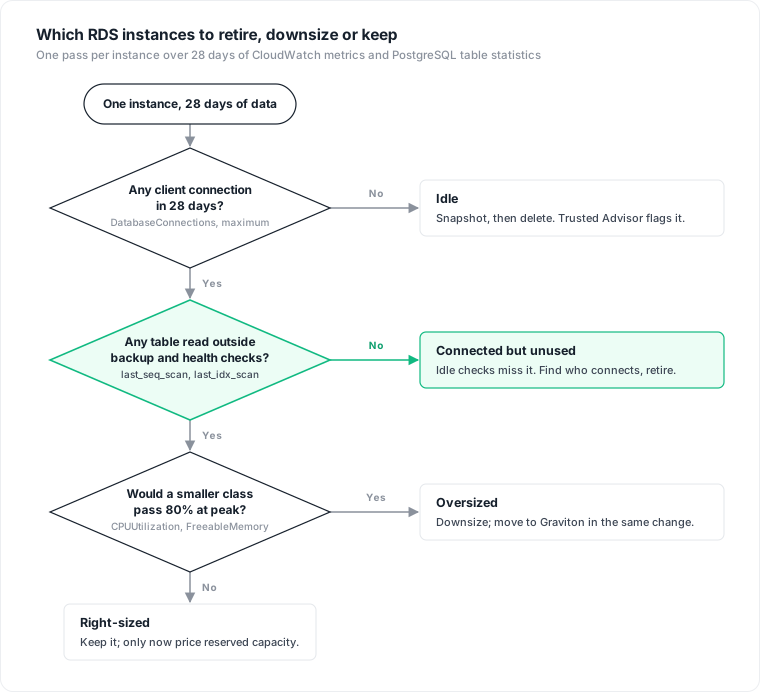
db.m6i.xlargewith 500 GB of gp3, the instance is about 70% of the bill, and Extended Support can add more than the instance itself. Before cutting, measure each instance: 28 days of peak CloudWatch metrics, which tables are still read, and an owner tag. AWS's idle checks require zero connections, so a database whose only client is a nightly job never shows up as idle.
RDS cost is easy to read off a pricing page and hard to read off a bill, because the bill aggregates every instance, volume and snapshot in the account into a handful of usage types. A db.m6i.xlarge Multi-AZ instance on RDS for PostgreSQL lists at $0.712 an hour in US East, about $520 a month before storage. A db.m7g.large Multi-AZ lists at about $246. A db.m7g.xlarge, the same size on Graviton, saves only 5%. Most of the money is in the size decision, and the size decision needs evidence per instance.
The six meters on an RDS bill
US East (N. Virginia) on-demand list prices for RDS for PostgreSQL, from the RDS for PostgreSQL pricing page and AWS's price list as of October 27, 2026. IOPS prices are Single-AZ; Multi-AZ doubles them:
| Line | How it is metered | Example list price |
|---|---|---|
| Instance | per instance-hour; partial hours per second, 10-minute minimum | db.m6i.xlarge $0.356 Single-AZ, $0.712 Multi-AZ |
| Storage | per GB-month allocated, not used | gp3 $0.115 Single-AZ, $0.23 Multi-AZ |
| Extra IOPS and throughput | per IOPS-month or MB/s-month above the gp3 baseline; per IOPS-month provisioned on io1 | gp3 $0.02 per IOPS; io1 $0.125 per GB plus $0.10 per IOPS |
| Backups and snapshots | free up to 100% of provisioned storage in the Region, then per GB-month | $0.095 per GB-month |
| Data transfer | internet egress and cross-Region per GB; Multi-AZ and same-Region replica replication free | $0.09 per GB for the first 10 TB to the internet |
| Extended Support | per vCPU-hour once a major version leaves standard support | $0.100 per vCPU-hour in years 1 and 2 (AWS's US East example) |
The RDS FAQ confirms that replication between a Multi-AZ primary and its standby is not billed as data transfer. The standby is billed as a second instance and a second volume instead.
A worked monthly RDS bill
Consider one production database: a db.m6i.xlarge Multi-AZ instance on RDS for PostgreSQL in US East, 500 GB of gp3, 1,500 GB of automated and manual snapshots, and clients in the same Region. At 730 hours a month and list prices:
| Line | Arithmetic | Per month |
|---|---|---|
| Instance, Multi-AZ | 730 × $0.712 | $519.76 |
| Storage, gp3 Multi-AZ | 500 × $0.23 | $115.00 |
| Extra IOPS | none: 500 GB is above 400 GiB, so the baseline is 12,000 IOPS | $0.00 |
| Backup storage | (1,500 − 500 free) × $0.095 | $95.00 |
| Total, supported major version | $729.76 | |
| Extended Support, years 1 and 2 | 4 vCPUs × 2 instances × $0.100 × 730 | $584.00 |
| Total, past end of standard support | $1,313.76 |
Three things in this table decide where to look. The instance line is about 70% of the supported bill, so instance size is the first lever. Extended Support is billed on the standby too: AWS's Extended Support charges page says the charges "apply to standby instances in Multi-AZ deployments". On this instance it adds $584 a month to a $520 instance line. Our RDS Extended Support pricing post covers the dates and exits. And storage only grows: AWS's storage documentation is explicit that "you can't reduce the amount of storage for a DB instance after storage has been allocated." Since November 2024 the way down is a Blue/Green Deployment with a smaller volume, available for RDS for PostgreSQL 12 and later.
On Aurora, the storage I/O meter changes the arithmetic, which is the subject of Aurora I/O-Optimized vs Standard.
Measure each instance for 28 days
AWS's right-sizing whitepaper, now archived, asks for "at least a two-week period (ideally, over a one-month period) to capture the workload and business peak". Four weeks catches month-end jobs that two weeks can miss. Compute Optimizer looks back 14 days by default, 32 days at no extra charge, or 93 days as a paid option.
CloudWatch keeps 1-minute RDS data for 15 days and hourly data for 455 days, per the CloudWatch retention rules. An hourly period over 28 days is 672 points, under the 1,440-point limit of one call:
for m in CPUUtilization FreeableMemory DatabaseConnections ReadIOPS WriteIOPS; do
  aws cloudwatch get-metric-statistics \
    --namespace AWS/RDS --metric-name "$m" \
    --dimensions Name=DBInstanceIdentifier,Value=orders-db \
    --start-time 2026-09-29T00:00:00Z --end-time 2026-10-27T00:00:00Z \
    --period 3600 --statistics Maximum Average \
    --output json > "orders-db-$m.json"
done
Read the maximum, not the average. The whitepaper's switch test is that "the application's observed vCPU is less than 80% of the vCPU capacity of the new instance", and the same for the memory peak. Halving the vCPUs roughly doubles the CPU percentage, so an instance whose hourly peak stays under about 40% is a candidate for the next size down, and one that peaks at 55% is not, whatever its average. AWS's database blog gives a policy-level version: primaries with "CPU utilization less than 30% and I/O less than 30% constantly" are under-utilized.
Memory sets the floor. FreeableMemory reports MemAvailable from /proc/meminfo, and the same AWS post warns that the downsizing decision "can't be based on memory utilization", because database buffers hold memory even when idle. Compute Optimizer reports RDS memory only as under-provisioned, never over-provisioned. Half the memory means a smaller cache, so check the cache hit ratio before and after a downsize.
Idle is not the same as unused
Trusted Advisor's Amazon RDS idle DB instances check flags an instance that "has not had a connection in the last 7 days". Compute Optimizer's idle finding also requires "no database connections" over the lookback. Both catch the database nobody touches. Neither catches a database that one process still opens every night.
Consider a reporting database whose only remaining clients are a nightly export, a monitoring agent and a pool's health check. DatabaseConnections is above zero every day, so no idle check fires, and the instance keeps billing its full line. The question that decides retirement is whether anyone still reads the data. On PostgreSQL 16 and later, pg_stat_user_tables answers it per table, with last_seq_scan and last_idx_scan:
SELECT schemaname, relname,
       seq_scan, last_seq_scan,
       idx_scan, last_idx_scan,
       GREATEST(last_seq_scan, last_idx_scan) AS last_read
FROM pg_stat_user_tables
ORDER BY last_read NULLS FIRST, relname;
And per database, with size and the counter reset time:
SELECT datname, numbackends, xact_commit,
       pg_size_pretty(pg_database_size(datname)) AS size,
       stats_reset, pg_postmaster_start_time() AS up_since
FROM pg_stat_database
WHERE datname NOT IN ('template0', 'template1')
ORDER BY pg_database_size(datname) DESC;
To tie a read to a client, pg_stat_activity shows usename, application_name and client_addr for live sessions.
What we measured
We ran these queries on a local PostgreSQL 17.2 instance, not on RDS. One database held two tables, orders with 200,000 rows and a primary key, and audit_log with 50,000 rows. Statistics were read from a fresh connection after each step:
VACUUM ANALYZEon the whole database leftlast_seq_scanandlast_idx_scanunchanged.COPY audit_log TO STDOUT, the statementpg_dumpuses for table data unless told to useINSERTs, movedlast_seq_scanonaudit_logto the time of the copy. A nightly logical backup makes every table look read every night, so discount reads that match the backup window.- Twenty connections that each ran only
SELECT 1, the shape of a health check, raisedxact_commitand touched no table statistics. - After a clean restart the counters survived. After
pg_ctl stop -m immediate, the crash case, every counter was zero,last_seq_scanwas NULL andstats_resetwas still NULL. This matches the documented behaviour: after a crash, a restore from a base backup or a point-in-time recovery, "all statistics counters are reset". A NULL after a reset looks exactly like "never read".
The fix for the last point is to run the two queries on a schedule and keep the results outside the database, so a reset shows up as a drop to zero. A table with no read across 28 days of snapshots, outside the backup window, is a finding. A NULL in a single reading is not.
Give every database's cost an owner
Tag each DB instance with a key such as owner or cost-center, then activate the key in the Billing console: per the cost allocation tag documentation, it can take up to 24 hours for a new key to appear and another 24 for it to activate. Group Cost Explorer by that tag and each team sees its RDS line.
Snapshots are billed on their own, so they need their own tags. Enable copy-tags-to-snapshot on each instance, and tag existing snapshots directly: the RDS tagging guide notes that tags "aren't applied retroactively", and snapshot storage used before tagging "remains unattributed".
Tags stop at the instance. When several logical databases share one instance, AWS bills it as one line. Splitting it needs a rule you state openly, for example storage by pg_database_size() share and compute by each database's share of xact_commit or pg_stat_statements time.
Then cut, in this order
Delete what is unused. Take a final snapshot and delete the instance. Stopping only pauses the instance line: a stopped instance still bills storage, Provisioned IOPS and backups, and RDS starts it again by itself after seven consecutive days. A final snapshot costs up to $0.095 per GB-month once the instance is gone, depending on how much free backup allowance the Region's other storage leaves.
Downsize what is oversized. One size down halves the instance line. The db.m6i.xlarge to db.m7g.large move saves about $274 a month on one Multi-AZ instance at list price.
Move to Graviton in the same change. At the same size the difference is small: db.m7g.xlarge lists 5.3% below db.m6i.xlarge, and db.r7g.xlarge 4.4% below db.r6i.xlarge. AWS claims up to 27% better price/performance for Graviton3 over Graviton2, a vendor figure that says nothing about Intel classes.
Fix storage. In US East, gp2 and gp3 list at the same $0.115 per GB-month, so the gain is in IOPS. On RDS for PostgreSQL, gp3 volumes of 400 GiB or more get a 12,000 IOPS and 500 MiB/s baseline. A 500 GB io1 volume provisioned at 6,000 IOPS lists at $662.50 a month Single-AZ; the same 500 GB on gp3 lists at $57.50 with twice the baseline IOPS. io1 and io2 still earn their price where latency consistency is the requirement.
Reserve last. Once the fleet is the right size, a commitment discount on what remains is safe. Bought first, it pays for one to three years of the oversizing you were about to remove.
The case against measuring first
The strongest objection is that measurement costs engineering time, and on a small fleet the savings do not pay for it. A team with ten instances can buy Reserved Instances in an afternoon. That is a fair trade when the fleet is small, stable and recently sized. It stops being one when the estate is inherited: nobody knows which databases are still read, and a reservation turns that uncertainty into a contract.
The method has limits we did not close. Our measurements ran on local PostgreSQL 17.2, not on RDS, and did not cover MySQL, MariaDB, Oracle or SQL Server. We did not test whether an RDS failover or snapshot restore resets the counters; treat both as resets until you have checked. The prices are US East list prices for RDS for PostgreSQL, and other Regions and engines differ. Thresholds such as 30% and 80% come from AWS guidance for general workloads; a latency-bound system can need more headroom.
Where Datapace fits
A database is only safe to downsize or retire once you can show what it costs, who still connects to it and what it holds. Datapace is building one map of your data estate with usage and cost attached, and agents that propose changes as pull requests your team reviews and merges. The decision to delete a database stays with the people who own it. To see that evidence on your own estate, book a call.
Sources
- AWS, Amazon RDS for PostgreSQL pricing, read October 27, 2026 (US East instance, gp2, gp3, io1, backup and data transfer list prices; backup storage free up to 100% of provisioned storage; per-second billing of partial hours with a 10-minute minimum; Extended Support example of $0.100 per vCPU-hour).
- AWS, Amazon RDS FAQs (no data transfer charge for Multi-AZ replication or same-Region read replicas).
- AWS, Amazon RDS Extended Support charges (charges apply to Multi-AZ standby instances).
- AWS, Amazon RDS storage autoscaling (allocated storage cannot be reduced).
- AWS, Amazon RDS Blue/Green Deployments support storage volume shrink, November 2024.
- AWS, Right Sizing: Provisioning Instances to Match Workloads, "Identifying Opportunities to Right Size", archived copy of December 12, 2023.
- AWS Database Blog, Optimizing costs in Amazon RDS (30% CPU and I/O policy, memory as a poor downsizing signal).
- AWS, Compute Optimizer rightsizing preferences, RDS recommendations and idle recommendations.
- AWS, Trusted Advisor cost optimization checks (Amazon RDS idle DB instances: no connection in the last 7 days).
- AWS, CloudWatch metrics for Amazon RDS, CloudWatch concepts and get-metric-statistics.
- PostgreSQL documentation, The cumulative statistics system, version 16 and pg_dump, version 17.
- AWS, Stopping an Amazon RDS DB instance temporarily.
- AWS, Tagging Amazon RDS resources and Activating user-defined cost allocation tags.
- AWS, Amazon RDS now supports M7g and R7g database instances, April 2023 (vendor claim).
- AWS, Amazon RDS DB instance storage (gp3 baselines for PostgreSQL).