TL;DR. Snowflake cost optimization is mostly a measurement problem. Every credit is recorded in
SNOWFLAKE.ACCOUNT_USAGE: per warehouse and hour inWAREHOUSE_METERING_HISTORY, per query inQUERY_ATTRIBUTION_HISTORY. The difference between the two is idle time, credits that no query, user or team owns. Five queries below show where your credits go; the levers come after, in the order the numbers point to.
Snowflake cost optimization often starts with a resize: take the biggest warehouse, drop a size, watch what breaks. That skips the step that says whether size was the problem. The bill has three lines, and Snowflake already records each one in views you can query. Warehouse compute is metered per second, with a 60-second minimum every time a warehouse starts. An X-Small burns 1 credit per hour and each size up doubles it, to 512 credits per hour for a 6X-Large, according to Snowflake's warehouse documentation. Since mid-August 2024 Snowflake also attributes those credits to individual queries, which makes the most useful number on the bill computable: the share of warehouse credits that paid for no query at all.
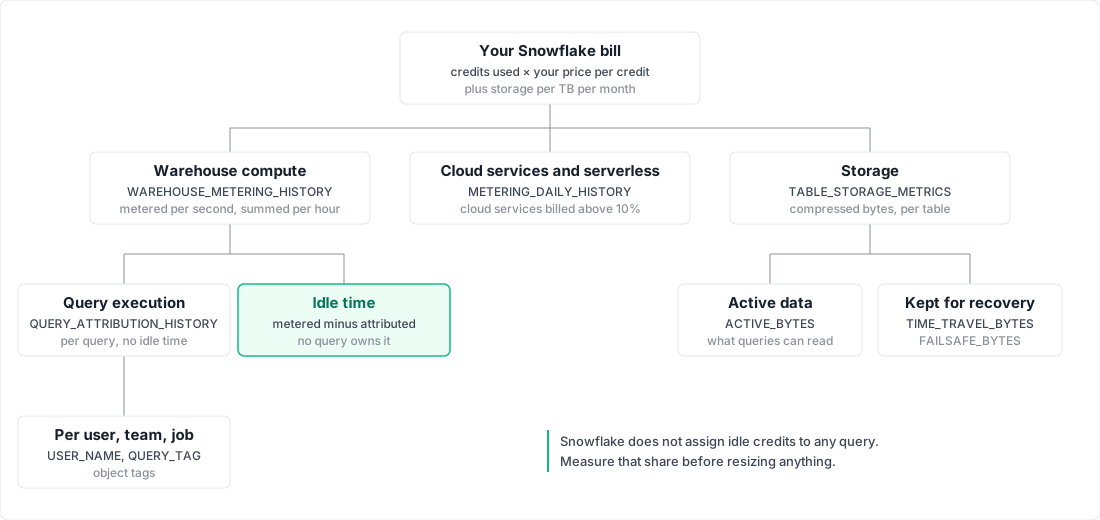
The three lines on a Snowflake bill
Compute is credits. Virtual warehouses are the line you control most directly. Serverless features (tasks, automatic clustering, search optimization and others) bill credits for Snowflake-managed compute instead, measured in compute-hours, as the compute cost documentation describes.
Cloud services is also credits, with an adjustment that hides most of it: "Usage for cloud services is charged only if the daily consumption of cloud services exceeds 10% of the daily usage of virtual warehouses." The calculation runs per day in UTC. A team that sees cloud services credits in a warehouse view and panics is often looking at credits that were never billed.
Storage is a flat rate per terabyte per month on compressed data, and it includes what Time Travel and Fail-safe keep. Fail-safe holds 7 more days for permanent tables. Time Travel defaults to 1 day and can be set to up to 90 days on Enterprise Edition.
The dollar price per credit and per terabyte depends on edition, cloud, region and contract. Snowflake's pricing page (fetched 2026-10-27) shows list prices by edition, platform and region and points to the Service Consumption Table for the full schedule. Everything below works in credits and bytes so it holds whatever you pay per credit; multiply by your contract rate at the end.
Measure: five queries on ACCOUNT_USAGE
All five read SNOWFLAKE.ACCOUNT_USAGE. QUERY_ATTRIBUTION_HISTORY needs a role with the USAGE_VIEWER or GOVERNANCE_VIEWER database role. Column names below were checked against the Snowflake documentation on 2026-10-27. Set one window and reuse it; ending it a day back leaves room for the views' latency.
SET (win_start, win_end) = (DATEADD(day, -31, CURRENT_DATE()), DATEADD(day, -1, CURRENT_DATE()));
1. Credits by service type, as billed
SELECT service_type,
       SUM(credits_used_compute)              AS compute_credits,
       SUM(credits_used_cloud_services)       AS cloud_services_credits,
       SUM(credits_adjustment_cloud_services) AS cloud_services_adjustment,
       SUM(credits_billed)                    AS billed_credits
FROM   snowflake.account_usage.metering_daily_history
WHERE  usage_date >= $win_start AND usage_date < $win_end
GROUP  BY service_type
ORDER  BY billed_credits DESC;
METERING_DAILY_HISTORY is the only view here that shows the 10% adjustment, as a negative number. If WAREHOUSE_METERING is the top row, which is common, the rest of this list applies. If a serverless type such as SERVERLESS_TASK or AUTO_CLUSTERING is near the top, the warehouse levers below will not move the bill much.
2. Credits by warehouse per day
SELECT DATE_TRUNC('day', start_time)    AS day,
       warehouse_name,
       SUM(credits_used_compute)        AS compute_credits,
       SUM(credits_used_cloud_services) AS cloud_services_credits
FROM   snowflake.account_usage.warehouse_metering_history
WHERE  start_time >= $win_start AND start_time < $win_end
GROUP  BY 1, 2
ORDER  BY 1, 3 DESC;
WAREHOUSE_METERING_HISTORY has one row per warehouse per hour, with up to 3 hours of latency (6 for the cloud services column). Plot it. A flat line across nights and weekends is a warehouse that does not suspend; a step up on one date is a schedule or a resize someone made that day.
3. Idle share per warehouse
SELECT warehouse_name,
       SUM(credits_used_compute)               AS metered_credits,
       SUM(credits_attributed_compute_queries) AS query_credits,
       SUM(credits_used_compute) - SUM(credits_attributed_compute_queries) AS idle_credits,
       ROUND(100 * (SUM(credits_used_compute) - SUM(credits_attributed_compute_queries))
             / NULLIF(SUM(credits_used_compute), 0), 1) AS idle_pct
FROM   snowflake.account_usage.warehouse_metering_history
WHERE  start_time >= $win_start AND start_time < $win_end
GROUP  BY warehouse_name
ORDER  BY idle_credits DESC;
CREDITS_ATTRIBUTED_COMPUTE_QUERIES "doesn't include warehouse idle time", so the difference is what the warehouse burned while running nothing. Snowflake's own reference page uses the same subtraction as its example of idle cost. Sort by idle credits, not idle percentage: a 70% idle X-Small costs less than a 20% idle 2X-Large.
4. Credits per user, tag and team
SELECT user_name,
       COALESCE(NULLIF(query_tag, ''), 'untagged') AS tag,
       COUNT(*)                                    AS queries,
       SUM(credits_attributed_compute)             AS credits
FROM   snowflake.account_usage.query_attribution_history
WHERE  start_time >= $win_start AND start_time < $win_end
GROUP  BY 1, 2
ORDER  BY credits DESC
LIMIT  50;
QUERY_ATTRIBUTION_HISTORY counts execution credits per query, "inclusive of any resizing and/or autoscaling". Teams map onto these rows in two ways. A QUERY_TAG set per session by the tool that runs the job names the job. An object tag on a user or warehouse names the owner, and Snowflake's cost attribution guide joins TAG_REFERENCES on domain = 'USER' to roll credits up by department. A large untagged row is itself a finding.
These credits exclude idle time, so they add up to less than the bill. To show each team a fully loaded number, spread each warehouse's metered credits over the tags that used it, in proportion:
WITH wh AS (
  SELECT warehouse_id, SUM(credits_used_compute) AS metered
  FROM   snowflake.account_usage.warehouse_metering_history
  WHERE  start_time >= $win_start AND start_time < $win_end
  GROUP  BY warehouse_id
), q AS (
  SELECT warehouse_id,
         COALESCE(NULLIF(query_tag, ''), 'untagged') AS tag,
         SUM(credits_attributed_compute)             AS attributed
  FROM   snowflake.account_usage.query_attribution_history
  WHERE  start_time >= $win_start AND start_time < $win_end
  GROUP  BY 1, 2
), shares AS (
  SELECT q.tag, q.attributed,
         q.attributed / NULLIF(SUM(q.attributed) OVER (PARTITION BY q.warehouse_id), 0)
           * wh.metered AS fully_loaded
  FROM   q JOIN wh ON wh.warehouse_id = q.warehouse_id
)
SELECT tag,
       SUM(attributed)   AS query_credits,
       SUM(fully_loaded) AS fully_loaded_credits
FROM   shares
GROUP  BY tag
ORDER  BY fully_loaded_credits DESC;
Snowflake's guide does the same allocation across the whole account. Doing it per warehouse keeps one team's idle warehouse off another team's invoice.
5. Recurring jobs and who runs them
SELECT query_parameterized_hash,
       ANY_VALUE(warehouse_name)       AS warehouse,
       COUNT(DISTINCT user_name)       AS users,
       ANY_VALUE(user_name)            AS a_user,
       COUNT(*)                        AS runs,
       SUM(credits_attributed_compute) AS credits
FROM   snowflake.account_usage.query_attribution_history
WHERE  start_time >= $win_start AND start_time < $win_end
GROUP  BY query_parameterized_hash
ORDER  BY credits DESC
LIMIT  25;
The parameterized hash groups every run of the same statement with different literals, which is how a scheduled job shows up. Join the hash to QUERY_HISTORY to read one QUERY_TEXT. A job that runs every 15 minutes under a service user, with no tag, is the row to ask about first.
Why the Snowflake bill grows
The five queries usually point at one of four causes.
Warehouses that never suspend. Auto-suspend is on by default at 600 seconds, but "setting a 0 or NULL value means the warehouse never suspends". The more common case is a warehouse whose queries arrive every few minutes: it never sits idle long enough to suspend, and it bills every gap between queries. Query 3 shows both. Snowflake's own Optimization insights flag "active warehouses with large gaps between successive queries", defined as idle more than 50% of their active time.
Warehouses larger than their queries. Cost per hour doubles with each size, while Snowflake's warehouse guidance notes that "larger is not necessarily faster for smaller, more basic queries". A Large warehouse serving one-second lookups is paying for parallelism it cannot use, and its idle time costs eight times what the same gaps would on an X-Small.
Scheduled jobs nobody owns. Query 5 finds them. Consider a refresh set up for a dashboard that was later retired, scheduled every 15 minutes: each run is cheap, and it runs 2,880 times in 30 days. These also keep warehouses awake, so they feed the first cause.
Storage held for recovery. Changing data costs storage twice: once as active bytes, again in Time Travel and Fail-safe for each day it is retained. Dropped tables stay billed until their retention runs out.
SELECT table_catalog,
       deleted,
       ROUND(SUM(active_bytes)             / POWER(1024, 4), 2) AS active_tb,
       ROUND(SUM(time_travel_bytes)        / POWER(1024, 4), 2) AS time_travel_tb,
       ROUND(SUM(failsafe_bytes)           / POWER(1024, 4), 2) AS failsafe_tb,
       ROUND(SUM(retained_for_clone_bytes) / POWER(1024, 4), 2) AS clone_tb
FROM   snowflake.account_usage.table_storage_metrics
GROUP  BY 1, 2
ORDER  BY SUM(time_travel_bytes) + SUM(failsafe_bytes) DESC;
TABLE_STORAGE_METRICS splits every table's bytes into those states. A database where Time Travel and Fail-safe exceed active bytes often holds tables rebuilt in full every day; the insights flag a related case, "short-lived permanent tables". Transient tables have no Fail-safe and at most 1 day of Time Travel.
The levers, in the order the numbers point
Take the levers in the order your numbers rank them, not the order a checklist lists them.
If idle credits lead, lower AUTO_SUSPEND on the warehouses at the top of query 3, and consolidate warehouses that each serve a trickle of queries: two warehouses idling between the same queries pay for idle twice.
If a few warehouses lead on query credits, test a size down. Snowflake suggests running the same 5 to 10 minute workload on several sizes and comparing. Check QUERY_HISTORY first. Remote spill means a query needed more memory than the warehouse had, even after spilling to local disk, and Snowflake's spillage guidance lists a larger warehouse or smaller batches as the fix; a nonzero BYTES_SPILLED_TO_REMOTE_STORAGE is only that signal on warehouses without query acceleration, which writes small amounts to remote storage by design. A high QUEUED_OVERLOAD_TIME is a concurrency problem, and Snowflake says resizing "is not intended for handling concurrency issues": use another warehouse or a multi-cluster one.
If a tag or job leads, give it an owner before you tune it. The cheapest query is the one that stops running.
If storage leads, shorten DATA_RETENTION_TIME_IN_DAYS where nobody needs 30 or 90 days of history, and move rebuildable staging tables to transient.
The case against measuring first
The strongest objection: setting every warehouse to a 60-second auto-suspend takes ten minutes, and Snowflake's Optimization insights already list the idle ones. Why build queries?
Because the blanket fix has costs the bill does not show. Suspending drops the warehouse cache, and Snowflake warns of "the trade-off between saving credits by suspending a warehouse versus maintaining the cache". A BI warehouse with steady traffic can get slower and bill more after the change, since every resume carries a fresh 60-second minimum. Some idle time is the price of a warm cache, worth paying on purpose. The queries tell you which warehouses that applies to. Use the insights too: they confirm the same signal from another angle.
The method has limits worth stating. Per-query attribution excludes queries of about 100 ms or less, cloud services, serverless features and AI token costs, and it does not cover Adaptive Warehouses, which use QUERY_METERING_HISTORY. It lags by up to 8 hours. Credits per hour above are for Gen1 standard warehouses; Gen2 rates are in the Service Consumption Table. And these queries were checked against Snowflake's documentation, not run against a live account for this article, so test them on yours before you trust the totals.
The same discipline applies on other warehouses: on BigQuery the question becomes on-demand bytes versus slot-hours, and idle compute is one of the largest sources of waste in data infrastructure wherever it runs.
Datapace is building one map of your data estate with usage and cost attached, and agents that propose changes as pull requests your team reviews and merges. Attribution like the above is where that map starts, and it does not replace the judgement on which idle time is worth keeping. To work through your own warehouse numbers, book a call.
Sources
- Snowflake, Understanding compute cost (per-second billing, 60-second minimum, 10% cloud services adjustment, serverless compute).
- Snowflake, Overview of warehouses (credits per hour by size, auto-suspend and auto-resume defaults).
- Snowflake, Understanding storage cost (flat rate per TB, compressed size, Time Travel and Fail-safe fees).
- Snowflake, Understanding and using Time Travel (retention defaults and limits by edition).
- Snowflake, Pricing options and Service Consumption Table, fetched 2026-10-27.
- Snowflake, WAREHOUSE_METERING_HISTORY view.
- Snowflake, QUERY_ATTRIBUTION_HISTORY view.
- Snowflake, METERING_DAILY_HISTORY view.
- Snowflake, QUERY_HISTORY view.
- Snowflake, TABLE_STORAGE_METRICS view.
- Snowflake, Attributing cost (tag and query tag rollups, idle time allocation).
- Snowflake, CREATE WAREHOUSE (AUTO_SUSPEND default and never-suspend values).
- Snowflake, Warehouse considerations (cache trade-off, sizing, multi-cluster for queuing).
- Snowflake, Optimization insights.
- Snowflake, SET (session variables).
- Snowflake, Understanding and viewing Fail-safe (7-day period).
- Snowflake, Working with temporary and transient tables (Time Travel and Fail-safe by table type).
- Snowflake, Resolving memory spillage (spill to remote storage, larger warehouse).