TL;DR. Databricks DBU cost on AWS ranges from $0.07 per DBU for model serving to $0.95 for serverless notebooks across the common compute types, and the rate you pay depends on the compute type you pick for the work. On classic compute the DBU price is only part of the bill: for one
m6id.xlargenode on Jobs Compute in US East, the DBUs cost $0.114 an hour and the EC2 instance $0.2373, so the instance is 68% of the hour. Cost per job therefore needs two joins: DBUs to list prices insystem.billing.usage, and nodes to instance prices. Without the second, every tuning decision, Photon first, is made on the smaller half of the number.
Most explanations of Databricks DBU cost stop at "DBUs times the rate". That formula is right for serverless and wrong for everything else, because classic clusters run on instances in your own cloud account and your cloud provider bills them separately. This post gives the list rates per compute type from Databricks' own rate data, prices one node-hour and one monthly job both ways, and then shows the SQL that turns your system tables into a cost per job.
A DBU's price depends on compute type, tier and cloud
Databricks defines a DBU as "a normalized unit of processing power on the Databricks Lakehouse Platform used for measurement and pricing purposes". Two numbers make the DBU line of a bill: how many DBUs a resource burns per hour, and the price of each DBU. The price is set by the SKU, meaning the compute type, the tier and, for serverless, the region.
AWS list prices per DBU, from the rate data behind Databricks' pricing pages and calculator, read on October 27, 2026 (serverless and SQL Pro rates vary by region; these are US East, N. Virginia):
| Compute type | Premium | Enterprise | Cloud instances billed separately? |
|---|---|---|---|
| Jobs Compute (classic) | $0.15 | $0.20 | Yes |
| All-Purpose Compute (classic) | $0.55 | $0.65 | Yes |
| SQL warehouse, Classic | $0.22 | $0.22 | Yes |
| SQL warehouse, Pro | $0.55 | $0.55 | Yes |
| SQL warehouse, Serverless | $0.70 | $0.70 | No |
| Serverless jobs and pipelines | $0.35 | $0.45 | No |
| Serverless notebooks | $0.75 | $0.95 | No |
| Model serving, real-time inference | $0.07 | $0.07 | No |
The same instance burns the same DBUs on Jobs and All-Purpose Compute, at a price 3.7 times higher on All-Purpose. An m6id.xlarge burns 0.76 DBU an hour on either, which costs $0.114 on Jobs Compute and $0.418 on All-Purpose in the Premium tier. SQL warehouses burn a fixed rate by size instead: a Small warehouse is 12 DBU an hour, so $2.64 of DBUs an hour on Classic and $6.60 on Pro, both plus instances, and $8.40 all-in on Serverless.
Photon multiplies the DBU count; the price per DBU stays. In the same data, nearly every Photon instance type on Jobs Compute burns about 2.9 times the DBUs of its non-Photon twin (2.204 against 0.76 on an m6id.xlarge), and 2 times on All-Purpose. Databricks' docs say only that "Photon instance types consume DBUs at a different rate than the same instance type running the non-Photon runtime".
Other clouds price differently. On Azure, Databricks notes that "the Premium tier on Azure Databricks corresponds to the Enterprise tier on AWS and GCP" and that Microsoft bills it.
On classic compute, the DBU price is the smaller half of the bill
Classic clusters run on instances in your cloud account. Databricks' pricing FAQ says so for trials: "you will still be charged by your cloud provider for resources, like compute instances, used within your account". Its compute docs say the same of idle time: "Idle compute continue to accumulate DBU and cloud instance charges during the inactivity period before termination".
Serverless folds the instance into the rate. Databricks' own answer page puts it as "Your serverless bill is the DBUs used multiplied by the price of the relevant SKU". That is why a serverless DBU costs more: it carries the machine.
One node-hour of an m6id.xlarge, Premium tier, with the instance at its EC2 on-demand list price of $0.2373 in US East (AWS price data, read October 27, 2026):
| Compute | DBUs per hour | DBU cost | EC2 cost | Total per node-hour | EC2 share |
|---|---|---|---|---|---|
| Jobs Compute | 0.76 | $0.1140 | $0.2373 | $0.3513 | 68% |
| Jobs Compute, Photon | 2.204 | $0.3306 | $0.2373 | $0.5679 | 42% |
| All-Purpose Compute | 0.76 | $0.4180 | $0.2373 | $0.6553 | 36% |
| All-Purpose Compute, Photon | 1.52 | $0.8360 | $0.2373 | $1.0733 | 22% |
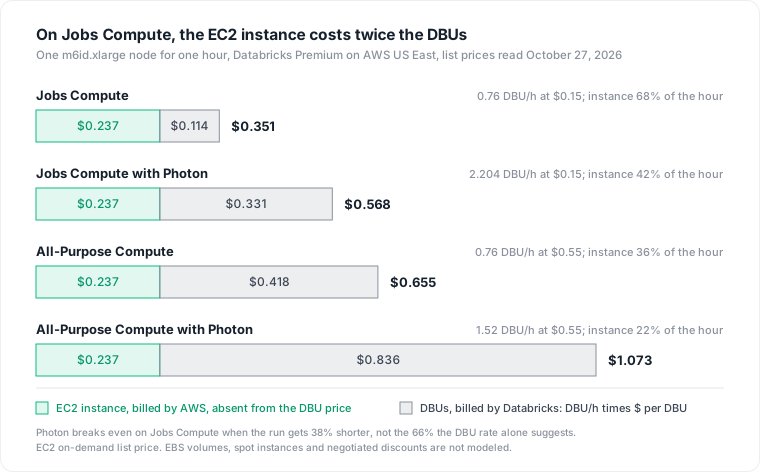
On Jobs Compute the EC2 instance costs twice the DBUs. Read only the Databricks invoice and you see a third of what the job costs.
A worked month: one nightly job, priced three ways
Consider a hypothetical nightly ETL job on a fixed-size cluster of one driver and eight m6id.xlarge workers, running two hours a night for 30 nights: 540 node-hours a month, Premium tier, US East list prices.
| Setup | DBUs | EC2 | Month |
|---|---|---|---|
| Jobs Compute | $61.56 | $128.14 | $189.70 |
| Jobs Compute with Photon, same run time | $178.52 | $128.14 | $306.67 |
| All-Purpose cluster, terminated right after each run | $225.72 | $128.14 | $353.86 |
| All-Purpose cluster, idle one hour after each run | $338.58 | $192.21 | $530.79 |
The same job costs 2.8 times more on a shared all-purpose cluster with an hour of idle. The rate gap explains 1.9 times; the idle hour, billed on both sides, explains the rest.
Photon breaks even at a 38% shorter run, not 66%. Judged on DBUs alone, Photon on Jobs Compute costs 2.9 times as much per hour, so it would need to cut run time by 66%. With the instance in the hour, the cost per node-hour rises only from $0.3513 to $0.5679, so a run 38% shorter breaks even. A run that is only 25% shorter still costs 21% more. Databricks' own guidance agrees the test is per job: jobs that run regularly "should be evaluated to see whether they are not only faster but also cheaper with Photon".
Compute Databricks cost per job from system tables
The billable usage table system.billing.usage holds DBUs per record with sku_name, usage_quantity, custom_tags and a usage_metadata struct of IDs. system.billing.list_prices holds the list price of each SKU over time. The queries below follow the column names as documented on October 27, 2026.
Price each job's DBUs with list_prices
-- DBU list cost per job, last 30 days
SELECT
  u.workspace_id,
  u.usage_metadata.job_id,
  u.sku_name,
  COUNT(DISTINCT u.usage_metadata.job_run_id) AS runs,
  SUM(u.usage_quantity) AS dbus,
  SUM(u.usage_quantity * p.pricing.effective_list.default) AS dbu_list_cost
FROM system.billing.usage u
JOIN system.billing.list_prices p
  ON  p.sku_name = u.sku_name
  AND p.cloud = u.cloud
  AND u.usage_end_time >= p.price_start_time
  AND (p.price_end_time IS NULL OR u.usage_end_time < p.price_end_time)
WHERE u.billing_origin_product = 'JOBS'
  AND u.usage_date >= current_date() - INTERVAL 30 DAYS
GROUP BY ALL
ORDER BY dbu_list_cost DESC;
Three details matter. effective_list "resolves list and promotional price", but neither is your negotiated rate, so apply your discount yourself. Corrections arrive as negative RETRACTION rows, which a plain SUM cancels out. And records are "typically available within 12 hours", so yesterday is not final yet.
Find the all-purpose clusters that hide job cost
A job on an all-purpose cluster has no job ID in the bill. The usage reference says job_id "does not populate for jobs run on all-purpose compute", and Databricks' job cost queries state that such jobs "are not billed as jobs and are thus excluded from cost attribution". Price those clusters by owner and termination setting instead:
WITH clusters AS (
  SELECT *
  FROM system.compute.clusters
  QUALIFY ROW_NUMBER() OVER (
    PARTITION BY workspace_id, cluster_id ORDER BY change_time DESC) = 1
)
SELECT
  c.cluster_name,
  c.owned_by,
  c.auto_termination_minutes,
  c.worker_node_type,
  SUM(u.usage_quantity * p.pricing.effective_list.default) AS dbu_list_cost
FROM system.billing.usage u
JOIN system.billing.list_prices p
  ON  p.sku_name = u.sku_name
  AND p.cloud = u.cloud
  AND u.usage_end_time >= p.price_start_time
  AND (p.price_end_time IS NULL OR u.usage_end_time < p.price_end_time)
JOIN clusters c
  ON  c.workspace_id = u.workspace_id
  AND c.cluster_id = u.usage_metadata.cluster_id
WHERE u.billing_origin_product = 'ALL_PURPOSE'
  AND u.usage_date >= current_date() - INTERVAL 30 DAYS
GROUP BY ALL
ORDER BY dbu_list_cost DESC;
An auto_termination_minutes of 0 means the cluster never stops on its own: Databricks lets you opt out "by specifying an inactivity period of 0". Run this in each region you use, because billing records are global while cluster records only match "for the region in which you are querying".
Add the EC2 half from node_timeline
system.compute.node_timeline records each node of all-purpose and jobs compute per minute, with its node_type. Multiply node time by your instance price and join it back to the cluster's DBUs:
WITH ec2_price (node_type, usd_per_hour) AS (
  VALUES ('m6id.xlarge', 0.2373), ('m6id.2xlarge', 0.4746)  -- your types and rates
),
vm AS (
  SELECT n.workspace_id, n.cluster_id,
         SUM(timestampdiff(SECOND, n.start_time, n.end_time) / 3600.0
             * e.usd_per_hour) AS ec2_cost
  FROM system.compute.node_timeline n
  JOIN ec2_price e ON e.node_type = n.node_type
  WHERE n.start_time >= current_date() - INTERVAL 30 DAYS
  GROUP BY ALL
),
dbu AS (
  SELECT u.workspace_id,
         u.usage_metadata.cluster_id AS cluster_id,
         MAX(u.usage_metadata.job_id) AS job_id,
         SUM(u.usage_quantity * p.pricing.effective_list.default) AS dbu_cost
  FROM system.billing.usage u
  JOIN system.billing.list_prices p
    ON  p.sku_name = u.sku_name
    AND p.cloud = u.cloud
    AND u.usage_end_time >= p.price_start_time
    AND (p.price_end_time IS NULL OR u.usage_end_time < p.price_end_time)
  WHERE u.usage_metadata.cluster_id IS NOT NULL
    AND u.usage_date >= current_date() - INTERVAL 30 DAYS
  GROUP BY ALL
)
SELECT
  coalesce(d.job_id, concat('all-purpose ', d.cluster_id)) AS workload,
  SUM(d.dbu_cost) AS dbu_cost,
  SUM(v.ec2_cost) AS ec2_cost,
  SUM(d.dbu_cost) + coalesce(SUM(v.ec2_cost), 0) AS total_cost
FROM dbu d
LEFT JOIN vm v USING (workspace_id, cluster_id)
GROUP BY 1
ORDER BY total_cost DESC;
This is an estimate at list price. Databricks warns that "nodes that ran for less than 10 minutes might not appear", and it leaves out EBS volumes, spot pricing and your AWS discounts. For the exact AWS figure, use tags: Databricks adds ClusterId and JobId to jobs compute, and "default tags automatically propagate to AWS EC2 and AWS EBS instances for cost analysis". Activate them as cost allocation tags and group your Cost and Usage Report by them. One gap remains: for compute launched from pools, custom tags "do not propagate to cloud resources".
Why the Databricks bill grows
- Scheduled jobs on all-purpose clusters. The DBU rate is 3.7 times the Jobs Compute rate, and the cost leaves the per-job view entirely.
- Clusters that never auto-terminate. The inactivity setting ranges "between 10 and 10,000 minutes (about 7 days)", or 0 for never, and idle time bills DBUs and instances.
- Oversized workers.
node_timelineholdscpu_user_percentandmem_used_percentper node and minute; a cluster whose workers sit at low CPU through every run is paying for both halves of idle capacity. - Photon where it does not pay. A Photon job that runs 25% faster costs 21% more in the example above.
Databricks cost optimization, in the order the queries point to
- Move scheduled work to Jobs Compute. Same instances, a DBU rate of $0.15 against $0.55 in Premium, a job ID in the bill, and a cluster that terminates when the job completes.
- Set auto-termination on every interactive cluster through a compute policy. Databricks' cost guidance suggests "a reasonable value (for example, 1 hour)".
- Right-size from node_timeline before you touch the rate. Fewer or smaller workers cut both halves at once.
- Test Photon per job against the full node-hour. Keep it where the run gets shorter than the break-even, about 38% on the example instance.
- Use spot instances for workloads with lax latency requirements, and the gp3 volumes Databricks recommends over gp2. Both cut only the AWS half.
- Commit last. Databricks offers discounts "when you commit to certain levels of usage". That discount reaches what Databricks bills; the EC2 instances stay on your AWS bill.
The case for going serverless, and where it stops
The strongest objection to all of this: move to serverless and the VM half disappears from your concern. The bill becomes DBUs times one rate, job_id populates for serverless jobs, and idle clusters stop being your problem.
That holds for attribution, and it is a good reason to try serverless. Cost comparisons stay hard. A serverless DBU in US East costs $0.35 against $0.15 for Jobs Compute, but the two DBU counts are not interchangeable, so the only fair comparison is to run a representative job both ways and compare total cost, EC2 included, from the queries above. Databricks also bills other features under the serverless jobs SKU, such as predictive optimization and data quality monitoring, so filter on billing_origin_product rather than sku_name.
The limits of this post: rates are AWS list prices for the Premium and Enterprise tiers, read October 27, 2026; Azure, GCP and negotiated rates differ. The node-hour and monthly figures are worked examples on one instance type, not measurements. We have not run these queries against a production account; they follow the documented schemas.
Where Datapace fits
Cost per job on Databricks lives in two bills that share only a cluster ID, and the same split shows up across the rest of the estate, as in cloud waste in data infrastructure. Datapace is building one map of your data estate with usage and cost attached, and agents that propose changes as pull requests your team reviews and merges. If your warehouse runs on Snowflake or BigQuery beside Databricks, the same attribution-first method is in Snowflake cost optimization and BigQuery on-demand vs editions.
Sources
- Databricks, Pricing (DBU definition, cloud provider charges, committed-use discounts) and Model Serving pricing (Azure tier note).
- Databricks, AWS rate data for the pricing pages and calculator, read October 27, 2026 (DBU prices per SKU and tier, DBUs per hour per instance type, Photon and SQL warehouse sizes).
- AWS, Amazon EC2 On-Demand pricing and its US East Linux price data, read October 27, 2026 (
m6id.xlarge$0.2373 an hour). - Databricks, How does serverless pricing work?
- Databricks docs, Billable usage system table reference, Pricing system table reference, Monitor costs using system tables and Monitor job costs and performance.
- Databricks docs, Compute system tables reference (
clusters,node_timeline, regional limits). - Databricks docs, Manage classic compute, Compute configuration reference, Photon and Use tags to attribute and track usage.
- Databricks docs, Best practices for cost optimization.
- AWS, Activating user-defined cost allocation tags.