TL;DR. To stop an RDS instance outside work hours saves its instance hours and nothing else. A hypothetical dev and staging pair (two db.r6g.large on RDS for PostgreSQL, Single-AZ, 200 GB of gp3 each, US East list prices) costs $374.50 a month running all the time and $143.77 when it runs 50 hours a week. Instance hours fall 70.2%, the bill 61.6%, because storage bills every hour. Stopping alone does not retire a database: RDS starts it again after seven days. A weekday schedule handles that, a 1-year No Upfront Reserved Instance on a scheduled database costs more than on-demand, and below about 549 ACU-hours a month (for 60 GB of data, I/O excluded) Aurora Serverless v2 with auto-pause costs less than the schedule.
Stopping an RDS instance pauses one line of the bill, the instance hours, and leaves the others running. For non-production databases that line is most of the money, so a schedule is still worth about $231 a month on a dev and staging pair. The rest of this post prices what stays on the bill, the seven-day restart, and when to scale to zero or delete instead.
Prices below come from the AWS RDS price list for US East (published November 12, 2026, read November 13) and the behaviour from AWS's guide to stopping a DB instance. It is a worked model, not a measured bill.
What stopping an RDS instance saves: 70% of the hours, 62% of the bill
Consider a team with a dev and a staging database, each a db.r6g.large on RDS for PostgreSQL, Single-AZ, with 200 GB of gp3 storage and no extra IOPS or throughput. Nobody uses either outside weekdays 08:00 to 18:00, which is 50 of the 168 hours in a week. Over a 730-hour month that is 217.26 running hours.
| Line, per database | Running 24/7 | Stopped outside 50 h a week |
|---|---|---|
| Instance, $0.225 an hour | 730 h: $164.25 | 217.26 h: $48.88 |
| gp3 storage, 200 GB at $0.115 per GB-month | $23.00 | $23.00 |
| Total per database | $187.25 | $71.88 |
| Dev and staging pair | $374.50 | $143.77 |
The schedule saves $230.73 a month on the pair, 61.6%. Storage was 12.3% of each database's bill when it ran all the time and becomes 32.0% once it is stopped most of the week. The bigger the volume relative to the instance, the less a schedule saves. A staging copy of production with 2,000 GB of gp3 would bill $230 a month for storage whether it runs or not.
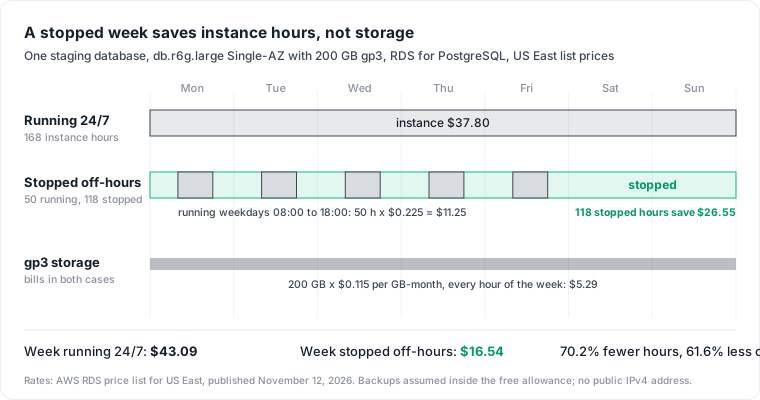
RDS bills in 1-second increments with a minimum of 10 minutes, so one start a day costs nothing extra. Starting is the slow part: AWS warns that starting a stopped instance "requires instance recovery and can take from minutes to hours."
What you still pay while it is stopped: storage, backups and a public IP
AWS's stop guide lists what keeps billing: "While your DB instance is stopped, you are charged for provisioned storage (including Provisioned IOPS). You're also charged for backup storage, including manual snapshots and automated backups within your specified retention window. Additionally, if your DB instance is publicly accessible, you will continue to be charged for the public IPv4 address."
- Provisioned storage and IOPS. gp3 is $0.115 per GB-month, plus $0.02 per IOPS-month and $0.08 per MiBps-month of provisioned gp3 IOPS and throughput where those are billed.
- Backup storage beyond the free allowance. AWS gives backup storage up to 100% of your total database storage for a Region at no charge, then $0.095 per GB-month. Its own example counts the storage of "active" instances, and the page does not say whether a stopped instance's volume counts toward the allowance. We assume the pair's backups stay inside it.
- A public IPv4 address. The VPC price list charges $0.005 per in-use public IPv4 address per hour: $3.65 a month for each publicly accessible database, stopped or not.
A stopped database keeps its endpoint, parameter group and the transaction logs needed for point-in-time restore. RDS also removes pending actions, including scheduled maintenance updates, except changes to the option group or DB parameter group.
RDS starts a stopped instance after 7 days, so a forgotten database runs again
AWS limits a stop to seven consecutive days: "If you don't manually start your DB instance after it is stopped for seven consecutive days, RDS automatically starts your DB instance for you." The event is RDS-EVENT-0154, "DB instance is being started due to it exceeding the maximum allowed time being stopped." Aurora clusters follow the same seven-day rule.
Stopping a database nobody needs saves one week. On the db.r6g.large above, the first seven days save $37.80. Then RDS starts it, and in a 30-day month it runs the other 23 days for $124.20 until someone notices. A database that should not exist needs a delete, not a stop.
Three limits catch teams that schedule stops across a fleet:
- RDS cannot stop an instance that has a read replica, or that is one.
- RDS for SQL Server can be stopped in Single-AZ but not in a Multi-AZ deployment.
- A stopped instance cannot be modified, so a resize waits for the next start.
Stop dev and staging on a schedule, and keep reservations off them
A schedule that stops the instance every weekday evening also takes care of the seven-day restart. From Friday 18:00 to Monday 08:00 the instance is stopped for 62 hours, far below the limit. If a holiday leaves it stopped long enough for RDS to start it, the next 18:00 stop shuts it down again.
AWS gives three ways to do this. EventBridge Scheduler can call the RDS API directly through a universal target, of the form arn:aws:scheduler:::aws-sdk:service:apiAction. Instance Scheduler on AWS is a deployable solution that "automates the starting and stopping of various AWS services including Amazon Elastic Compute Cloud (Amazon EC2) and Amazon Relational Database Service (Amazon RDS) instances." For databases that must stay off for weeks, AWS's re:Post guide uses Step Functions and starts tagged instances 30 minutes before their weekly maintenance window, then stops them again.
A sketch of the first option, with your own role and instance name (not run against an account here):
# Stop staging-db at 18:00 Toronto time, Monday to Friday
aws scheduler create-schedule \
  --name stop-staging-db \
  --schedule-expression "cron(0 18 ? * MON-FRI *)" \
  --schedule-expression-timezone "America/Toronto" \
  --flexible-time-window Mode=OFF \
  --target '{"Arn":"arn:aws:scheduler:::aws-sdk:rds:stopDBInstance",
             "RoleArn":"arn:aws:iam::111122223333:role/scheduler-rds",
             "Input":"{\"DbInstanceIdentifier\":\"staging-db\"}"}'
# A second schedule with startDBInstance at 07:30 brings it back before work
Keep these databases out of commitments. A 1-year No Upfront reserved db.r6g.large is $0.1298 an hour, and AWS states it "bills a discounted hourly rate for every hour within the term, regardless of usage." That is $94.75 a month, against $48.88 on-demand for the scheduled hours. The reservation only wins above 421 running hours a month, about 97 hours a week. Our Database Savings Plans post covers the other way to commit, and the same rule holds: commit only to the hours a database really runs.
The strongest objection is people's time. A developer who works at 21:00 finds the database stopped and waits minutes or more for it to start. Give the team permission to start it on demand, and let the 18:00 stop shut it again the next day. Each hour it runs out of schedule costs $0.225.
Find the candidates: zero connections outside work hours
The CloudWatch metric DatabaseConnections counts the client network connections to the instance. Pull its hourly maximum for two weeks:
aws cloudwatch get-metric-statistics \
  --namespace AWS/RDS --metric-name DatabaseConnections \
  --dimensions Name=DBInstanceIdentifier,Value=staging-db \
  --start-time 2026-10-30T00:00:00Z --end-time 2026-11-13T00:00:00Z \
  --period 3600 --statistics Maximum
An instance whose maximum sits at zero every night and weekend is a schedule candidate. One that shows a connection every night at 02:00 has a job or a monitor attached, and that reader needs an owner before anything stops. Our RDS cost optimization guide covers the production side of this check, where a quiet instance is often not an unused one.
When to scale to zero or delete instead
Aurora Serverless v2 for staging that is idle most of the day. With a minimum capacity of 0 ACUs, an instance pauses after an idle interval of 300 seconds by default (up to 86,400), and "While an Aurora serverless instance is auto-paused, its instance charge is zero." Storage still bills, at $0.10 per GB-month of consumed storage plus $0.20 per million I/O requests on Aurora PostgreSQL Standard.
Put the staging database's 60 GB of data on it (a hypothetical figure). Storage is $6.00 a month, which leaves a budget of 549 ACU-hours at $0.12 before it costs more than the scheduled RDS instance's $71.88, I/O excluded. Each ACU is about 2 GiB of memory, so the budget is 2.5 ACUs on average over the 217 work hours, or 69 hours at 8 ACUs, the memory of a db.r6g.large. A staging database that is busy during test runs and idle in between fits. One under load all day does not.
The cost is the wake-up. AWS puts a typical resume at about 15 seconds, and says it can take 30 seconds or longer after more than 24 hours paused, so client timeouts need to be longer than that.
Delete environments unused for weeks. Take a final snapshot and delete the instance. After deletion AWS bills its backup storage at $0.095 per GB-month: a 60 GB snapshot would be $5.70 a month, against at least $23.00 of gp3 for a stopped instance, plus instance hours each time RDS starts it after seven days. Our AWS snapshot cost post explains why deleting an instance can move its snapshots from free to billed.
Where this model stops
The model uses US East on-demand list prices, a 730-hour month and PostgreSQL. Other engines, Regions and Multi-AZ deployments change the rates, and a Multi-AZ instance doubles both the instance and the storage line. It does not price data transfer, Performance Insights or Extended Support, and we did not measure start times.
Idle dev and staging databases are a line nobody owns because they belong to no product. Datapace is building one map of your data estate (databases, warehouses, pipelines and what consumes them) with usage and cost attached, and agents that propose changes as pull requests your team reviews and merges. Those agents would draft a stop schedule like the one above. To find which of your databases could stop tonight, book a call.
Sources
- AWS, Stopping an Amazon RDS DB instance temporarily, read November 13, 2026.
- AWS Price List API for US East, read November 13, 2026: the RDS offer file (published November 12, 2026) and the VPC offer file (published November 5, 2026).
- AWS, Amazon RDS for PostgreSQL pricing and DB instance billing.
- AWS, Amazon RDS event categories and messages and Stopping and starting an Aurora DB cluster.
- AWS, Reserved DB instances for Amazon RDS.
- AWS, EventBridge Scheduler universal targets, Instance Scheduler on AWS and the re:Post guide to stop an RDS instance for longer than seven days with Step Functions.
- AWS, Amazon RDS CloudWatch metrics, Aurora Serverless v2 auto-pause and how Aurora Serverless v2 works.