TL;DR. PI AF alone is not enough for a performance evaluation of an AVEVA PI System. It describes what data exists and how it is organized, but not how fast that data is written, stored, read or computed. Those answers sit in PI Data Archive's subsystem counters and in the Windows host underneath. Read the three layers together, in the order data flows, and check the PI counters before you buy hardware.
PI AF alone is not enough to evaluate the performance of an AVEVA PI System. It describes what data exists and how it is organized, but not how fast that data is written, stored, read or computed. A PI AF performance evaluation that stops at the asset model will name the pumps and their tags, and miss the backfill, the deep history query or the slow disk that makes PI Vision crawl.
This guide splits the evaluation into three layers, gives the exact counter for each metric, and ends with a diagnosis table that reads the layers together. AVEVA's own analytics guidance shows why the split matters: most of an analysis's time usually goes to fetching input data and publishing results, and a long-range summary that misses the data cache goes back to PI Data Archive for it.
PI AF describes the model; the time is spent below it
PI AF holds the asset hierarchy: elements, templates, attributes that point at PI Points, analyses and event frames. It is the right place to ask which pumps a plant has and which tags belong to them. It is the wrong place to ask why a display takes eight seconds.
The path a value takes shows why. An interface sends values to PI Data Archive, where the snapshot subsystem applies compression and the archive subsystem writes the surviving events through a cache to disk. Clients such as PI Vision, PI DataLink, Seeq and PI Analysis Service read back through PI Network Manager, and the archive serves history from its cache or, on a miss, from disk. Most of the steps where time is spent sit in PI Data Archive or on the host, out of AF's view.
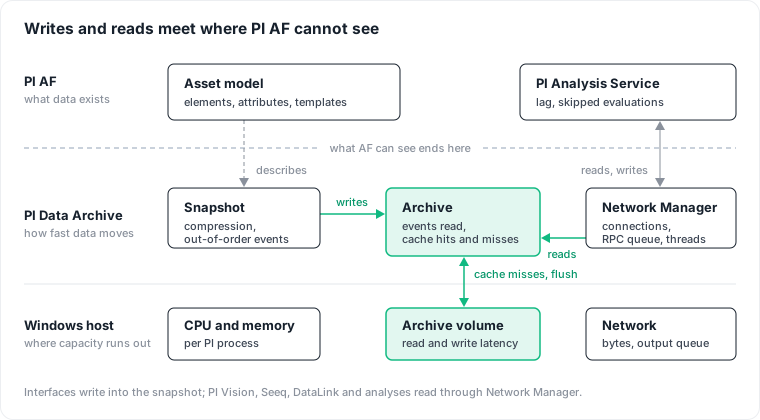
Consider two hypothetical estates: an AF database with 50,000 attributes can run on a quiet server, while one with 2,000 attributes can sit on a server saturated by a single badly scoped integration. The model does not predict the load.
Layer 1, PI AF: the model and the analytics load
AF contributes two kinds of evidence. The first is structural: element and attribute counts, which attributes reference PI Points, template sizes, the number of analyses with their type and schedule, and dependency chains between analyses. That tells you how load will scale, and which tags the business model actually uses.
The second is the only runtime signal on the AF side: PI Analysis Service statistics, read in PI System Explorer under Management with the names below, or through the AF SDK with AFAnalysisService.QueryRuntimeInformation (fields such as lastLag, averageLag and skipCount).
| Statistic | What a bad value looks like |
|---|---|
CurrentLag | High and rising: evaluation falls further behind its triggers |
EvaluationSkippedCount | Large and growing: the service sheds load (IsLoadSheddingEnabled is true by default) |
AverageElapsedMilliSeconds vs AverageTriggerMilliSeconds | Elapsed time near or above the time between triggers: the group cannot finish before the next trigger arrives |
AVEVA's troubleshooting post on high analysis latency says the majority of evaluation time is usually spent fetching input data and publishing results. It adds that groups down a dependency chain wait for upstream groups, and that a summary over a long range can miss the data cache and go back to PI Data Archive. Its worked example traces the latency to a 7-day summary scheduled every second. When analyses lag, check the data they read before you rewrite the analyses.
Layer 2, PI Data Archive: throughput, storage and concurrency
PI Data Archive publishes Windows performance counters per subsystem, and the piartool command line exposes internal counters and thread state. Four groups of counters cover it.
Ingestion: watch the out-of-order rate, not only the event rate
PI Snapshot Subsystem\Snapshots/sec is the rate of events sent to the snapshot, after the interface has applied exception reporting. PI Archive Subsystem\Archived Events/sec is the rate of events added to the archive. The ratio between the two gives a rough view of effective compression, skewed upward by out-of-order events, which skip compression but are still archived.
The line most teams miss is out-of-order data: OutOfOrderSnapshots/sec on the snapshot and Out of Order Events/sec on the archive. Events older than the current snapshot bypass compression, and AVEVA warns that excessive out-of-order events cause excess CPU consumption, excessive disk I/O and archives filling faster than expected. Look first at anything that writes history late, such as a backfill or buffered data replayed after an outage. None of it is visible from AF.
Query workload: separate bulk pulls from chatty clients
PI Archive Subsystem\Events Read/sec counts archived events read, the full-fidelity history clients pull. Seeq's knowledge base calls it the most important counter for Seeq's load, one that spikes when a user accesses lots of data. Put it next to Read Operations/sec, the rate of archive read calls: many operations with few events each points to a display polling single values, few operations with millions of events each points to a bulk history pull. GetSnapshots/sec covers current-value reads, and the PI Network Manager counters show how many connections are open and how many bytes move.
Storage: the cache hit rate tells you how deep clients reach
Cache Record Memory Reads/sec and Cache Record Disk Reads/sec split archive reads into served from memory and loaded from disk; memory reads divided by the sum is your hit rate. piartool -as shows the same story from inside the subsystem. A falling hit rate while Events Read/sec rises suggests clients reach deeper into history than the cache holds. AVEVA's 2023 deck on Data Archive performance lists Archive_CacheRecordsPerPoint as the read cache parameter, and gives summary calculations that re-read the same data as its best use. AVEVA also notes that most Data Archive servers require no tuning; change it only with this evidence in hand.
Concurrency: a queue that never drains
Avg. RPC Requests in Queue is available for each subsystem, and AVEVA says a consistent and significant queue means the subsystem is saturated processing RPCs. Compare RPC Threads Active with RPC Threads Total: active at total means no spare workers. piartool -thread <subsystem> -info, or Get-PIThreadInformation in PowerShell Tools for the PI System, lists the subsystem's threads so you can see which are busy. For notifications, pilistupd -ss shows pending events per PI Update Manager consumer, capped by default at 50,000 per consumer; a count that only grows means a slow or disconnected consumer.
Layer 3, the Windows host: judge it against its own baseline
PI subsystems are Windows processes, so the host counters finish the picture.
| Resource | Counters |
|---|---|
| CPU | Processor(_Total)\% Processor Time, and Process(<name>)\% Processor Time for piarchss, pisnapss, pibasess, pinetmgr and the analysis processes |
| Memory | Memory\Available KBytes, Memory\Pages/sec, Process(<name>)\Private Bytes |
| Disk | PhysicalDisk\Avg. Disk sec/Read, Avg. Disk sec/Write, Disk Reads/sec, Disk Writes/sec, on the volume holding the archive files |
| Network | Network Interface\Bytes Total/sec, Output Queue Length |
No fixed threshold for disk latency or CPU holds across servers. A latency that is normal on a shared SAN can be a regression on local SSD. Baseline each server and look for changes that line up in time with the PI counters. On virtual machines, add the hypervisor's CPU ready time, the time a VM was ready to run but could not be scheduled on a physical CPU. Broadcom notes that high values match slowness inside the guest even when the host looks healthy.
The metric set: one counter per question
| Metric | Source | Exact counter or statistic | Why it matters |
|---|---|---|---|
| Number of PI Points | PI Data Archive | PI Base Subsystem\Point Count | Scale |
| Events written/sec | PI Data Archive | PI Snapshot Subsystem\Snapshots/sec, PI Archive Subsystem\Archived Events/sec | Ingestion throughput, effective compression |
| Out-of-order events/sec | PI Data Archive | OutOfOrderSnapshots/sec, Out of Order Events/sec | Hidden ingestion cost |
| Events read/sec | PI Data Archive | PI Archive Subsystem\Events Read/sec, Read Operations/sec | Query workload |
| Archive cache hit / disk reads | PI Data Archive | Cache Record Memory Reads/sec, Cache Record Disk Reads/sec | Storage performance |
| RPC queue / active threads | PI Data Archive | Avg. RPC Requests in Queue, RPC Threads Active, RPC Threads Total | Concurrency bottlenecks |
| Analysis evaluation lag | PI AF (Analysis Service) | CurrentLag | Processing latency |
| Skipped evaluations | PI AF (Analysis Service) | EvaluationSkippedCount | Processing reliability |
| CPU / RAM | Windows Server | % Processor Time per host and per PI process, Available KBytes, Pages/sec | Compute bottlenecks |
| Disk latency / IOPS | Windows Server | Avg. Disk sec/Read, Avg. Disk sec/Write, Disk Reads/sec, Disk Writes/sec | Storage bottlenecks |
The PI Performance Monitor interface collects Windows performance counters into PI Points, so they trend next to process data. A workable baseline samples every 10 to 60 seconds for at least two weeks, covering shift changes, month-end reports and scheduled exports, and log backfills, new interfaces and patching on the same timeline.
Read the layers together, in the order data flows
No single counter names the cause. The diagnosis comes from which counters move together.
| Symptom | Pattern across the layers | Likely cause | First action |
|---|---|---|---|
Displays slow, analyses lagging, high CPU on pisnapss and piarchss | Snapshots/sec well above baseline, Archived Events/sec close to it | Excessive ingestion: exception and compression settings too tight, or new points added without review | Review exception and compression deviations on the noisiest points |
| Archives filling faster than planned, disk writes high | OutOfOrderSnapshots/sec and Out of Order Events/sec elevated | Out-of-order writes from backfill, buffer replay or clock drift | Find the source interface; schedule backfills off-peak |
| Queries slow at certain hours, disk reads spike | Events Read/sec and Cache Record Disk Reads/sec rise together, hit rate drops, disk latency rises | Deep full-fidelity queries over long ranges | Identify the client application issuing the reads; move it to summary or interpolated reads |
| Everything slow, no subsystem stands out | Avg. RPC Requests in Queue stays above zero, RPC Threads Active at total | Concurrency saturation | Check long-running threads with piartool -thread; cut chatty clients |
| KPIs late, skipped evaluations growing, archive reads normal | CurrentLag rising, elapsed time near the trigger interval | Analysis schedules misaligned with the work | Lengthen periodic schedules, split heavy groups, break dependency chains |
| KPIs late, archive reads high at the same time | CurrentLag rising with Events Read/sec and disk reads | Analyses bound by Data Archive I/O | Fix the archive read path first; the analyses may be fine |
| PI counters normal, latency still high | High disk sec/Read or sec/Write on the archive volume, paging, CPU ready on the hypervisor | Undersized or contended infrastructure | Resize, move archives to faster storage, or remove contention |
Two rules follow. Fix in the order of the data path: an ingestion problem slows the archive, which slows queries, which delays analyses, so look upstream before tuning downstream. Read the PI counters before you buy hardware: a server saturated by out-of-order backfill stays saturated on a bigger machine, only for longer, and the larger server is a cost you keep paying.
The case for starting with AF anyway
The strongest objection is practical: AF is what PI teams already know, and without it no counter has a meaning. Events Read/sec doubling tells you nothing until you know which line, which asset and which KPI owner the read points belong to.
That objection is right about meaning and wrong about sufficiency. AF answers "which asset", the Data Archive answers "how much work", and the host answers "where capacity runs out". An evaluation needs the join. Start with the AF inventory, then collect the other two layers before you draw a conclusion.
This guide has limits. The PI counter names come from AVEVA documentation, PI Square and the Seeq knowledge base, and the Windows names from Microsoft's counter reference. AVEVA's pages render only with JavaScript, so check the names against your PI Data Archive version in Performance Monitor before building collection on them. It does not cover PI Vision server or PI Web API performance. It gives no fixed thresholds: Microsoft's generic guidance, such as processor time below 75% on average, was written for other workloads.
What Datapace is building for PI estates
A connector that reads only AF would deliver a documented asset model, which is metadata discovery. It cannot say whether slowness comes from ingestion, queries, archive storage or the server, which interfaces and clients drive the load, or whether a server is undersized or misused. Datapace is building one map of your data estate with usage and cost attached, and agents that propose changes as pull requests your team reviews and merges. For a PI System, that means a reusable connector design that combines AF, PI Data Archive and infrastructure telemetry on the same map, so a finding names the client, the points and the counters behind it. Where plant data goes next, and what it costs once it leaves the historian, is the subject of our posts on Industry 4.0 data costs and on AWS IoT SiteWise pricing for one plant; the gap between a symptom and the change that caused it is covered in which commit caused the database regression. To walk through your own PI estate, book a call.
Sources
- AVEVA, Archive Subsystem performance counters, Snapshot subsystem statistics, Base subsystem statistics, Network manager statistics and Subsystem statistics.
- AVEVA, Output from piartool -as and piartool -thread.
- AVEVA, Compression and out-of-order events.
- AVEVA, Update Manager queue limits and Data Archive tuning parameters.
- AVEVA, PI Performance Monitor interface.
- AVEVA, AF SDK: AFAnalysisService.RuntimeInformationFields.
- AVEVA, PowerShell Tools for the PI System: Get-PIThreadInformation.
- AVEVA PI Square, Troubleshooting PI Analysis Service performance issues: high latency.
- AVEVA World 2023, Optimizing data archive performance for AVEVA PI System.
- Seeq Knowledge Base, Monitoring your PI Server performance.
- AVEVA, Exception reporting and pilistupd output.
- Microsoft, Exchange 2010 performance counters (Processor, Process, Network Interface), PhysicalDisk object, memory counters and network subsystem counters.
- Broadcom, Understanding vSphere host CPU readiness.