
TL;DR. Tableau pricing is six per-user list prices: Creator, Explorer and Viewer at $75, $42 and $15 a month on Standard, and $115, $70 and $35 on Enterprise, all on annual contracts. Enterprise costs 2.33 times Standard for a Viewer seat but 1.53 times for a Creator, so the edition upgrade lands hardest on the seat most often left unused. In a hypothetical 200-seat Enterprise estate, $32,340 of a $110,400 year pays for people who never sign in or never edit. A second bill sits in the warehouse: Tableau suspends only some refreshes of dashboards nobody opens, and a subscription keeps the rest alive. Below: the prices, the worked year, and the queries that find both.
Tableau pricing is per named user, per role, per year, and it does not care whether the user opens a dashboard. That makes the license list the easiest part of a BI bill to price and the hardest to keep honest: roles are granted once, upgraded on request and rarely taken back.
This post gives the list prices, a priced example with its assumptions stated, and the method to find unused Tableau licenses and the warehouse compute that unopened dashboards still trigger. It is a worked model: no Tableau site was measured.
Tableau pricing in 2026: six list prices, per user, billed annually
| Role | Standard | Enterprise | Enterprise per year | What the role does |
|---|---|---|---|---|
| Creator | $75 | $115 | $1,380 | Connects new data, publishes data sources and flows |
| Explorer | $42 | $70 | $840 | Edits existing workbooks, builds from published data sources |
| Viewer | $15 | $35 | $420 | Views and interacts, gets alerts and subscriptions |
Prices are per user per month for Tableau Cloud, from Tableau's Cloud pricing page, which lists "Creator: $115 per user/month, billed annually" for Enterprise and the Standard rates alongside. Tableau's site refuses automated readers, so we read the Internet Archive capture of September 8, 2026; the October 12 capture of the main pricing page shows the same $15 and $35 starting prices.
Four rules shape the bill more than the rates do:
- Annual only. "All Tableau Cloud plans require an annual contract, billed annually."
- One Creator minimum. "Every deployment requires at least one Creator license."
- No mixing. Editions and licensing models cannot be mixed in one Cloud deployment; a second edition means a second site.
- Cloud+ and Tableau+ are quoted by sales. Tableau Next starts at $40 per user per month on the main pricing page.
Enterprise multiplies the Viewer seat most
The Enterprise upgrade costs 2.33 times Standard for a Viewer, 1.67 times for an Explorer and 1.53 times for a Creator (our arithmetic: 35 / 15, 70 / 42, 115 / 75). Enterprise adds Data Management, Advanced Management, eLearning and up to 10 sites, and it charges for them per head, so the roles with the most heads carry most of the uplift.
Viewers are also the seats most likely to sit idle, and nothing on the invoice says who opened what. In the example below, Viewers are 48% of the monthly bill on Standard and 57% on Enterprise.
One side effect of Enterprise helps the audit. Admin Insights "captures up to 90 days of data by default and up to 365 days with an Advanced Management license", per Tableau's Admin Insights guide, and Enterprise includes Advanced Management. A Standard site sees one quarter of history; an Enterprise site sees a full contract year.
Tableau Cloud and Tableau Server start at the same per-user price
The main pricing page lists Server at the same starting prices as Cloud: $15 for Standard and $35 for Enterprise per user per month. The difference sits outside the license:
- Server adds a second bill you run yourself: the machines, storage, backups and upgrades. Tableau pitches it to teams with "data residency, compliance, or security requirements that can't be outsourced."
- Server offers compute-based pricing. "Organizations license processing power in 8-core units rather than by individual users", with Creators still licensed per user.
- Cloud offers capacity-based Viewer blocks. You buy Creators and Explorers per user, then Viewer capacity "without paying for individual Viewer licenses". It cannot be mixed with per-user Viewers on the same deployment.
Both alternatives are priced by sales, so this post cannot compare them; if most users are readers, ask for a quote.
Four ways the Tableau bill grows without anyone deciding
- Roles are granted for a project and never lowered.
- Explorer is given to readers. Someone asks to "edit a filter", gets Explorer, and only ever views. On Enterprise that is $420 a year above a Viewer seat.
- Grant role on sign in licenses the curious. The feature "lets unlicensed users in specific groups become licensed when they sign into a Tableau site" (Tableau). One click from a link in an email and a seat is taken.
- Leavers who own content are not removed. Tableau sets them to Unlicensed instead: "If you attempt to remove a user who owns content, the user site role will be set to Unlicensed, but the user will not be removed" (Tableau). Their content stays on the site, owned by someone who no longer signs in.
A worked year: $32,340 of a $110,400 Tableau bill goes unused
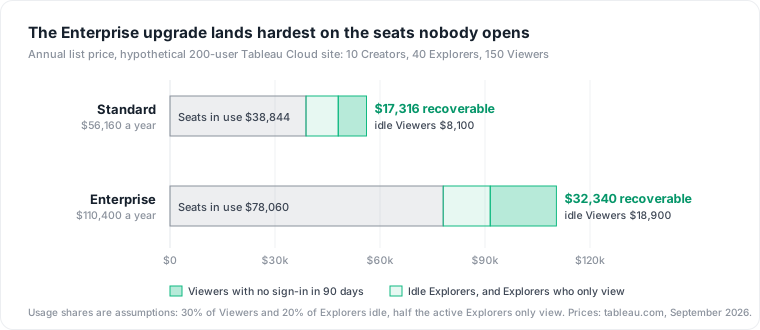
Consider a hypothetical Tableau Cloud Enterprise site with 200 named users: 10 Creators, 40 Explorers and 150 Viewers. The usage below is an assumption chosen to show the method, not a benchmark: 45 Viewers (30%) and 8 Explorers (20%) did not sign in for 90 days, and 16 of the remaining 32 Explorers only viewed content in that time.
| Line | Arithmetic | Per year |
|---|---|---|
| Licenses, 200 users | (10 x $115 + 40 x $70 + 150 x $35) x 12 | $110,400 |
| Viewers with no sign-in in 90 days | 45 x $35 x 12 | $18,900 |
| Explorers with no sign-in in 90 days | 8 x $70 x 12 | $6,720 |
| Explorers who only view, moved to Viewer | 16 x ($70 - $35) x 12 | $6,720 |
| Recoverable at renewal | $32,340 (29.3%) |
The same site on Standard would pay $56,160 a year and recover $17,316 (30.8%) under the same assumptions. Viewers with no sign-in are the largest line on both editions, and on Enterprise they cost 2.33 times as much.
Find unused Tableau licenses in Admin Insights or the repository
Tableau Cloud: TS Users and TS Events
The Admin Insights project ships a data source, TS Users, with the two fields that matter: "Days Since Last Login", the "Number of days since the user last logged in", and "User License Type", "Viewer, Explorer, or Creator" (TS Users). The method:
- Connect a new workbook to TS Users and filter Days Since Last Login above 90.
- Add users who never signed in: Tableau's guide says to "change the filter on the 'Last Login Date' to null to see a list of users who have never signed in to the site."
- For Explorers who signed in, open TS Events. Events are grouped into "action types, such as Create, Access, Update and Delete." An Explorer with Access events and no Create or Update events in the window is a Viewer in practice.
- Price the list with the table above, and send it to each user's manager before changing any role.
Tableau Server: the repository's _users and _views_stats
On Server, the repository data dictionary exposes _users.login_at, "The time of the most recent login for this user", and _views_stats.last_view_time, "The time of the most recent access of the specified view by the specified user."
-- Users with no sign-in in 90 days, and when they last opened a view
SELECT u.name,
       u.login_at,
       MAX(vs.last_view_time)       AS last_view,
       COALESCE(SUM(vs.nviews), 0)  AS views_ever
FROM _users u
LEFT JOIN _views_stats vs ON vs.users_id = u.id
GROUP BY u.id, u.name, u.login_at
HAVING u.login_at IS NULL
    OR u.login_at < now() - interval '90 days'
ORDER BY u.login_at NULLS FIRST;
Join the result to the site role shown on the Users page before you price it. The Stale Content admin view does the same for content, with a threshold of 1 to 120 days.
The second bill: dashboards nobody opens can still query your warehouse
A seat costs money once a year. An unopened dashboard can cost money every hour, because "Refreshing an extract will query the data source the extract was created from and rebuild the extract" (Tableau). A live connection queries the database as views are used, so the cost without readers sits with extracts.
Tableau stops some of these refreshes. Its auto-suspend rule suspends a workbook's refresh tasks "after the workbook has been inactive for 32 days." The rule has three gaps, and they are where the waste survives:
- It "applies to full extract refreshes only, and only applies to refresh tasks that run more frequently than weekly." Incremental and weekly refreshes keep running.
- "Having any data-driven alert or subscription set-up on the workbook" resets the inactivity timer. A weekly email nobody reads keeps an hourly refresh alive.
- On Server, the setting is a site option with a threshold of 7 to 100 days (Tableau Server), with a default of 32, so check that it is turned on for each site.
Price one forgotten hourly refresh on Snowflake
Consider an incremental extract that refreshes every hour and takes 3 minutes, alone on an X-Small Snowflake warehouse with the default AUTO_SUSPEND of 600 seconds (CREATE WAREHOUSE). An X-Small (Gen1) uses 1 credit per hour, billed per second with a 60-second minimum (warehouses overview), so each hour bills 3 minutes of work plus 10 minutes of idle before suspension:
- 13 minutes x 24 hours = 5.2 credits a day, 1,898 credits a year.
- At an assumed $3 per credit (check your contract), that is $5,694 a year, more than 13 Enterprise Viewer seats at $420.
On a shared warehouse the idle tail is shared too, so the real figure sits between 438 credits a year (3 minutes of work) and 1,898.
Attribute Tableau queries with a query tag
Tableau runs initial SQL "when you open the workbook, refresh an extract, sign in to Tableau Server, or publish to Tableau Server," and can insert the WorkbookName parameter ("Use only in workbooks with an embedded data source"). On Snowflake, set the session's QUERY_TAG in the connection's initial SQL:
ALTER SESSION SET QUERY_TAG = [WorkbookName];
Check the tag in QUERY_HISTORY after the first refresh, then price each workbook:
SELECT query_tag,
       SUM(credits_attributed_compute) AS credits_90d
FROM SNOWFLAKE.ACCOUNT_USAGE.QUERY_ATTRIBUTION_HISTORY
WHERE start_time >= DATEADD(day, -90, CURRENT_TIMESTAMP())
GROUP BY query_tag
ORDER BY credits_90d DESC;
QUERY_ATTRIBUTION_HISTORY counts only execution and "doesn't include any warehouse idle time", so the 10-minute tail above will not show here. Join the tags to the workbooks with no views in _views_stats or TS Events, and you have the list of dashboards that cost money and have no readers. For the idle share, see Snowflake cost optimization.
The objection: seats are cheap and contracts are annual
The strongest case against this audit: $420 a Viewer is noise next to the warehouse, and an annual contract means nothing drops until renewal. Both are true. A role you lower in March still bills until the term ends, and Tableau's terms limit reshuffling: users "may only be downgraded to a lower site role (including Unlicensed) when they will permanently discontinue access to Server Software at the higher role" (Tableau).
That sets the timing, and it does not cancel the saving. Run the seat audit 90 days before renewal, so the count you sign is the count you use, and give freed seats to new hires before buying more. The warehouse side has no such delay: a suspended refresh stops billing the next hour.
What this does not cover
- List prices only, read from archived captures dated September 8 and October 12, 2026. Discounts, Cloud+ and Tableau+ quotes, capacity and compute-based options change every row.
- The usage shares are assumptions. No Tableau site or warehouse was measured.
- Not covered: Tableau Next, Data 360 credits, embedded analytics and Server infrastructure costs. Other BI tools price differently and get their own posts.
Unused seats are one line of a wider pattern of resources that outlive their owner; see cloud waste in data infrastructure, and data warehouse cost for the compute side.
Where Datapace fits
The Tableau invoice lists seats, the warehouse bill lists credits, and the link between them (which dashboard drives which queries, and whether anyone reads it) is on neither. Datapace is building one map of your data estate (databases, warehouses, pipelines and what consumes them, dashboards included) with usage and cost attached, and agents that propose changes as pull requests your team reviews and merges. If the warehouse side is the larger number for you, start with data warehouse cost.
Sources
- Tableau, Tableau Cloud pricing, read via the Internet Archive capture of September 8, 2026, and Tableau pricing, read via the capture of October 12, 2026.
- Tableau Help, Admin Insights, TS Users and TS Events.
- Tableau Help, Grant license on sign in and Manage users.
- Tableau, Tableau Server data dictionary 2026.3 and Stale Content.
- Tableau Help, Automatically suspend extract refreshes, Tableau Cloud and Tableau Server, Refresh data and Run initial SQL.
- Snowflake, Warehouses overview, CREATE WAREHOUSE, Parameters and QUERY_ATTRIBUTION_HISTORY.