TL;DR. Cloud SQL pricing for one PostgreSQL instance (4 vCPUs, 16 GB, a 500 GB SSD, HA) totals $606.71 a month at Iowa list prices, and $287.35 of that (47%) pays for the standby. Google bills compute and storage on what you provisioned, whatever the database used, so the standby, a vCPU count sized for a past peak and a disk that grew once all keep billing after the load moves. Two defaults move the number further: a new PostgreSQL 16 or later instance starts on Enterprise Plus, which takes the same 4 vCPU HA instance to $1,060.76, and a 1-year committed use discount cuts only 16.7%, because it skips storage.
Every rate below is from Google's Cloud SQL pricing page, Iowa (us-central1), the region the page shows by default, read on November 6, 2026. Monthly figures use 730 hours. The instance is hypothetical and the same one our cloud database cost comparison priced against RDS and Azure; this page takes it apart on Cloud SQL only.
The Cloud SQL bill for one HA Postgres instance: $606.71 a month
The spec: Cloud SQL for PostgreSQL, Enterprise edition, a custom machine with 4 vCPUs and 16 GB (Enterprise allows 0.9 to 6.5 GB per vCPU), 500 GB of SSD, high availability, and 400 GB of automated backups. Google prices storage per GiB-hour; we show it as a monthly rate.
| Line | Rate (Iowa, HA) | Quantity | Monthly cost |
|---|---|---|---|
| vCPU | $0.0826 per vCPU-hour | 4 × 730 hours | $241.19 |
| Memory | $0.014 per GiB-hour | 16 × 730 hours | $163.52 |
| SSD storage capacity | $0.000465753 per GiB-hour ($0.34 a month) | 500 GiB | $170.00 |
| Backups (used) | $0.000109589 per GiB-hour ($0.08 a month) | 400 GiB | $32.00 |
| Total | $606.71 |
In Cloud Billing, compute shows up under SKU names that carry the availability type. Google's list of CUD-eligible SKUs names them Cloud SQL for PostgreSQL: Regional - vCPU in Americas and Regional - RAM in Americas for an HA instance, and Zonal for a single-zone one; the pricing page calls HA instances "regional instances". Search your SKU descriptions for "Regional" to find every HA instance on the account.
Egress is extra and not in the table. Internet egress not using Cloud Interconnect is $0.19 per GiB, so each 100 GiB sent to clients outside Google Cloud adds $19.00; traffic to Compute Engine in the same region is free. The pricing page also lists $0.01 an hour for an IPv4 address while the instance is idle.
Why does HA double the Cloud SQL bill? The standby bills at the full rate
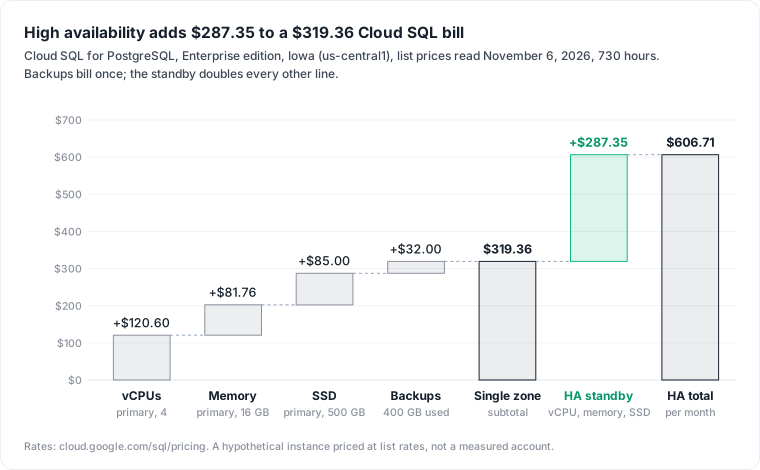
HA doubles the bill because the standby is a second instance billed like the first. Google's high availability guide says it in one line: "An HA-configured instance costs twice as much as a standalone instance. This price includes CPU, RAM, and storage." The HA rates on the pricing page are exactly twice the zonal ones: $0.0826 against $0.0413 per vCPU-hour, $0.34 against $0.17 per GiB-month of SSD.
Backups are the only line HA does not double. The backup rate is the same $0.000109589 per GiB-hour in the zonal and HA tables, which is why the single-zone bill is $319.36 and not half of $606.71. The standby adds $287.35, a second copy of the zonal vCPU, memory and SSD lines.
Read replicas add a third copy at the same rates. The replication guide says "a read replica is charged at the same rate as a standard Cloud SQL instance" with no charge for the replication itself, and the instance settings page requires a replica's storage to be "at least as high as the storage capacity of the primary instance". A zonal replica of our instance costs $287.36 (no backups), taking the total to $894.07.
For production, the standby is the point. It is what keeps the database up through a zone failure, and the strongest objection to this section is that the standby is insurance bought on purpose. We agree for the primary. The waste is HA on a staging or dev copy restored from production with its settings intact, one of the patterns in cloud waste in data infrastructure: each copy pays $287.35 a month for a failover nobody needs.
Is Enterprise Plus worth it? The default edition costs 75% more here
Enterprise Plus is the edition you get unless you ask for the other one. The editions guide says the gcloud CLI and the Admin API default to Enterprise Plus for PostgreSQL 16, 17 and 18, and that in the console "Cloud SQL Enterprise Plus edition is selected by default when you create a new primary instance". PostgreSQL 18 is the default major version.
Three things raise the bill on Enterprise Plus:
- Each unit costs 30% more. N2 rates in Iowa are $0.1074 per HA vCPU-hour and $0.0182 per HA GiB-hour, against $0.0826 and $0.014 on Enterprise.
- There is no 4 vCPU, 16 GB machine. N2 types run at 8 GB per vCPU (only the 128 vCPU type differs), so the N2 4 vCPU type,
db-perf-optimized-N-4, has 32 GB of memory; the C4 and C4A 4 vCPU types have 31 and 32 GB. We price N2 because it is the Enterprise Plus series that keeps the SSD storage our example uses. Our 16 GB of memory becomes 32 GB on the bill. - Data cache is on by default. The data cache guide says it is "enabled automatically when you create a Cloud SQL Enterprise Plus edition instance", and the N-4 type carries 375 GB of it. Data cache storage bills at $0.000438356 per GiB-hour with HA; if the full 375 GB is billed as GiB, that is $120.00 a month.
| Same workload, HA, Iowa | Enterprise, 4 vCPU, 16 GB | Enterprise Plus N2, 4 vCPU, 32 GB |
|---|---|---|
| vCPU | $241.19 | 4 × $0.1074 × 730 = $313.61 |
| Memory | $163.52 | 32 × $0.0182 × 730 = $425.15 |
| SSD, 500 GiB | $170.00 | $170.00 |
| Backups, 400 GiB | $32.00 | $32.00 |
| Data cache, 375 GiB | $120.00 | |
| Total per month | $606.71 | $1,060.76 |
The edition default adds $454.05 a month, 75%, to the same four vCPUs. Turning data cache off brings Enterprise Plus to $940.76; the guide says you can do that "with near-zero downtime". Data cache helps, Google says, when the working set does not fit in memory and reads dominate.
What the money buys is real: a 99.99% availability SLA that includes maintenance (Enterprise is 99.95% excluding it), sub-second downtime for planned operations against a few minutes, up to 35 days of point-in-time recovery against 7, and read pools. If those numbers appear in your own SLA, pay for them. If nobody chose the edition and the instance runs PostgreSQL 16 or later, check which one you are on.
Why didn't my Cloud SQL storage shrink? Automatic increases are permanent
Storage bills on what is provisioned, and automatic increases never go back on their own. The instance settings page is direct: "spikes in storage requirements result in incremental, permanent increases in storage size and cost for your instance." Cloud SQL checks free space every 30 seconds; on SSD instances of 500 GB or more, it adds 25 GB each time free space drops under 25 GB.
Consider a one-off job, a large import or a query with a big temporary table, that pushes our instance from 500 GiB to 700 GiB. With HA, the extra 200 GiB costs $68.00 a month, $816.00 a year, long after the job has finished. Google's own advice is to resize by hand before such an operation instead of letting automatic increases follow it.
A way back exists. Cloud SQL has a manual storage shrink, "available in all Cloud SQL editions", with conditions that keep it from being routine:
- It takes downtime. "Storage shrink operations require instance downtime; instances restart when the operation is complete."
- Replicas keep the big disk. If you shrink the primary, "its replica continues to have a larger disk" until you shrink each replica too.
- It has limits. For PostgreSQL,
max_wal_sizemust be under 5128 MB, and Google recommends keeping a buffer of "roughly 100 GB or 20% or more of current usage, whichever is larger". Shared-core instances and cascading replicas are excluded.
We have not run a shrink, so we cannot say how long the downtime lasts on a given disk. Google's page compares it to restoring a read replica.
What a committed use discount cuts: 25% of compute, 16.7% of this bill
A Cloud SQL committed use discount is a one- or three-year commitment to an hourly spend on vCPU and memory, at 25% off for one year and 52% off for three, the same in every region. It applies across MySQL, PostgreSQL and SQL Server and to both editions in the region, but not to shared-core machines such as db-f1-micro. It does not apply "to storage, backups, IP Addresses, outbound data transfer, or licensing", and the pricing page adds extended support to that list.
| HA example, per month | On demand | 1-year CUD | 3-year CUD |
|---|---|---|---|
| vCPU and memory | $404.71 | $303.53 | $194.26 |
| SSD and backups | $202.00 | $202.00 | $202.00 |
| Total | $606.71 | $505.53 | $396.26 |
| Saving on the whole bill | 16.7% | 34.7% |
Two rules matter before buying. "Any overage in usage is charged at the on-demand rate", and after purchase "you cannot cancel your commitment". Commit to the compute you will still run in a year, which means right-sizing first: a commitment bought on an oversized instance locks the waste in at a discount.
The lines that surprise later: extended support and SQL Server licences
An old major version can add two-thirds to the bill. Cloud SQL charges extended support on instances whose major version is past end of life: $0.07 per vCPU-hour in years 1 and 2, $0.14 with HA, doubling in year 3. PostgreSQL 13 has been in extended support since February 1, 2026, and PostgreSQL 14 enters it on February 1, 2027. On our 4 vCPU HA instance, year 1 costs 4 × $0.14 × 730 = $408.80 a month, 67% on top of $606.71; our PostgreSQL 14 end of life guide covers the upgrade.
SQL Server readers face a bigger line. Cloud SQL charges a licence per core-hour: $0.47 for Enterprise, $0.13 for Standard, with a four-core minimum per instance, no bring-your-own licence and no CUD. Four vCPUs of SQL Server Enterprise cost $1,372.40 a month in licences alone, more than twice our whole PostgreSQL bill. HA instances pay for one licence, not two.
Check your own Cloud SQL bill by instance and SKU
For cost per instance, turn on the detailed export of usage cost data, which adds "granular, resource-level cost data" and identifies Cloud SQL resources by resource.global_name from December 1, 2022, and group by instance and SKU:
SELECT
  resource.global_name AS instance,
  sku.description,
  SUM(cost)
    + SUM(IFNULL((SELECT SUM(c.amount) FROM UNNEST(credits) c), 0)) AS net_cost
FROM `project.dataset.gcp_billing_export_resource_v1_XXXXXX_XXXXXX_XXXXXX`
WHERE service.description = 'Cloud SQL'
  AND invoice.month = '202610'
GROUP BY 1, 2
ORDER BY net_cost DESC;
The credits term follows Google's example queries, so the result is cost after discounts. Read it with three checks:
- Find the "Regional" SKUs. Each one is an HA instance; ask whether it is production.
- Compare SSD GiB with what the database holds. A disk far above
pg_database_sizeplus its buffer is a past spike, and a shrink candidate. - Expect a remainder. Google notes that some network data transfer, "Cloud SQL backups in specific locations, and Storage Snapshot costs aren't included in the granular Cloud SQL instance costs".
The limits of this page: rates are Iowa list prices read on November 6, 2026, and other regions, currencies and negotiated discounts differ. The bill is hypothetical, not a measured account, and assumes a 375 GB data cache billed in full. We did not price Hyperdisk Balanced, Enterprise Plus C4 and C4A machines, cross-region replicas at $0.12 per GiB, or the Cloud DNS charge. For the same bill on AWS, read RDS pricing.
The export gives you a cost per instance; it does not say which application, query or team needs that instance at its current size. Datapace is building one map of your data estate (databases, warehouses, pipelines and what consumes them) with usage and cost attached, and agents that propose changes as pull requests your team reviews and merges. To compare this instance with its equivalents on AWS and Azure, read cloud database cost.
Sources
- Google Cloud, Cloud SQL pricing, rates for us-central1 as read on November 6, 2026 (vCPU, memory, HA, Enterprise Plus N2, data cache, SSD, backup, egress, IPv4, extended support and SQL Server licence rates; CUD exclusions for storage, network and extended support).
- Google Cloud, Cloud SQL CUD eligible SKUs (SKU descriptions).
- Google Cloud, About high availability and About replication.
- Google Cloud, Cloud SQL editions, Machine series overview and Data cache overview.
- Google Cloud, Instance settings (automatic storage increases) and About storage shrink.
- Google Cloud, Committed use discounts for Cloud SQL.
- Google Cloud, Database version policies (PostgreSQL extended support dates, default version).
- Google Cloud, Detailed usage cost data export and Example queries for Cloud Billing data export.