TL;DR. Power BI pricing comes down to one comparison: $14 a month per reader on Pro against a flat Fabric capacity. At Microsoft's list prices in East US, an F64 on a 1-year reservation costs $5,002.67 a month, so it beats Pro seats for everyone from 358 readers, and from 601 on pay-as-you-go. Below that, Pro for everyone is the cheapest plan. Premium Per User looks like a middle path, but a PPU workspace can only be opened with a PPU license or a trial, so every reader pays $24. One more line belongs in the budget: Fabric capacity overage is on by default for new capacities and bills at 3 times the pay-as-you-go rate.
Power BI pricing is per seat for people and per capacity for compute, and the right plan depends on how many people only read reports. This guide prices each plan from Microsoft's own pages, read on November 3, 2026, works out the line where a Fabric capacity beats seats, and shows how to find the Pro licenses nobody opens. It is a list-price model; no Power BI tenant was measured.
Power BI pricing in 2026: pick your plan from this table
| Your organization | Plan to buy | Monthly list cost | Why |
|---|---|---|---|
| Fewer than 358 people read reports | Pro for everyone | $14 x users | Below 358 readers, an F64 costs more than their seats |
| 358 readers or more, few authors | F64 on a 1-year reservation, Pro for authors | $5,002.67 + $14 x authors | On F64, viewers with a free license and a viewer role need no seat |
| Large models or 48 refreshes a day, small group | PPU for everyone who opens the content | $24 x users | Viewers of a PPU workspace need PPU too |
| Reports embedded in your app for customers | The smallest F SKU that carries the load | from $262.80 (F2) | End users of app-owns-data embedding need no license |
| Users already on Microsoft 365 E5 | The Pro license inside E5 | $0 extra | Each E5 license includes one Pro license |
The per-user prices come from Microsoft's Power BI pricing page: Pro at "$14.00 user/month, paid yearly" and Premium Per User at "$24.00 user/month, paid yearly". Microsoft set both prices from April 1, 2025, at renewal for existing customers, in "the first pricing update since we launched Power BI nearly 10 years ago." Power BI bought through Microsoft 365 E5 annual subscriptions did not change.
Fabric capacity is priced per capacity unit (CU). The Azure retail price list for East US lists $0.18 per CU-hour pay-as-you-go and $938 per CU for a 1-year reservation. Over a 730-hour month:
| SKU | CUs | Pay-as-you-go a month | 1-year reservation a month |
|---|---|---|---|
| F2 | 2 | $262.80 | $156.33 |
| F8 | 8 | $1,051.20 | $625.33 |
| F32 | 32 | $4,204.80 | $2,501.33 |
| F64 | 64 | $8,409.60 | $5,002.67 |
| F128 | 128 | $16,819.20 | $10,005.33 |
The reservation is 40.5% below pay-as-you-go, the same figure Microsoft's pricing page gives ("saving 40.5% over pay-as-you-go prices"). Prices vary by region, so rerun the query for yours.
Do report viewers need a Pro license? Yes, below F64
A Fabric capacity smaller than F64 removes no seats. Microsoft's Fabric licensing guide is explicit: "On F SKUs smaller than F64, each user viewing Power BI content must have Pro, PPU, or an individual trial. On F64 or larger, users with only a Free license and a viewer role can view Power BI content."
That matters to teams that buy a small F SKU for a lakehouse or a warehouse and expect report readers to come free with it. On an F8 or an F32, every reader still needs a $14 seat. Authors need a paid license at every size: "To create Power BI items in workspaces that aren't My workspace, you need a Pro license" (PPU or an individual trial also qualify). This guide prices authors on Pro.
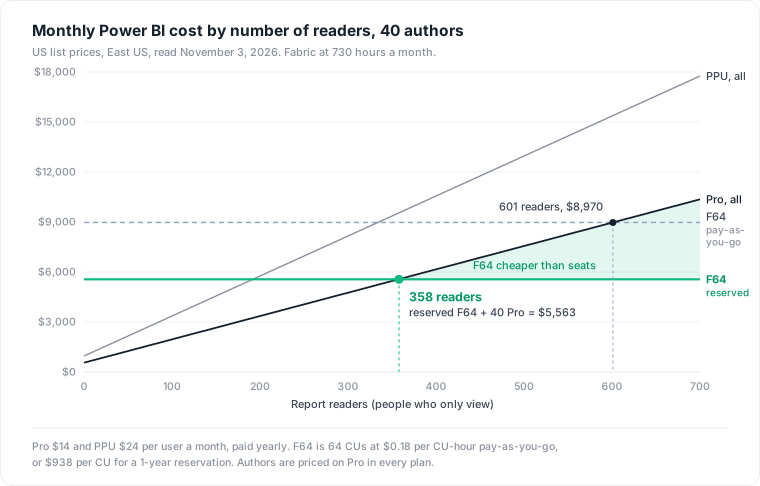
When does Fabric F64 beat Pro seats? From 358 readers on a reservation
The arithmetic is short, because authors need Pro under both plans and cancel out:
- Pro for everyone: $14 x (authors + readers).
- F64 plus Pro for authors: F64 price + $14 x authors.
- Break-even readers = F64 price / $14.
On a 1-year reservation, $5,002.67 / $14 = 357.3, so F64 wins from 358 readers. On pay-as-you-go, $8,409.60 / $14 = 600.7, so it wins from 601. The number of authors does not move the line.
The strongest case for F64 below 358 readers
The line above treats F64 as a seat discount. It is also compute: the same capacity runs lakehouses, warehouses, pipelines and notebooks. If you would buy an F32 for those workloads anyway, the step to F64 costs only the difference: 32 more CUs at $938 a year each, $2,501.33 a month on reservations. That buys back 2,501.33 / $14 = 178.7 seats. With a Fabric workload already on an F32, F64 wins from 179 readers. Price the step, not the whole capacity, when the capacity has another job.
Is Premium Per User worth it over Pro? Only if every reader gets it too
PPU adds what Microsoft's licensing guide lists as "48 data refreshes per day, support for semantic models that use more than 1GB of memory, and the XMLA endpoint", against eight scheduled refreshes a day on shared capacity (data refresh). The catch is who can open the result: "To access a Power BI Premium Per-User (PPU) workspace you need a PPU license or a Power BI individual trial" (Fabric licensing).
PPU for the authors and Pro for the readers does not work for content in a PPU workspace. Either the readers get PPU, or the content they read lives in a Pro workspace without the Premium features.
PPU for everyone costs $24 per user. Against an F64 reservation plus Pro for 40 authors ($5,562.67), PPU for everyone costs more from 232 users. Microsoft's own rule of thumb, from a broader comparison, is 250: "PPU is more cost effective when Power BI Premium features are needed for fewer than 250 users."
A worked month: 300 people, 40 authors and 260 readers
Consider a hypothetical organization with 300 Power BI users: 40 authors who publish and 260 readers. No Fabric workloads, no E5.
| Plan | Arithmetic | Per month | Per year |
|---|---|---|---|
| Pro for everyone | 300 x $14 | $4,200.00 | $50,400 |
| F64 reserved, Pro for authors | $5,002.67 + 40 x $14 | $5,562.67 | $66,752 |
| PPU for everyone | 300 x $24 | $7,200.00 | $86,400 |
| F64 pay-as-you-go, Pro for authors | $8,409.60 + 40 x $14 | $8,969.60 | $107,635 |
Pro for everyone is the cheapest plan here by $1,362.67 a month. The reserved F64 needs 98 more readers before it wins.
Now assume, as an illustration and not a measurement, that 20% of the readers (52 people) did not open a report in 90 days. On Pro for everyone, their seats cost 52 x $14 = $728 a month, $8,736 a year, 17.3% of the bill. That is the line to cut first, and the next section shows how to find it.
Fabric capacity overage is on by default and bills at 3 times the rate
Teams that cross 358 readers and buy an F64 meet a second meter. Microsoft's capacity overage guide says overage "charges at three times the pay-as-you-go rate, but only for usage that exceeds your current capacity and would otherwise trigger throttling." The overview still calls it opt-in, but the setup guide for F SKUs says: "When you create a new Fabric capacity, capacity overage is enabled by default," and "The default threshold is 25%." You can opt out before you finish creating the capacity.
The threshold is set in increments of the SKU's capacity units, so on an F64, which provides 1,536 CU-hours a day, 25% is 384 CU-hours in any rolling 24 hours. At $0.54 per CU-hour (the "Capacity Overage" meter in the price list), that is $207.36 a day at the threshold. A capacity that hits the default threshold every day of a 30-day month pays $6,220.80 in overage, more than the reserved F64 itself. And the threshold "isn't a hard spending cap": operations already running continue.
Microsoft's guide advises keeping the threshold below one third of daily CU-hours, "the point at which costs are similar to scaling up the SKU." That holds on pay-as-you-go: 512 CU-hours x $0.54 = $276.48, the same as 64 more CUs for 24 hours at $0.18. On a reservation, the line is lower. Reserving 64 more CUs costs 64 x $938 / 365 = $164.47 a day, which buys 304.6 CU-hours of overage, 19.8% of daily CU-hours. A reserved F64 left on the 25% default can spend more on overage than the upgrade would cost.
What to do on a new capacity:
- Set the threshold yourself during creation instead of accepting 25%.
- Watch the "Capacity Overage Capacity Usage CU" meter in Azure Cost Management, as the guide suggests.
- If overage runs most days, size up; Microsoft's guide calls it "ideal for rare unexpected spikes" and says to scale up if you are throttled regularly.
How do I find Power BI licenses nobody uses?
The license list sits in the Microsoft 365 admin center under Billing, Licenses. Usage sits in the activity log, and the log is short: the Get Activity Events API only accepts a window "within the last 28 days," one UTC day per call. A 90-day audit needs a daily export that started 90 days ago.
- Schedule a daily export with Get-PowerBIActivityEvent, run as a Power BI tenant administrator:
Connect-PowerBIServiceAccount
$day = (Get-Date).ToUniversalTime().Date.AddDays(-1)
Get-PowerBIActivityEvent `
  -StartDateTime $day.ToString("yyyy-MM-ddT00:00:00") `
  -EndDateTime   $day.ToString("yyyy-MM-ddT23:59:59") `
  -ResultType JsonString |
  Out-File "pbi-activity-$($day.ToString('yyyy-MM-dd')).json"
- After 90 days, list each user's last
ViewReportorViewDashboardevent. - Join that list to the users holding Pro or PPU licenses. Licensed users with no view in 90 days are the candidates.
- Check for users who hold a standalone Pro license and an E5: "Each E5 license includes one Power BI Pro license" (Microsoft).
- Send the list to managers before removing anything, then reassign freed seats to new users before buying more.
The refresh bill outlives the reader
A seat costs $14 whether anyone reads. A semantic model costs compute on every refresh, and Power BI pauses the schedule of an unread model "after two months, when no user has visited any dashboard or report" built on it (data refresh). On shared capacity that is up to eight refreshes a day for two months, and for an import model each one reads from the source warehouse. On Fabric capacity it is up to 48 a day, each drawing on the capacity. We priced that tail across BI tools in cloud waste in data infrastructure; Tableau pricing shows the same pattern with a 32-day rule.
The limits of this guide: US list prices in East US, read November 3, 2026; no Enterprise Agreement discount, nonprofit or government pricing; and the 20% idle share is an assumption. P SKUs, which Microsoft is retiring, and Copilot capacity use are not covered. For where BI seats sit in the whole bill, see data warehouse cost.
Datapace is building one map of your data estate with usage and cost attached, and agents that propose changes as pull requests your team reviews and merges. A Power BI seat, the model it reads and the warehouse queries its refreshes run belong on that one map. To price the warehouse side of those refreshes first, read cloud waste in data infrastructure.
Sources
- Microsoft, Power BI pricing, read November 3, 2026 (Pro, Premium Per User, Fabric reservation saving, F64 viewing).
- Microsoft, Important update to Microsoft Power BI pricing, November 12, 2024, read via the Internet Archive.
- Microsoft, Azure retail prices for Microsoft Fabric in East US, read November 3, 2026 (Power BI capacity usage, 1-year reservation, capacity overage meters).
- Microsoft Learn, Understand Microsoft Fabric licenses and capacity and Power BI licensing guide for organizations.
- Microsoft Learn, Capacity overage in Microsoft Fabric and Enable capacity overage.
- Microsoft Learn, Data refresh in Power BI.
- Microsoft Learn, Admin - Get Activity Events and Get-PowerBIActivityEvent.