TL;DR. OSIsoft PI pricing is not published, but AVEVA's own license schedule (v1.5, June 2026) says what you pay for. Under the Aggregate Tag model you commit to a tag tier for the whole term, every day above it is charged at an overage rate, and "under no circumstances" can the tier be lowered during the term. In a hypothetical 3-year term with a 50,000-tag tier and 1,500 tags added every quarter, a site that never retires a tag spends 10 of 12 quarters over the tier and ends at 64,500 tags. Retiring the 500 tags of replaced equipment at each change cuts the tag-days of overage by 42% and the count at renewal to 59,000. The cheapest moment to cut a PI bill is before you sign the next tier.
OSIsoft PI pricing comes as a quote: AVEVA publishes no price list for the PI System. What AVEVA does publish is the license schedule that PI order forms incorporate by reference, version 1.5 of June 2026, read on November 1, 2026. It names each meter, and for the tag tier it says the tier can never be lowered during a term.
That rule decides where the money goes. Tags added at every line change and never retired become the price of the next term. Below: the meters, a worked term, the copies of the same tags that are licensed again, and how to count your own tags before renewal.
AVEVA publishes how PI is billed, not what it costs
The best-known page on the subject agrees. Canary, a competing historian vendor, writes that "AVEVA does not actively publish pricing on the AVEVA PI website" and compares its own published prices with a "$162,000 PI solution" from a City of Holland proposal, which it says it cannot verify. That article is from April 2020 and written to sell Canary, so treat the figure as one old quote, not a list price.
The license schedule is more useful than any quote, because it applies to every order form that references it. It says licenses are "either for a set term or subscription based" and that each product is used "in accordance with the license model identified in such Order Form." The meters are these:
| What you license | How the schedule counts it |
|---|---|
| PI Server (storage) | By node and data streams, where data streams are "data tags or modules", or by an aggregate tag tier across all PI Servers |
| Data collection: PI Interfaces and PI Connectors | By node (one operating system instance) or by connection; a PI to PI Interface is one-way, so two-way transfer needs two |
| AVEVA Adapters | "By connection plus number of data streams, on an annual basis" |
| Client tools: PI Vision, PI DataLink | By individual user or named user; PI Vision has a publisher license and an explorer license that cannot save displays |
| PI Integrators (to Power BI, Tableau and other tools) | By data streams published to third-party software in the last 7 days, per installation |
| PI System Access (PSA) | Required for any non-AVEVA program that reads PI Server data programmatically |
Some servers are free of the tag meter. Under both aggregate tag models, the HA, ancillary and test PI Servers included with the model are not counted toward the tier. The test server matches the production tag count up to one million tags, with a 90-day data retrieval limit.
The Aggregate Tag tier cannot go down during a term
The schedule describes two aggregate models for AVEVA PI Data Infrastructure. Both let you spread tags across "Customer's entire deployment of PI Servers, irrespective of the amount of nodes or sites," and both bill a monthly fixed charge set by the tier.
- Aggregate Tag (reporting, as this post calls it). You commit to a minimum tag count. A PI to CONNECT agent on every PI Server in the model, except the exempt HA, ancillary and test servers, reports "the daily tag count to CONNECT." When the count passes the tier, you are "additionally charged Daily at the pre-set Overage Daily Rate."
- Aggregate Tag, Capacity (non-reporting). No agent, and the schedule has no overage clause: the tier is a ceiling the count "shall not, at any time during the respective Term, exceed" without an amendment to the order form.
Both share one clause: "Under no circumstances may Customer decrease or downgrade" the tier during the term. Cleaning tags mid-term lowers the overage on the reporting model and frees headroom on the capacity model, but it does not lower the fixed charge until the next term. The tier you sign is the floor for the whole term.
A worked term: 1,500 tags a quarter and none retired
Consider a hypothetical plant on the reporting model with a 50,000-tag tier for 3 years. It starts with 48,000 tags. Each quarter a line change adds 1,500 tags, and in each change 500 of them replace sensors on equipment that was removed. The overage rate is in each customer's order form and is not public, so the model counts tag-days over the tier: the number of tags above the tier on each day, summed. Quarters are 91.25 days.
| Year | Tags at year end, none retired | Average tags over the tier | Tags at year end, replaced tags retired | Average tags over the tier |
|---|---|---|---|---|
| 1 | 52,500 | 875 | 51,000 | 250 |
| 2 | 58,500 | 6,250 | 55,000 | 3,500 |
| 3 | 64,500 | 12,250 | 59,000 | 7,500 |
| Term | 7,071,875 tag-days | 4,106,250 tag-days |
With no tag retired, the count passes the tier in the seventh month and stays above it for 10 of the 12 quarters. Retiring the 500 replaced tags at each change cuts tag-days over the tier by 42% (4,106,250 against 7,071,875). If the overage rate is a fixed amount per tag per day, the overage bill falls in the same proportion.
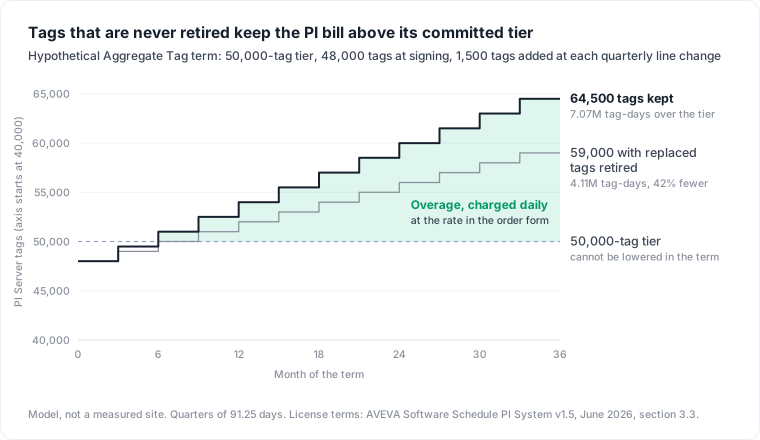
The larger effect comes at renewal. If the next tier is sized to the count on the day you sign, the plant that kept every tag negotiates from 64,500 tags, 29% above its first tier, and the one that retired them from 59,000, 18% above. Whatever the price per tag, that gap is locked in for the next term by the no-downgrade clause.
Copies of the same tags are licensed again
A historian is rarely the last stop for its data, and several of the places its tags are copied to have their own meter. The aggregate models soften two of them: their included PI to PI Interface and PI System Connector "can be used for any number of inbound and outbound data transfers" between their PI Servers, and they include a PSA add-on for those servers.
- A central roll-up server. An ancillary server "cannot be used as a roll-up server, e.g., central server pulling data from multiple servers." So a central roll-up server has to be licensed as a PI Server in its own right, and under the aggregate models, which count tags across all PI Servers in the model, its copies of site tags would count toward the tier a second time.
- PI Integrators. They are licensed by data streams published to third-party software "within the last 7 days," and "Licensing is not based on the aggregate data streams across installations." The same tag published by one installation to Power BI and by another to a data lake is licensed twice.
- Your own extractor. A PSA license is required for "a non-AVEVA Software program, application, or device that programmatically accesses data stored in the PI Server." A Python job that copies tags to the cloud needs one, from the PSA add-on included in the aggregate models or bought separately; AVEVA's own client tools and integrators do not.
- The cloud copy. Once the tags land in a cloud service, they are billed again by that service. Our AWS IoT SiteWise pricing model puts ingestion for 2,000 streams read once a second at $778 a month when the gateway sends 10 values per stream per entry, and AWS Timestream pricing shows the screens reading them setting most of the bill.
The 7-day window in point 2 cuts both ways: a stream drops out of the count 7 days after it was last published. An integrator that publishes every tag "in case someone needs it" licenses every tag.
Count your tags before renewal in PI System Management Tools
AVEVA's documentation gives the tools. These steps use PI System Management Tools (PI SMT) and PI Builder.
- Read the licensed count. In PI SMT, open Operation, then Licensing, choose Count, and expand
pibasess.MaxAggregatePointModuleCount. AVEVA's point and module statistics page says "Amount Used is the number of data streams (points and modules together) that you are using," because the license counts data streams, not points. On newer systems the permitted count sits underpibasess.maxpointcount, and AVEVA's licensing check says it is "the lesser of" the two. - List the stale points. The Stale and Bad Points tool finds points that have "not updated within a specified time"; by default a tag is stale after four hours, so set a window that matches your slowest real signal. AVEVA notes that the Scan Off state "marks points that are no longer used, such as points from obsolete equipment," and PtCreated "indicates a new point that has not yet begun collecting data."
- Export and group. The results list shows the tag, its point source and its last value, and can be exported to CSV. Grouped by point source, the list shows which interface, and so which line, the dead tags came from.
- Decommission, then decide on deletion. AVEVA's PI Builder procedure decommissions points by setting
scanfrom 1 to 0, or, for interfaces that use the point source instead, by moving them to a point source kept for decommissioned points. Decommissioning only edits point attributes; it is the Delete button that AVEVA documents as discarding the archive. The Delete button in the Point Browser removes points "permanently, and all archive data of these points will be discarded." - Check Amount Used again. We found no AVEVA page that says whether a decommissioned point leaves the data stream count. Step 1 after step 4 tells you on your own server; if the count does not move, deletion is the documented way to remove a point, and the history you must keep has to be exported first.
Writes are only half of it. A tag that still updates may have no reader: no AF attribute, no PI Vision display, no integrator stream. What PI AF alone does not tell you covers how to read those references from AF.
The objection: a tag costs less than the history it holds
The strongest case against tag cleanup: a quality investigation or a regulator may need a signal from a line removed years ago, and deleting a point discards its archive. Next to that risk, a few thousand tags look cheap.
That holds for tags with history someone may need, and they should stay. The model above retires a narrower set: tags on removed equipment, decided at the moment of the line change, when the engineer who knows the equipment is still there. PtCreated points that have not begun collecting data hold no history at all. The audit exists to separate the tags you keep on purpose from the tags you keep by default, and to do it before the tier is signed.
What this model does not tell you
- No prices. AVEVA publishes none, and neither does this post. The overage rate, the tier sizes and the fixed charge are in each order form.
- The plant is hypothetical, and so are the 1,500 tags a quarter and the 500 replaced. Your line changes set your numbers.
- Not covered: perpetual licenses signed under older OSIsoft terms, the reseller terms of the Dianomic software the schedule also covers, CONNECT data services pricing, and how an order form sizes the next tier at renewal.
- The schedule can change. This post reads v1.5 of June 2026; your order form names the version that binds you.
Plant data is paid for in more than one place: how Industry 4.0 multiplies plant data and its cost covers the copies, and what a data pipeline costs covers the jobs that move them. BI seats nobody opens follow the same pattern as tags nobody reads, as Tableau pricing shows.
Where Datapace fits
A PI order form counts tags, and a cloud bill counts gigabytes and queries, but neither says which tag still has a reader. Datapace is building one map of your data estate (databases, warehouses, pipelines and what consumes them) with usage and cost attached, and agents that propose changes as pull requests your team reviews and merges. To walk through your own historian before a renewal, book a call.
Sources
- AVEVA, AVEVA Software Schedule PI System v1.5, June 2026, sections 3.1 to 3.6 and 5.1, read November 1, 2026.
- AVEVA PI Server documentation: Verify Data Archive licensing, View point and module statistics, Find and view stale and bad points, View Stale and Bad Points, Decommission multiple points with PI Builder, Delete button in Point Browser.
- Canary Labs, Enterprise Data Historian Pricing Comparison for AVEVA PI, Ignition, and Canary, April 23, 2020.