TL;DR. Databricks serverless pricing on AWS is $0.35 per DBU for jobs in the Premium tier, against $0.15 for classic Jobs Compute. That 2.3x gap is the number most comparisons stop at, and it leaves out the EC2 instances classic compute also bills. Across the 492 m, r, c and i instance types of generations 5 to 8 in Databricks' rate data, classic Jobs Compute on on-demand EC2 costs a median $0.40 per DBU all-in, more than serverless. What decides the bill is how many DBUs serverless burns for your job: on
m6id.xlargeworkers, serverless is cheaper until it burns 1.32 times the classic DBUs. On recent Graviton workers such asm7git must burn fewer.
Databricks serverless pricing looks expensive because the rate card compares two different things. A serverless DBU carries the machine; a classic DBU does not, and your cloud provider bills the instance on a separate invoice. Put the instance back into the classic number and most of the gap disappears, and the question becomes a DBU count you can measure per job.
This post prices serverless jobs, notebooks and SQL warehouses from the rate data behind Databricks' pricing pages and calculator and the AWS EC2 on-demand price list, both read on November 12, 2026, for AWS US East (N. Virginia). It is a worked model at list price: no job ran.
How Databricks serverless is priced: one rate per DBU, the machine included
Databricks' own answer page states the model: you pay "only for the compute you actually consume, billed at per-second granularity, with no up-front costs and no charge for idle capacity". Its FAQ adds: "Your serverless bill is the DBUs used multiplied by the price of the relevant SKU". Notebooks and jobs stop billing once idle for a few minutes; a serverless SQL warehouse bills by size until its auto stop shuts it down.
| SKU, AWS US East | Premium | Enterprise | Cloud instances billed separately? |
|---|---|---|---|
| Serverless jobs | $0.35 | $0.45 | No |
| Serverless pipelines (DLT) | $0.35 | $0.45 | No |
| Serverless notebooks (interactive) | $0.75 | $0.95 | No |
| Serverless SQL warehouse | $0.70 | $0.70 | No |
| Classic Jobs Compute | $0.15 | $0.20 | Yes |
| Classic SQL warehouse, Pro | $0.55 | $0.55 | Yes |
Serverless and SQL Pro rates vary by region; classic Jobs Compute has one rate per tier. For the classic rates and the cost-per-job SQL on classic compute, see our Databricks DBU cost guide.
Serverless jobs come in two modes on the same SKU. The serverless jobs docs say "Both modes use the same SKU, but standard performance mode consumes fewer DBUs, reflecting lower compute usage". Standard mode tolerates a "startup latency of 4 to 6 minutes", and Databricks' best-practice page says it "can reduce costs by up to 70% compared to performance-optimized mode". That is a vendor figure, and "up to" is the ceiling: for a nightly batch job, standard mode is the first setting to check.
Classic Jobs Compute costs more per DBU than serverless once EC2 is in
A classic node-hour has two lines: the DBUs the instance type burns times $0.15, and the instance at its EC2 price. Divide the sum by the DBUs and you get what a classic DBU really costs. Then divide by $0.35 and you get the DBU budget: how many DBUs serverless may burn, per classic DBU, before it costs more.
| Worker type | DBUs per hour | DBU cost | EC2 per hour | All-in per DBU | Serverless budget |
|---|---|---|---|---|---|
m6id.xlarge | 0.76 | $0.1140 | $0.2373 | $0.4622 | 1.32x |
i3.xlarge | 1.00 | $0.1500 | $0.3120 | $0.4620 | 1.32x |
r6id.xlarge | 1.02 | $0.1530 | $0.3024 | $0.4465 | 1.28x |
m5.xlarge | 0.69 | $0.1035 | $0.1920 | $0.4283 | 1.22x |
m6i.xlarge | 0.76 | $0.1140 | $0.1920 | $0.4026 | 1.15x |
m7i.xlarge | 0.84 | $0.1260 | $0.2016 | $0.3900 | 1.11x |
m8g.xlarge | 1.00 | $0.1500 | $0.1795 | $0.3295 | 0.94x |
m7g.xlarge | 0.96 | $0.1440 | $0.1632 | $0.3200 | 0.91x |
Across all 492 m, r, c and i instance types of generations 5 to 8 that appear in both price lists, the median all-in cost is $0.40 per classic DBU, and 409 of them cost more than $0.35. The headline 2.3x gap is a comparison of a DBU with a machine against a DBU without one.
Local-disk variants usually cost more per DBU: $0.46 for m6id against $0.40 for m6i. The 83 types at $0.35 or less come from 11 families, all Graviton except i7i: m7g, r7g, c7g, c8g and m8g sit at $0.31 to $0.33 per DBU.
Serverless vs classic for one nightly job: the 1.32x DBU budget
Consider a hypothetical nightly ETL job on one driver and eight m6id.xlarge workers, for two hours on each of 30 nights, which is 540 node-hours in a month at Premium list prices. It is the same job our DBU cost guide prices on classic compute.
| Setup | DBUs | DBU cost | EC2 | Month | Serverless budget (vs 410.4 classic DBUs) |
|---|---|---|---|---|---|
| Classic Jobs Compute | 410.4 | $61.56 | $128.14 | $189.70 | 542.0 DBUs (1.32x) |
| Classic Jobs Compute, Photon | 1,190.16 | $178.52 | $128.14 | $306.67 | 876.2 DBUs (2.13x) |
| Classic, Enterprise tier ($0.20 against $0.45) | 410.4 | $82.08 | $128.14 | $210.22 | 467.2 DBUs (1.14x) |
| Classic, instances at half the on-demand price | 410.4 | $61.56 | $64.07 | $125.63 | 358.9 DBUs (0.87x) |
The budget is the classic month divided by the serverless rate: $189.70 / $0.35 = 542.0 DBUs, or 18.07 per run against 13.68 on classic. The 2.13x Photon crossing is measured against the 410.4 non-Photon DBUs, not against Photon's 1,190.16. If serverless burned the same 410.4 DBUs, the month would cost $143.64, 24% less than classic.
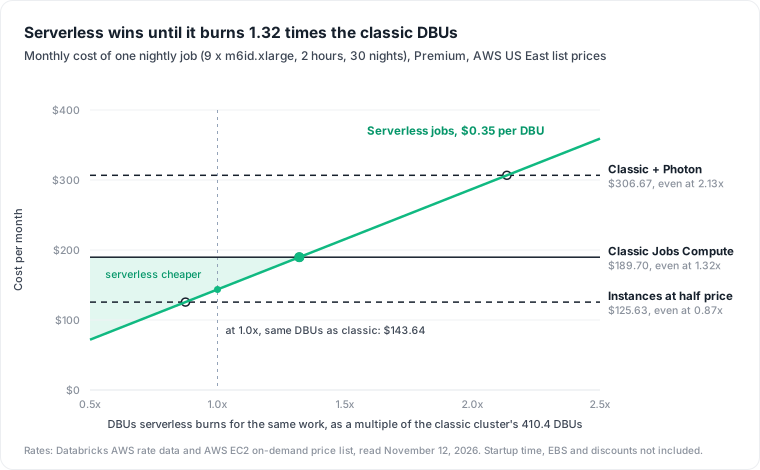
The job's run time does not move the line; the DBU ratio does. Both bills scale with hours, so a monthly-cost-by-hours chart shows two lines that never cross. The model leaves out startup time on both sides.
The strongest case against serverless is a cheap instance. Classic compute keeps every lever on the instance: Graviton, spot capacity and your AWS commitments. At half the on-demand EC2 price, the budget falls to 0.87x and serverless must do the work in fewer DBUs than classic. Databricks says serverless is on average "20% more cost-efficient than comparable classic cluster workloads", but that is Databricks' claim, and its rate data lists serverless jobs by DBU price, with no DBUs per hour to compare. You find out by running the job.
Serverless SQL warehouse pricing: $0.70 per DBU and a 10-minute idle default
SQL warehouses burn a fixed number of DBUs per hour by size, the same on Pro and serverless:
| Size | DBUs per hour | Serverless, all-in | Pro, DBUs only |
|---|---|---|---|
| 2X-Small | 4 | $2.80 | $2.20 |
| X-Small | 6 | $4.20 | $3.30 |
| Small | 12 | $8.40 | $6.60 |
| Medium | 24 | $16.80 | $13.20 |
| Large | 40 | $28.00 | $22.00 |
| X-Large | 80 | $56.00 | $44.00 |
A Pro warehouse is cheaper only if its EC2 instances cost less than the $0.15 per DBU gap: $1.80 an hour for a Small. The rate data lists Pro sizes by DBUs, not by instance type, so read the instances from your AWS bill before you compare.
The idle tail matters more than the rate. Databricks' warehouse docs set the serverless auto stop default at 10 minutes, and Pro and Classic at 45 minutes, with a 10-minute minimum. A Small warehouse that stops after its default idle time costs $1.40 of idle on serverless and $4.95 of DBUs on Pro, plus the instances. Serverless warehouses also start in "typically between 2 and 6 seconds" against "typically approximately 4 minutes" for Pro, which is why a short auto stop is practical there. For a dashboard warehouse woken many times a day, the idle tails often outweigh the rate gap.
Measure serverless cost per job: compare DBUs per run, not rates
The budget turns the decision into one number per job. Run the job once on serverless (standard mode for batch), then compare DBUs per run against its classic runs:
-- DBUs per run for each job, classic and serverless side by side
SELECT
  usage_metadata.job_id                       AS job_id,
  coalesce(product_features.is_serverless, false) AS on_serverless,
  product_features.performance_target         AS serverless_mode,
  COUNT(DISTINCT usage_metadata.job_run_id)   AS runs,
  SUM(usage_quantity)
    / COUNT(DISTINCT usage_metadata.job_run_id) AS dbus_per_run
FROM system.billing.usage
WHERE billing_origin_product = 'JOBS'
  AND usage_unit = 'DBU'
  AND usage_date >= current_date() - INTERVAL 30 DAYS
GROUP BY 1, 2, 3
ORDER BY job_id, on_serverless;
Divide the serverless dbus_per_run by the classic one. Below the budget for your worker type in the table above, serverless is cheaper at list price; above it, keep the job on classic. If the classic runs use Photon, their DBUs already include Photon's multiplier, so divide by the Photon budget instead: on m6id.xlarge, $0.2577 all-in per Photon DBU, or 0.74x. The billing table reference documents performance_target as PERFORMANCE_OPTIMIZED, STANDARD or null, so the query also shows what standard mode saves on your own job.
Three limits apply. Serverless usage can take up to 24 hours to reach the billing table, so compare full days. Classic dbus_per_run excludes EC2, which is why the budget, not the raw ratio, is the test. And a negotiated discount on DBUs or on EC2 changes the budget, so recompute it with your own rates.
Where this model stops
The prices are AWS US East list prices for the Premium tier, read November 12, 2026, with on-demand EC2 and no EBS volumes; Azure, GCP, other regions and negotiated rates differ. The node-hour and monthly figures are a worked model on one job shape, not a measurement, and they leave out startup time on both sides. We have not compared a serverless and a classic run of the same job ourselves; the query above is how a team with both would do it.
Serverless or classic is a per-job choice, and it sits beside the rest of the platform bill, from the warehouse covered in our data warehouse cost comparison to the jobs in our Databricks cost optimization guide. Datapace is building one map of your data estate with usage and cost attached, and agents that propose changes as pull requests your team reviews and merges. Moving a job whose DBU ratio sits under its budget to serverless is one such change. To work out which of your Databricks jobs would cost less on serverless, book a call.
Sources
- Databricks, AWS rate data for the pricing pages and calculator (read November 12, 2026): DBU prices per SKU, tier and region; DBUs per hour per instance type; SQL warehouse sizes.
- AWS, EC2 On-Demand US East Linux price data, read November 12, 2026.
- Databricks, How does serverless pricing work?
- Databricks docs, Run your Lakeflow Jobs with serverless compute and Best practices for serverless compute.
- Databricks blog, The evolution of data engineering: how serverless compute is transforming notebooks and Lakeflow Jobs, March 12, 2026.
- Databricks docs, Create a SQL warehouse and SQL warehouse types.
- Databricks docs, Billable usage system table reference and Serverless compute.