TL;DR. BigQuery partitioning cuts the on-demand bill of every query that filters on the partition column, and nothing else. On a hypothetical 4 TiB events table, a 7-day dashboard falls from 819.2 GiB to 15.7 GiB per run and three query shapes fall from $1,850 to $121.23 a month. It also moves old partitions of an append-only table to the long-term storage rate (half price in the US multi-region), a discount an appended unpartitioned table never gets; that saving starts about 90 days after the rewrite. It does not help queries without a date filter. On tables that grow by less than about 10 GB a day, daily partitions are too small, so cluster or partition by month. On editions it saves slot-hours, not bytes.
BigQuery partitioning splits a table into segments by a date, timestamp or integer column, and a query that filters on that column reads only the matching partitions. On on-demand pricing that is the whole saving: Google bills $6.25 per TiB processed (US multi-region, read November 9, 2026, on the BigQuery pricing page), so fewer bytes read is fewer dollars. This post prices one table before and after, ranks your own tables by what they cost unpartitioned, and shows the rewrite and its one-time cost.
What partitioning does to your BigQuery bill: $1,850 to $121 a month
Consider a hypothetical events table: 4 TiB of logical bytes holding 365 days, loaded once a day, about 11.2 GiB per day. Three query shapes hit it:
| Query shape | Runs a month | GiB billed per run, unpartitioned | GiB per run, partitioned by day | Monthly cost before | Monthly cost after |
|---|---|---|---|---|---|
| A. Dashboard, last 7 days, columns holding 20% of the bytes | 200 | 819.2 | 15.7 | $1,000.00 | $19.18 |
| B. Daily transform, yesterday, all columns | 30 | 4,096 | 11.2 | $750.00 | $2.05 |
| C. Ad hoc lookup, all history, 20% of the bytes, no date filter | 20 | 819.2 | 819.2 | $100.00 | $100.00 |
| Total | $1,850.00 | $121.23 |
The arithmetic: shape A reads 20% of 4,096 GiB, which is 819.2 GiB or 0.8 TiB, so $5.00 a run. After partitioning it reads 7 partitions of 11.22 GiB at the same 20%, which is 15.71 GiB or $0.0959 a run. Shape B falls from 4 TiB ($25.00) to one partition ($0.0685). Google bills "the total data processed in the columns you select", so the column share matters as much as the date range. The table ignores the free TiB and assumes no cache hits, which holds if new data lands between runs: results are not cached "if any of the referenced tables or logical views have changed since the results were previously cached."
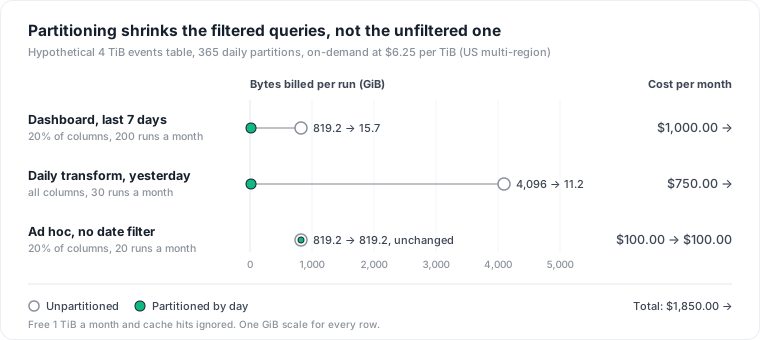
After partitioning, the query without a date filter is 82% of what is left. That is the pattern to expect: partitioning removes the cost of the filtered queries almost entirely and leaves the unfiltered ones exactly where they were.
Storage moves too, and this part also applies on editions. Google charges active logical storage at $0.000027397 per GiB-hour in the US multi-region, about $0.02 per GiB-month, and long-term storage at about $0.01. Long-term applies to data "not modified for 90 consecutive days", and "each partition of a partitioned table is considered separately for long-term storage pricing."
An unpartitioned table loses that discount every day it receives data: Google's cost best practices list "loading, streaming, or appending data to the table" among the actions that move it back to active storage. So our append-only events table bills all 4,096 GiB at the active rate, $81.92 a month. Partitioned by day, 90 partitions (1,009.97 GiB) stay active and 275 (3,086.03 GiB) go long-term: $20.20 plus $30.86, or $51.06. That is $30.86 a month saved on storage alone, with no change to any query, starting about 90 days after the rewrite. The copy writes every partition, so all of them bill at the active rate until they age past 90 days without changes.
Which tables to partition first: rank them by bytes billed
Start from the job history, not the table list. INFORMATION_SCHEMA.JOBS keeps 180 days of jobs with referenced_tables and total_bytes_billed; TABLE_STORAGE reports total_partitions, which is 0 for unpartitioned tables. This query ranks the unpartitioned tables by what queries spent reading them in 30 days:
DECLARE on_demand_per_tib FLOAT64 DEFAULT 6.25;

WITH table_bytes AS (
  SELECT t.project_id, t.dataset_id, t.table_id,
         COUNT(*)                   AS jobs,
         SUM(j.total_bytes_billed)  AS bytes_billed
  FROM `region-us`.INFORMATION_SCHEMA.JOBS AS j,
       UNNEST(j.referenced_tables) AS t
  WHERE j.creation_time >= TIMESTAMP_SUB(CURRENT_TIMESTAMP(), INTERVAL 30 DAY)
    AND j.job_type = 'QUERY'
    AND j.statement_type != 'SCRIPT'
  GROUP BY 1, 2, 3
)
SELECT b.dataset_id, b.table_id, b.jobs,
       ROUND(b.bytes_billed / POW(1024, 4) * on_demand_per_tib, 2) AS dollars_upper_bound,
       ROUND(s.total_logical_bytes / POW(1024, 3), 1)              AS table_gib,
       ROUND(s.active_logical_bytes / POW(1024, 3), 1)             AS active_gib,
       ROUND(s.long_term_logical_bytes / POW(1024, 3), 1)          AS long_term_gib
FROM table_bytes AS b
JOIN `region-us`.INFORMATION_SCHEMA.TABLE_STORAGE AS s
  ON  s.project_id   = b.project_id
  AND s.table_schema = b.dataset_id
  AND s.table_name   = b.table_id
WHERE s.total_partitions = 0
ORDER BY b.bytes_billed DESC
LIMIT 20;
Read the result with three checks:
- The dollar column is an upper bound. A join bills once but appears under each table it references, so a table that is always joined to a bigger one gets credit for bytes it did not cause.
- An
active_gibequal totable_gibon a large table means it is appended to. That table also gets the storage saving above. - Divide
table_gibby the days it holds. Below about 10 GB a day, daily partitions are too small (see the last section).
Then read the query text of the top jobs for each candidate and note the column they filter on. If most bytes come from queries that filter on a date column, partition on it. If they filter on a customer or account ID, cluster on it instead. Google's partitioning recommender does a version of this from 30 days of workload data; more on it below.
How to partition an existing table in four steps
Google is explicit that "you cannot directly convert an existing non-partitioned table to a partitioned table". You build a new one from a query:
Create the partitioned copy. Pause the loads into the table first.
CREATE TABLE analytics.events_p
PARTITION BY DATE(event_ts)
CLUSTER BY customer_id
OPTIONS (require_partition_filter = TRUE)
AS SELECT * FROM analytics.events;
Set
partition_expiration_dayslater, once the copy is verified: on a copy of exactly 365 days, a 365-day expiration can drop the oldest partition before you count rows.CLUSTER BY customer_idis optional and aimed at shape C. The table above leaves it out, because its saving cannot be priced before the queries run.Verify. Compare
COUNT(*)on both tables, and dry-run shape A against the new one: the estimate should be close to 7 days' worth of the columns it reads.Swap the names.
ALTER TABLE analytics.events RENAME TO events_old;thenALTER TABLE analytics.events_p RENAME TO events;, and resume the loads.Drop the old table once the dashboards and pipelines run clean.
The one-time cost is one full scan plus the overlap. On-demand, a CREATE TABLE ... AS SELECT bills "the sum of bytes processed for all the columns referenced from the tables scanned by the query": 4 TiB, or $25.00 here. Each day both tables exist costs about $2.69 of extra active storage (4,096 GiB at $0.000027397 per GiB-hour for 24 hours). Against a saving of $1,728.77 a month on queries, the rewrite pays for itself the first day.
Three details from Google's documentation break this runbook on some tables. A table with streaming inserts can usually be renamed "5 hours after the last streaming operation", and in some cases the wait is "up to 8 days". Renaming drops any search index or vector index on the table. And a single job can modify at most 4,000 partitions, so a table with more than about 11 years of daily data needs the copy split into batches (the table itself can hold 10,000).
When partitioning does not help
Queries without a usable filter on the partition column
Shape C costs the same after partitioning. So does any filter BigQuery cannot use for pruning: Google's query guide says to "use a constant expression in your filter", and its example of a filter that does not prune reads the date from a subquery (SELECT MAX(timestamp) FROM ...). Turn require_partition_filter on for that reason: a query without a usable filter then fails with "Cannot query over table ... without a filter that can be used for partition elimination" instead of billing the whole table. The cost is friction: shape C must now state the date range it needs, and someone has to decide what that range is.
Small partitions
Google suggests clustering instead of partitioning when "partitioning results in a small amount of data per partition (approximately less than 10 GB)". For daily partitions that is a table growing by about 10 GB a day, or 3,650 GB a year. For tables with little data per day spread over a wide date range, Google recommends monthly or yearly partitioning "along with clustering on the partitioning column". The catch for budgeting: a clustered table's dry-run estimate "is an upper bound, and can be higher than the actual number of bytes billed". You only know the real saving after the query runs.
Reservations bill slot-hours, not bytes
Under editions, the bytes column above is not on the invoice. Reading fewer partitions usually means fewer slot-hours too, but by how much shows only in total_slot_ms after the change. Google's recommender expresses its estimates in slot hours ("Save about 64 slot hours per month by partitioning on column_C by DAY") and warns that "in some cases, the estimated savings might be overestimated". Storage is billed apart from compute, so the storage saving is the same under both models. For which model a project should be on at all, read BigQuery on-demand vs editions.
A static table already in long-term storage
The storage gain assumes an appended table. A table nobody writes to already bills the long-term rate, and the rewrite resets all of it to active for 90 days: on 4 TiB that is $40.96 a month more (4,096 GiB at $0.01) for about 2.96 months, roughly $121 on top of the $25 scan. It still pays if filtered queries hit it; it does not if only shape C does.
Two more limits. The long-term discount varies by region: in Iowa (us-central1) Google's hourly rates work out to about $0.023 and $0.016 per GiB-month, about 30% off, not the 50% of the US multi-region. And the strongest objection to this whole runbook is that Google's recommender already finds these tables. It does, for tables where it sees "significant savings", ranked in slot hours; the query above ranks them in dollars, includes the storage line, and shows you which queries would still scan everything after the change.
Partitioning is one fix on one line of the bill; data warehouse cost shows where that line sits next to the others, and Looker pricing traces the scheduled dashboards that keep running shape A long after anyone reads them.
Knowing which tables are queried, by whom and at what cost is the hard part of this runbook: the job history stops at 180 days and names users and service accounts, not the dashboards or teams behind them. Datapace is building one map of your data estate (databases, warehouses, pipelines and what consumes them) with usage and cost attached, and agents that propose changes such as this one as pull requests your team reviews and merges. To talk through your own BigQuery bill, book a call.
Sources
- Google Cloud, BigQuery pricing, read November 9, 2026 (on-demand $6.25 per TiB and free TiB, column-based billing, no charge for cache hits, active and long-term logical storage rates for US multi-region and us-central1, per-partition long-term rule, recommendation to partition and cluster).
- Google Cloud, Introduction to partitioned tables (pruning, when to cluster instead, the 10 GB guidance, monthly or yearly partitioning with clustering, no direct conversion of an existing table).
- Google Cloud, Query partitioned tables (constant expressions for pruning, the subquery example that does not prune, require partition filter error).
- Google Cloud, Estimate and control costs (actions that move data back to active storage, per-partition long-term eligibility, clustered table estimates as upper bounds).
- Google Cloud, Using cached query results (results not cached when referenced tables changed).
- Google Cloud, Data definition language statements (bytes processed for CREATE TABLE AS SELECT,
partition_expiration_days,require_partition_filter, ALTER TABLE RENAME TO limits for streaming tables and indexes). - Google Cloud, Quotas and limits (10,000 partitions per table, 4,000 partitions modified by a single job).
- Google Cloud, JOBS view (
referenced_tables,total_bytes_billed, 180 days of history, excludingSCRIPTparents). - Google Cloud, TABLE_STORAGE view (
total_partitionsis 0 for unpartitioned tables, active and long-term logical bytes). - Google Cloud, Manage partition and cluster recommendations (30-day workload window, savings in slot hours, the warning that estimated savings might be overestimated).