
TL;DR. The Databricks pricing calculator returns the DBU cost of the hours you type, and nothing else. For a modelled workspace on AWS US East (a nightly ETL job, a Small serverless SQL warehouse for BI, a 3-node notebook cluster) its formula gives $1,691.35 a month. The same month with EC2, S3 and idle hours comes to $3,050.08. The usual warning is that the calculator misses the cloud VMs; in this model they and storage add $391.22. Idle hours add $967.51, and most of that sits on a serverless warehouse, where there is no VM to miss.
The Databricks pricing calculator answers one question well: what a given number of instance-hours costs in DBUs. A monthly budget needs three more lines, and this post prices all of them for one workspace, then shows the query that checks the estimate against the bill when the month closes. In this model the biggest missing line comes from scheduled refreshes, not from the VMs.
Databricks pricing calculator: what it counts and what it leaves out
The official calculator asks for a plan, a cloud, a compute type and an instance type, then #Instances, Hours/Day and Days/Month. We read the page's JavaScript on November 22, 2026 to see the formula. For classic compute it is:
Price/month = price per DBU x DBUs per hour x instances x hours/day x days/month
The rates come from the rate file behind the calculator, which lists an hourrate per instance equal to DBUs per hour times the DBU price. For an m6id.2xlarge on Jobs Compute, Premium, that is 1.52 DBU at $0.15, or $0.228 an hour. No field in the formula prices the machine, the storage or the time compute stays up after the work ends.
Each of those is billed elsewhere or by rule:
- EC2 for classic compute. Databricks' architecture overview says "in the classic compute plane, Databricks compute resources run in your AWS account", so the instances arrive on your AWS bill.
- Storage. Delta tables in your own S3 buckets are billed by AWS. Databricks' default storage, where used, shows up in its own bill under
DEFAULT_STORAGE. - Networking. Workspace subnets in a customer-managed VPC "must have outbound access to the public network using a NAT gateway and internet gateway" or a similar appliance, and AWS bills that too.
- Idle time. A SQL warehouse keeps billing until auto stop fires: "Idle SQL warehouses continue to accumulate DBU and cloud instance charges until they are stopped".
The rate gap between compute types is covered in our Databricks DBU cost post. Here the question is the month.
The inputs a Databricks estimate needs
Seven inputs per workload decide the number. The calculator asks for four of them.
| Input | Why it moves the bill | In the calculator? |
|---|---|---|
| Compute type (Jobs, All-Purpose, SQL, serverless) | Sets the price per DBU: $0.15 to $0.70 in the lines below | Yes |
| Instance type or warehouse size | Sets DBUs per hour, and the EC2 rate on classic | Yes |
| Node count, driver included | Multiplies both halves | Yes (#Instances) |
| Hours of work per day and days per month | The planned hours | Yes |
| EC2 price of each instance | The second bill on classic compute | No |
| Auto stop or auto-termination setting | Hours billed after the work ends, per start | No |
| Storage and network | S3, NAT, egress | No |
The settings row is the one teams skip, and its effect depends on how often compute starts, not on how long it works. A warehouse woken 500 times a month pays its auto stop 500 times.
A worked month: one workspace on AWS
Consider a hypothetical workspace on AWS US East, Premium tier, list prices read November 22, 2026 from the Databricks rate file and the AWS EC2 and S3 price files. Three workloads and one storage line:
- Nightly ETL on Jobs Compute: 5
m6id.2xlargenodes (1 driver, 4 workers), 3 hours a night, 30 nights. - BI dashboards on a Small serverless SQL warehouse (12 DBU an hour at $0.70), 8 hours on 22 weekdays.
- Notebooks on an All-Purpose cluster of 3
m6id.xlargenodes, 4 hours of work on 22 weekdays. - Delta tables: 5,000 GB on S3 Standard at $0.023 per GB-month.
| Line | Hours | DBU cost (calculator) | EC2 or S3 | Planned month |
|---|---|---|---|---|
| Nightly ETL | 450 instance-hours, 684 DBUs | $102.60 | $213.57 (at $0.4746 an hour) | $316.17 |
| BI warehouse | 176 hours, 2,112 DBUs | $1,478.40 | none, machine included | $1,478.40 |
| Notebooks | 264 instance-hours, 200.64 DBUs | $110.35 | $62.65 (at $0.2373 an hour) | $173.00 |
| Delta tables on S3 | $115.00 | $115.00 | ||
| Total | $1,691.35 | $391.22 | $2,082.57 |
The VM half depends on the compute type. On the Jobs line, EC2 is 2.08 times the DBU cost, so the line costs 3.08 dollars per DBU dollar. That fits Flexera's rule to "budget roughly $2 to $3 in total spend for every $1 on your Databricks DBU invoice". On the All-Purpose line EC2 is 0.57 times the DBUs, and on the serverless warehouse it is zero. Across this workspace, compute plus storage comes to 1.23 dollars per DBU dollar. Apply a multiplier per line, never to the workspace total.
The idle hours a calculator does not see
The planned month assumes compute stops when the work stops. Two ordinary settings break that assumption.
Serverless SQL: off-hours refreshes pay the 10-minute auto stop each time
Databricks sets the serverless auto stop to 10 minutes by default; the UI minimum is 5 and the API can go to 1 (docs). Now give the BI warehouse one dashboard with a scheduled refresh every hour. Inside the 8 working hours the warehouse is already up. Outside them, each refresh wakes it for a 1-minute query plus 10 minutes of idle:
- 16 off-hours wakes on each of 22 weekdays, 24 on each of 8 weekend days: 544 wakes.
- 544 x 11 minutes = 99.73 hours x 12 DBU x $0.70 = $837.76 a month.
- At a 5-minute auto stop: 544 x 6 minutes = 54.40 hours, $456.96.
- With the refresh scheduled only inside working hours: $0.
A shorter auto stop cuts the line by 45%; moving the schedule deletes it. The line is 57% of the warehouse's planned hours, and it exists only because of one schedule. Pro and classic warehouses default to 45 minutes and cannot go below 10, so the same refresh costs more there, EC2 included; our serverless pricing post compares the two.
All-Purpose clusters: the inactivity setting runs through lunch
An All-Purpose cluster stops only after its inactivity period. The cluster docs put the range at "between 10 and 10,000 minutes (about 7 days)", and the Clusters API says that if autotermination_minutes is not set, "this cluster will not be automatically terminated". The legacy create-cluster UI used a 120-minute default for Standard clusters, so we model 120 minutes.
Split the 4 hours of notebook work into two 2-hour sessions with a 1-hour lunch between them:
| Inactivity setting | Idle per day | Idle instance-hours | DBU | EC2 | Idle cost |
|---|---|---|---|---|---|
| 120 minutes | 1 h lunch + 2 h after the last session | 198 | $82.76 | $46.99 | $129.75 |
| 15 minutes | 15 min before lunch + 15 min at the end | 33 | $13.79 | $7.83 | $21.62 |
At 120 minutes the cluster bills 75% more instance-hours than the work uses. The calculator user who typed "4 hours a day" never sees them.
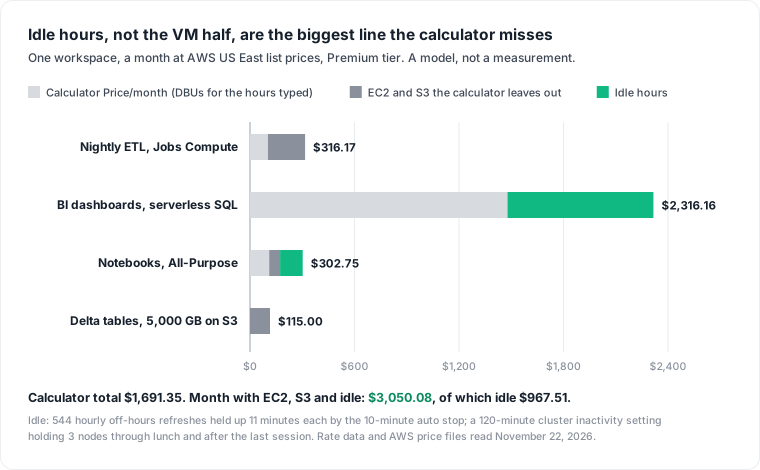
The full month is $3,050.08, and the calculator showed 55% of it. EC2 and S3 add 23% to the calculator figure; idle adds 57%. Move the refreshes into working hours and set the cluster to 15 minutes, and the month drops to $2,104.19, a 31% cut with no change to any workload. Our Databricks cost optimization post covers the other levers in order.
The strongest objection: move everything to serverless and the estimate becomes complete, since the VM half disappears. It does simplify the bill, and Databricks' answer page confirms "your serverless bill is the DBUs used multiplied by the price of the relevant SKU". It does not fix the estimate: the largest idle line in this model is on a serverless warehouse. That answer page says Serverless Notebooks and Jobs stop charging after a few minutes idle, while serverless SQL warehouses are "billed at a fixed DBU-per-hour rate based on the warehouse size"; the warehouse docs above say they bill until auto stop fires. Serverless removes the VM line from the estimate; idle hours stay.
Check the estimate against system.billing
When the month closes, compare each estimate line to what Databricks recorded. system.billing.usage holds usage_quantity per SKU with a billing_origin_product such as JOBS, SQL or ALL_PURPOSE, and system.billing.list_prices holds the price of each SKU over time. Put your estimate in a VALUES list and let the query print the gap:
-- Last calendar month: estimate vs recorded DBUs at list price, per product
WITH estimate (product, est_dbus, est_cost) AS (
  VALUES ('JOBS', 684.0, 102.60),
         ('SQL', 2112.0, 1478.40),
         ('ALL_PURPOSE', 200.64, 110.35)
),
recorded AS (
  SELECT u.billing_origin_product AS product,
         SUM(u.usage_quantity) AS dbus,
         SUM(u.usage_quantity * lp.pricing.effective_list.default) AS cost
  FROM system.billing.usage AS u
  JOIN system.billing.list_prices AS lp
    ON  lp.sku_name = u.sku_name
    AND lp.cloud = u.cloud
    AND u.usage_start_time >= lp.price_start_time
    AND (lp.price_end_time IS NULL OR u.usage_start_time < lp.price_end_time)
  WHERE u.usage_unit = 'DBU'
    AND u.usage_date >= add_months(trunc(current_date(), 'MM'), -1)
    AND u.usage_date <  trunc(current_date(), 'MM')
  GROUP BY 1
)
SELECT coalesce(r.product, e.product) AS product,
       e.est_dbus,
       round(r.dbus, 1) AS recorded_dbus,
       e.est_cost,
       round(r.cost, 2) AS recorded_cost,
       round(coalesce(r.cost, 0) - coalesce(e.est_cost, 0), 2) AS gap
FROM recorded r
FULL OUTER JOIN estimate e ON e.product = r.product
ORDER BY gap DESC;
Read the result in this order:
- A positive gap on
SQLorALL_PURPOSEis usually idle (SQLalso covers materialized views). Group that product's rows byusage_metadata.warehouse_idorusage_metadata.cluster_idand by the hour ofusage_start_timeto see when it billed. - A product you did not estimate (
PREDICTIVE_OPTIMIZATION,NETWORKINGand others are documented values) shows up as a row with no estimate. - The EC2 half is not in this table. Databricks tags classic nodes with
Vendor,ClusterIdand, on jobs compute,JobId, and its docs say "default tags automatically propagate to AWS EC2 and AWS EBS instances for cost analysis". Once those tags are switched on in AWS Billing, filter the EC2 spend onVendorand compare it to your EC2 lines.
Three limits apply. effective_list resolves the list and promotional price, so apply any negotiated rate yourself. Records are "typically available within 12 hours", so run the check a day after the month ends. Corrections arrive as RETRACTION rows with negative quantities, which the SUM nets out. For cost per job rather than per product, use the queries in our DBU cost post.
What this model does not cover: Enterprise tier, Azure and GCP rates, spot or reserved instances, EBS, NAT and egress charges, cluster start-up time, and autoscaling. The workspace and its schedules are assumptions, not measurements from a real account, and we have not run the query against a production workspace; it follows the documented schemas. The estimate-then-check habit applies to the rest of the data platform too, as in our data FinOps post.
Datapace is building one map of your data estate (databases, warehouses, pipelines and what consumes them) with usage and cost attached, and agents that propose changes as pull requests your team reviews and merges. On Databricks, that map would put the estimate, the recorded DBUs and the cloud bill on the same workload. To check your own month against your estimate, book a call.
Sources
- Databricks, Pricing calculator (inputs and formula read from the page's JavaScript, November 22, 2026) and its AWS rate file, read November 22, 2026 (Premium: Jobs Compute $0.15 and All-Purpose $0.55 per DBU, serverless SQL $0.70 in US East;
m6id.xlarge0.76 andm6id.2xlarge1.52 DBU an hour; Small warehouse 12 DBU an hour). - Databricks, How does serverless pricing work?
- AWS, EC2 On-Demand pricing (US East price file published November 21, 2026:
m6id.xlarge$0.2373,m6id.2xlarge$0.4746 an hour) and S3 pricing (S3 Standard, first 50 TB, $0.023 per GB-month). - Databricks docs, Configure a SQL warehouse, Manage classic compute, Clusters API: create and the legacy create cluster UI.
- Databricks docs, Databricks architecture overview, Billable usage system table, Pricing system table, Use tags to attribute and track usage and Configure a customer-managed VPC.
- Flexera, Databricks pricing calculator.