TL;DR. A Snowflake budget is a monthly credit limit that sends a notification when spend is projected to pass it. Since February 2026 it can also call your own stored procedure, which can suspend a warehouse. That does not make it a replacement for a resource monitor: a budget only runs on calendar months and refreshes every 6.5 hours or less, so its action lands late. In the worked month below, a daily resource monitor first stops a runaway X-Large warehouse after 28 credits; an account budget action at 100% stops it after 733 to 837.
Snowflake budgets watch spend that resource monitors cannot see: serverless features, Cortex and other AI services, grouped by team. They are the right tool for that, and a weak one for stopping a single warehouse that runs away tonight. This guide covers what a budget does, the account and custom kinds, how it compares with a resource monitor on the same incident, and the SQL to set its limit from last month's bill.
Everything here comes from Snowflake's documentation, read November 14, 2026. The account in the worked month is hypothetical. The two queries use the columns Snowflake documents; nobody ran them on a real account for this guide.
What a Snowflake budget does and does not do
Snowflake's budgets overview defines a budget as "a monthly spending limit on the compute costs for a Snowflake account or a custom group of Snowflake objects." When the limit "is projected to be exceeded, a notification is sent", to email, to Amazon SNS, Azure Event Grid or Google Cloud PubSub, or to a webhook such as Slack or PagerDuty.
The limit itself enforces nothing. Snowflake says it "is used for alerting and notification purposes only". It also covers compute costs only, per that definition: the supported services table lists no storage line. Four details shape what it can catch:
- Calendar months only. The interval runs from 12:00 AM UTC on the first to the last day of the month. There is no daily or weekly budget.
- A refresh lag. "By default, the budget refresh interval is up to 6.5 hours." You can cut it to one hour, a "low latency budget", but that "increases the compute cost of the budget by a factor of 12."
- A late default alert. Per the notifications page, "notifications begin when the projected spending is more than 10% above the spending limit". A budget of 2,000 credits stays quiet until the forecast passes 2,200.
SET_NOTIFICATION_THRESHOLDchanges that percentage. - A forecast you cannot inspect. The alert is "a daily alert notification when current spending is on track to exceed the spending limit based on time-series forecasting." Snowflake does not publish the model.
Custom actions let a budget suspend a warehouse, with conditions
Since February 24, 2026, a budget can call a stored procedure "when a spending threshold is reached", for example to suspend warehouses. The custom actions page sets the terms:
- Each action triggers on projected or actual consumption at a percentage you set; up to 10 actions per budget.
- The procedure runs with owner's rights, "can't take more than 30 minutes", and is retried once on failure, so it must be safe to run twice.
- A projected-spend action runs "not more than once a day"; an actual-spend action "not more than once a month".
- Cycle-start actions run when the month resets, which is where you resume what the action suspended.
- A suspend alone does not hold. Auto-resume is on by default, so the next query wakes the warehouse. The procedure must also run
ALTER WAREHOUSE ... SET AUTO_RESUME = FALSE, and the cycle-start action must set it back to TRUE. A monitor's suspend holds without this: per the resource monitor guide, the warehouse cannot be resumed until the next interval starts or someone raises the quota or threshold, removes the warehouse from the monitor, or drops the monitor.
The warehouse overview says "By default, auto-resume is enabled", and the ALTER WAREHOUSE reference says that with AUTO_RESUME = FALSE "the warehouse only starts again when explicitly resumed".
So Espresso AI's line that a budget "does not replace a resource monitor's ability to stop a warehouse" (Snowflake Budgets Explained) is out of date. The real questions are how late the budget stops it, and whether the stop holds.
Account budget for the total, custom budgets for teams and objects
The account budget "monitors spending for all credit usage in the account". You activate it once with CALL SNOWFLAKE.LOCAL.ACCOUNT_ROOT_BUDGET!ACTIVATE(); and set the limit with SET_SPENDING_LIMIT, per the account budget page. Activated mid-month, it backfills data from the first of the month, per the overview.
Custom budgets watch a group of objects: warehouses, tables (for clustering and search optimization), pipes, tasks, materialized views, compute pools and more, listed in the overview's supported services table. Three rules matter for cost attribution:
- Add objects by tag, not one by one. A tag such as
cost_center = 'sales'picks up every object carrying it, per the custom budget page. Objects added individually are not backfilled, and the overview warns "You might exceed your budget for the first month." - Tag changes are slow. "It can take up to six hours for the change to be reflected in budgets that use tags."
- One object can count in two budgets. A warehouse tagged both
financeanddevcounts toward both limits, so custom budgets do not add up to the account total.
An account holds at most 100 custom budgets, and budgets do not cover hybrid tables.
Snowflake budgets vs resource monitors, side by side
| Resource monitor | Budget | |
|---|---|---|
| Watches | Warehouses and the cloud services behind them | Warehouses, serverless features, AI services |
| Period | Daily, weekly, monthly, yearly or never | Calendar month only |
| Built-in action | Notify, Suspend, Suspend Immediately | Notify |
| Custom action | No | Stored procedure, up to 10 per budget |
| Data lag | Not published | Up to 6.5 hours, 1 hour at 12x the budget's compute cost |
| Who creates it | ACCOUNTADMIN | Roles granted the budget roles |
| Own cost | Not stated in the guide | Serverless measurement tasks plus storage |
The resource monitor column comes from Snowflake's resource monitor guide, which states plainly: "Resource monitors work for warehouses only. You can't use a resource monitor to track spending associated with serverless features and AI services. To monitor credit consumption by these features, use a budget instead." Monitors are not exact either: Snowflake warns that warehouses "may take some time to suspend", and that its quota counts cloud services credits that are never billed. The warehouse sizing guide covers both effects.
A worked month: the monitor stops a runaway first, at 28 credits
Consider a hypothetical account on Gen1 rates from the warehouse overview (Small 2, Medium 4, Large 8, X-Large 16 credits an hour), in a 30-day month:
| Warehouse | Size | Normal schedule | Credits a day |
|---|---|---|---|
| ETL_WH | Medium | 00:00 to 06:00 UTC | 24 |
| BI_WH | Small | 08:00 to 18:00 UTC | 20 |
| DEV_WH | Large | 13:00 to 15:00 UTC | 16 |
| Total | 60, so 1,800 a month |
The account budget is 2,000 credits, about 11% headroom. On day 20 at 14:00 UTC, someone resizes DEV_WH to X-Large and a test loop keeps it busy without stopping. DEV_WH now burns 16 credits every hour of the day instead of 16 a day. Left alone, the month ends at 5,632 credits, 2.8 times the limit.
Four controls, each set the way a careful team would set it (the budget procedures suspend DEV_WH and turn auto-resume off):
| Control | Threshold | Crossed at (UTC) | DEV_WH credits since the loop began |
|---|---|---|---|
| Resource monitor on DEV_WH | Daily quota 40, Suspend at 90% | Day 20, 15:45 | 28 |
| Custom budget on DEV_WH | 600 a month, actual action at 90% | Day 21, 04:15 | 228, up to 332 with lag |
| Account budget notification | Default, projected above 2,200 | About day 21, 07:00 | About 272, up to 376 with lag |
| Account budget custom action | Actual at 100% of 2,000 | Day 22, 11:47 | 733, up to 837 with lag |
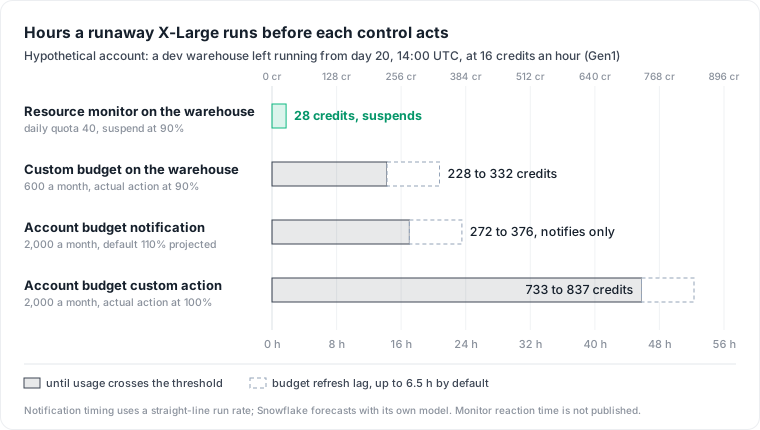
The monitor acts first because it can be tight. A daily quota of 40 is 2.5 times DEV_WH's normal 16 a day, and it still trips within two hours. A monthly budget cannot sit below a normal month, so the custom budget needs 600 against a normal 480, and the runaway has to eat that headroom before anything fires. The account budget is worse: the runaway must eat the whole account's headroom.
Four caveats on the numbers:
- The notification row uses a straight-line run rate (spend so far divided by elapsed time, times the month); Snowflake's forecast may fire earlier or later, and Snowflake sends it as a daily alert, so it can land later still.
- The lag is the documented maximum, not a measured one.
- Snowflake does not publish how fast a monitor reacts after its threshold, and Suspend lets running queries finish, so the monitor's real figure is somewhat above 28.
- The table counts credits until the first stop. A daily monitor resets at 12:00 AM UTC, so a loop that keeps retrying resumes DEV_WH every day and burns up to 36 more credits each day: about 388 by month end if nobody acts on the notifications (28 on day 20, plus 36 a day for days 21 to 30). A custom budget whose action turns auto-resume off holds until the month resets, at 228 to 332. The monitor buys speed and a daily signal. It does not replace someone fixing the job.
Budgets for Cortex and other AI features
This is where budgets have no substitute among the controls compared here. Since the April 10, 2026 release, custom budgets track "AI Functions, Cortex Code, Cortex Agents, and Snowflake CoWork, broken down by the team or cost center consuming them." The shared resources page describes the setup: tag the users with ALTER USER ... SET TAG, call SET_USER_TAGS on the budget, then ADD_SHARED_RESOURCE for each AI feature. The budget then counts only the credits those users consume.
For a hard per-person cap on AI spend, Snowflake now offers per-user quotas, with daily, weekly or monthly limits and a built-in Block action "evaluated within minutes of a spend event". That is the AI-side equivalent of a tight resource monitor, and it is a separate object from a budget.
Set the limit from last month's spend
A limit picked by feel either fires every month or never. Read last month first. This query splits last full month's credits by service type from METERING_DAILY_HISTORY, with credits_billed after the cloud services adjustment:
SELECT service_type,
       SUM(credits_used)   AS credits_used,
       SUM(credits_billed) AS credits_billed
FROM   snowflake.account_usage.metering_daily_history
WHERE  usage_date >= DATE_TRUNC('month', DATEADD(month, -1, CURRENT_DATE()))
  AND  usage_date <  DATE_TRUNC('month', CURRENT_DATE())
GROUP  BY service_type
ORDER  BY credits_billed DESC;
Then size the per-warehouse monitors from each warehouse's month and its worst day, from WAREHOUSE_METERING_HISTORY (latency up to 3 hours):
WITH per_day AS (
  SELECT warehouse_name,
         TO_DATE(start_time) AS usage_day,
         SUM(credits_used)   AS day_credits
  FROM   snowflake.account_usage.warehouse_metering_history
  WHERE  start_time >= DATE_TRUNC('month', DATEADD(month, -1, CURRENT_DATE()))
    AND  start_time <  DATE_TRUNC('month', CURRENT_DATE())
  GROUP  BY warehouse_name, usage_day
)
SELECT warehouse_name,
       SUM(day_credits) AS month_credits,
       MAX(day_credits) AS worst_day
FROM   per_day
GROUP  BY warehouse_name
ORDER  BY month_credits DESC;
A rule of thumb from the worked month: set each daily monitor a little above the warehouse's worst normal day, and the account budget about 10% above last month, with SET_NOTIFICATION_THRESHOLD lowered so the first email comes before the forecast passes 110%. Once a budget runs, GET_SPENDING_HISTORY returns its own daily spend by service type, per the monitoring page. Check what the budgets themselves cost with the SERVERLESS_TASK_HISTORY query on Snowflake's budget costs page.
The strongest objection: custom actions make monitors redundant
The case for budgets only: one object type, every service covered, and procedures that can do more than suspend. With a low latency budget and a tight custom budget per warehouse, the lag drops to an hour.
It still does not close the gap. A custom budget per warehouse eats into the limit of 100, each low latency budget costs 12 times its normal compute, and the monthly period stays: no budget can be tighter than a normal month. Use both. Resource monitors on warehouses, with daily quotas, stop runaways fast. A per-warehouse budget whose action turns auto-resume off sets a monthly ceiling. Budgets also cover what monitors cannot see (serverless, Cortex, teams across objects) and tell you where the month is heading.
Neither answers the question that follows an alert: which job, table or dashboard drove the spend, and whether anyone uses what it produced. The credit attribution runbook gets you per-query cost, and data warehouse cost puts the warehouse in the context of the whole platform bill.
The limits of this guide: the incident is one shape (a single warehouse running away). A slow drift across many objects, which a monitor's daily quota would not catch, favours a budget. Snowflake's forecast and monitor reaction times are not published, so the timings are bounds, not measurements.
Datapace is building one map of your data estate with usage and cost attached, and agents that propose changes as pull requests your team reviews and merges. The aim is that a budget alert names the warehouse, the pipeline and the tables behind the spend. To trace which queries drove last month's credits before you set the first limits, follow the Snowflake cost optimization runbook.
Sources
- Snowflake, Monitor credit usage with budgets (definition, monthly interval, refresh interval, supported services, limits).
- Snowflake, Notifications for budgets (default 110% threshold).
- Snowflake, Custom actions for budgets.
- Snowflake, Feb 24, 2026: User-defined actions for budgets.
- Snowflake, Work with the account budget.
- Snowflake, Custom budgets (tags, backfill, supported objects).
- Snowflake, Working with resource monitors.
- Snowflake, Overview of warehouses (credits per hour by size, auto-resume default) and ALTER WAREHOUSE (
AUTO_RESUME). - Snowflake, Apr 10, 2026: Budgets for AI features and Using budgets for AI features.
- Snowflake, Per-user quotas.
- Snowflake, METERING_DAILY_HISTORY and WAREHOUSE_METERING_HISTORY.
- Snowflake, Monitor budgets and Understand budget costs.
- Espresso AI, Snowflake Budgets Explained.