
TL;DR. The GA4 BigQuery export costs nothing to run, and a year of events costs little to store. In our model of an online store with 1 million sessions a month, storage reaches $6.74 in December and $40.72 for the year. The bill comes from queries. Ten daily queries that filter on the
event_datecolumn scan every table exported so far, so they cost $0 in January and $136.07 in December, $763 over the year. The same queries filtered on_TABLE_SUFFIXto the last 28 days cost $54.72 for the year. In November the store averages 98.6% of the 1 million events a day that standard properties may export, and on Black Friday it sends twice that.
The GA4 BigQuery export is free, and that is why its cost goes unwatched. The bill that grows is the query bill, and it grows with every day of history the export adds. This post prices one store for a year and shows which filter keeps that line flat.
The model uses Google's list prices for BigQuery on-demand, read on November 13, 2026. It is a worked example; nothing here was measured on a real bill. The store and its query habits are hypothetical; the prices and limits are Google's.
Is the GA4 BigQuery export free? Yes, until you query it
Google Analytics charges nothing for the export itself. Google's BigQuery Export guide says "Each export will incur costs on the BigQuery side for storage and processing", and streaming adds "$0.05 per gigabyte of data." The BigQuery free tier covers the first 10 GiB of storage and the first 1 TiB of query data processed each month.
Consider an online store with 1 million sessions a month, 20 events per session, and 50% more sessions in November and 30% more in December. Google estimates that "1 gigabyte equates to approximately 600,000 Google Analytics events, though that number will vary depending on event size", which is about 1,667 bytes per event.
| Input | Value | Where it comes from |
|---|---|---|
| Sessions | 32,877 a day (1 million a month), November +50%, December +30% | Hypothetical |
| Events | 20 per session: 657,534 a day, 986,301 a day in November | Hypothetical |
| Event size | About 1,667 bytes, so 1.02 GiB a day | Google's 600,000 events per GB |
| Queries | 10 a day, each reading columns that hold 20% of the bytes of every table it scans | Hypothetical |
| Prices | Iowa (us-central1): active storage $0.000031507 and long-term $0.000021918 per GiB-hour, queries $6.25 per TiB, free tier deducted | BigQuery pricing |
Over 2026 the store exports 256 million events, 397 GiB. That is enough to leave the BigQuery sandbox behind in about ten days, since the sandbox holds 10 GiB.
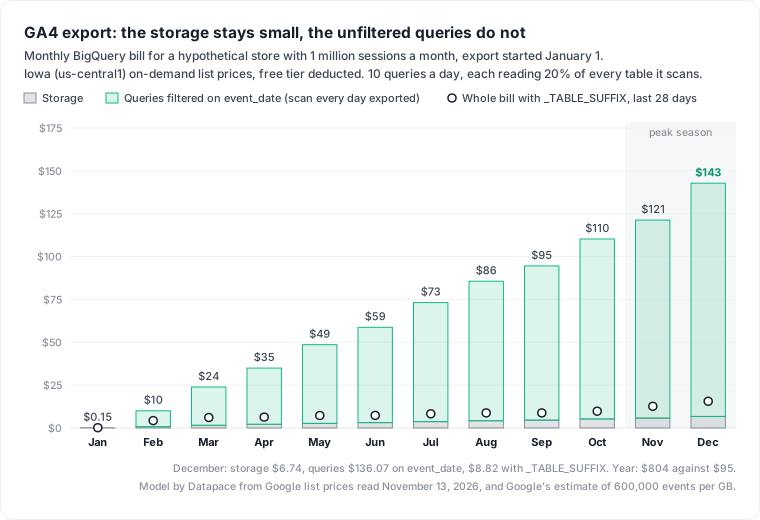
What a year of GA4 events costs to store: $40.72
In Iowa (us-central1), BigQuery bills active logical storage at $0.000031507 per GiB-hour, about $0.023 a GiB-month, and moves any table "that has not been modified for 90 consecutive days" to the long-term rate of about $0.016. GA4 writes one events_YYYYMMDD table per day, and Google says Analytics "will update daily tables for up to 2 calendar days, plus today beyond the date of the table". Each daily table stops changing after three days and turns long-term about 93 days after its date.
| Month | Tables held (GiB, end of month) | Storage bill |
|---|---|---|
| January | 31.6 | $0.15 |
| June | 184.7 | $3.11 |
| November | 356.2 | $5.75 |
| December | 397.3 | $6.74 |
The whole year of storage costs $40.72, the smallest line in this model.
What querying the export costs: $763 a year, or $55 with one filter
BigQuery on-demand bills the bytes a query reads, at $6.25 per TiB after the free TiB. GA4 data sits in daily tables, so most SQL reads events_*. Google's wildcard table guide is precise about what limits the scan: "To restrict a query so that it scans only a specified set of tables, use the _TABLE_SUFFIX pseudocolumn in a WHERE clause with a condition that is a constant expression."
A filter on the event_date column limits the rows returned, not the tables scanned. These two queries return the same 28 days:
-- Reads every events_ table in the dataset: the filter is on a column
SELECT event_name, COUNT(*) AS events
FROM `my-project.analytics_123456789.events_*`
WHERE event_date BETWEEN '20261016' AND '20261112'
GROUP BY event_name;

-- Reads 28 tables: the filter names the tables
SELECT event_name, COUNT(*) AS events
FROM `my-project.analytics_123456789.events_*`
WHERE _TABLE_SUFFIX BETWEEN '20261016' AND '20261112'
GROUP BY event_name;
On December 31 in our model, a query of the first kind reads 79.2 GiB and one of the second kind reads 7.4 GiB. Over a month of 10 queries a day, the gap compounds:
| Month | Queries on event_date | Queries on _TABLE_SUFFIX |
|---|---|---|
| January | 0.93 TiB, $0 | 0.92 TiB, $0 |
| June | 9.90 TiB, $55.61 | 1.67 TiB, $4.22 |
| December | 22.77 TiB, $136.07 | 2.41 TiB, $8.82 |
| Year | $763.32 | $54.72 |
The event_date line has no ceiling. In the second year it keeps growing, because every new table joins every scan. The _TABLE_SUFFIX line follows traffic and nothing else. The ratio of bytes scanned between the two lines does not depend on our 20% column share or our 10 queries; those, and the free TiB, set the dollar amounts.
Two side effects of the wildcard matter here. With streaming export on, events_* also matches the events_intraday_ tables, and a date range on _TABLE_SUFFIX leaves them out. And Google states that "Cached results are not supported for queries against multiple tables using a wildcard", so a dashboard pays for every refresh; our retail data warehouse cost post prices that for a store chain.
Black Friday and the daily export limit: 2 million events against 1 million
Google's setup guide sets the cap: "Standard Google Analytics properties have a BigQuery Export limit of 1 million events for Daily (batch) exports." In November our store averages 986,301 events a day, 98.6% of the cap. On a Black Friday with 100,000 sessions it sends 2 million.
The same guide says what follows: "if a standard property significantly exceeds the one-million-event daily limit, Analytics may pause daily exports immediately", and when the daily export pauses, "previous days' exports will not be reprocessed." The store's busiest day is the day most likely to go missing from its warehouse.
There are three ways out, in order of cost:
- Exclude events you never query. The guide's own advice is to "leverage the data-filtering options (data-stream export and event-exclusion)". Dropping 4 of 20 events per session brings a 1.2 million event day down to 960,000, under the cap, but leaves Black Friday at 1.6 million.
- Turn on streaming export for the season. It has "No volume limits" and costs $0.05 per GB: about $0.17 for the Black Friday day and $2.55 for all of November, Black Friday included. Google calls it a "Best-effort service" that "may contain data gaps", and it leaves out traffic source data for new users and new sessions.
- Upgrade to Analytics 360, whose daily export goes "up to 20B events per day". That is a license decision with its own price.
Cut it in this order: the suffix filter, a daily aggregate, then expiry
Fix the queries first, because that is where the money is. Search scheduled queries and dashboard SQL for events_* without _TABLE_SUFFIX. Run each one as a dry run, which estimates the bytes it would process, and check the estimate matches the days you asked for.
Then build a daily aggregate and point dashboards at it. A scheduled query that summarises the last three days, since Analytics keeps updating a table for two days after its date, reads at most about 124 GiB in December even if it read every byte, inside the free TiB. Dashboards then read a small table, at the 10 MB minimum BigQuery bills per table and per query.
-- Rebuild the last 3 days: GA4 keeps updating a daily table for 2 days after its date
DELETE FROM `my-project.reporting.ga4_daily`
WHERE day >= DATE_SUB(CURRENT_DATE(), INTERVAL 3 DAY);

INSERT INTO `my-project.reporting.ga4_daily` (day, event_name, events, users)
SELECT PARSE_DATE('%Y%m%d', event_date), event_name,
       COUNT(*), COUNT(DISTINCT user_pseudo_id)
FROM `my-project.analytics_123456789.events_*`
WHERE _TABLE_SUFFIX BETWEEN FORMAT_DATE('%Y%m%d', DATE_SUB(CURRENT_DATE(), INTERVAL 3 DAY))
                        AND FORMAT_DATE('%Y%m%d', DATE_SUB(CURRENT_DATE(), INTERVAL 1 DAY))
GROUP BY 1, 2;
For a partitioned copy of the raw events instead of an aggregate, our BigQuery partitioning post prices when partitioning pays.
Expire raw tables last, and only on purpose. In December, keeping 90 days of tables instead of the whole year cuts storage from $6.74 to $2.39, a saving of $4.35. It cannot be undone: Google says "Once you export data from Analytics to BigQuery, you cannot re-export it." BigQuery's dataset guide adds a trap: if you change the default from Never, "any tables that already exist in the dataset won't expire". The same rule catches sandbox users, whose tables "automatically expire after 60 days"; after upgrading, Google says they "should update the default expiration times for your BigQuery resources such as tables, views, and partitions."
The strongest objection is that none of this matters at this size. Daasity's GA4 export guide says "a mid-sized brand that works with Daasity paid less than $5 last month for storage and less than $5 for a month's worth of analysis." Our model agrees for the first two months. The point is the slope: the event_date line gains about $12 a month from February to October, and it multiplies with each dashboard and analyst who copies the query.
Where this model stops
The model uses on-demand pricing at the Iowa (us-central1) rates on Google's page, logical storage, 30 or 31 day months and Google's average event size. It does not price physical storage billing, BigQuery editions (our on-demand vs editions post covers when slots win), Looker Studio, or data leaving BigQuery. In the US multi-region, long-term storage is cheaper ($0.000027397 and $0.000013699 per GiB-hour), which brings December storage to $4.82 and the year to $30.54; query prices are the same. Your events may be larger or smaller than Google's estimate; the dry run tells you.
A query filtered on the wrong column looks like any other analysis line on the bill. Datapace is building one map of your data estate (databases, warehouses, pipelines and what consumes them) with usage and cost attached, and agents that propose changes as pull requests your team reviews and merges, such as moving a scheduled query from event_date to _TABLE_SUFFIX. For the cross-platform view of the same bill, read our data warehouse cost comparison, or book a call to look at your own export.
Sources
- Google Analytics Help, BigQuery Export (export types, streaming price, events per GB, table updates, no re-export), read November 13, 2026.
- Google Analytics Help, Set up BigQuery Export (the 1 million event cap, pausing, data filtering), read November 13, 2026.
- Google Analytics Help, BigQuery Export schema (dataset and table names, event_date).
- Google Cloud, BigQuery pricing (storage and on-demand rates, free tier, 10 MB minimum), read November 13, 2026.
- Google Cloud, Query multiple tables using a wildcard table, Update dataset properties and BigQuery sandbox.
- Daasity, Exporting data from GA4 to BigQuery.