TL;DR. Snowflake access history can tell you which tables nobody reads, but the obvious query gets the list wrong. Snowflake logs a
MERGEas a read query, so a staging table whose only reader is its loader can look used, and reads by data sharing consumers never reach the provider'sACCOUNT_USAGEview. This runbook filters out a table's own loads, joinsTABLE_STORAGE_METRICSto price each unread table, adds the credits its pipeline still burns, and shows why the drop itself can bill for 97 more days. In the worked example below, the naive query finds 4.8 TB of unread data; the filtered one finds 8.8 TB.
Snowflake access history is the ACCESS_HISTORY view in SNOWFLAKE.ACCOUNT_USAGE: one row per query, with the tables and columns it read and the ones it wrote. That is enough to answer the cost question behind it, which tables are billed every month while no person, dashboard or job reads them. The credit attribution runbook uses the same view to rank tables by retained bytes. This post is the unused-data side: getting the "never read" list right, pricing it, and dropping it without surprises.
Everything below comes from Snowflake's documentation, read November 11, 2026. The queries follow the documented columns but were not run against a live account for this post, and the account in the figure is a worked example, not a measurement.
What Snowflake access history records, and what it misses
The ACCESS_HISTORY reference covers "the last 365 days (1 year)", with "latency for the view may be up to 180 minutes (3 hours)". The feature itself "requires Enterprise Edition (or higher)". Three columns matter here:
direct_objects_accessed: what the SQL named, a view for example.base_objects_accessed: the tables behind it. A query on a view records the base table here, per Snowflake's access history guide.objects_modified: what the query wrote.
Read base_objects_accessed, not direct_objects_accessed. A table read only through a view never appears in the direct column, so a direct-only query flags it as unused.
Four gaps decide whether the list can be trusted:
- Loads can count as reads. Snowflake's read notes include "DML operations that read data (e.g. contains a SELECT subquery, specifies certain columns in WHERE or JOIN): INSERT ... SELECT, UPDATE, DELETE, and MERGE." A
MERGE INTO tmatches ont's key columns, so it can recordtas read on every run. - Share consumers are invisible. "The queries on the data share executed in the consumer account are logged and only visible to the consumer account, not the Data Sharing provider account." A table you share can be read every day and show no read in your account's view. (The reference notes an
accountNamefield for the consumer account in theORGANIZATION_USAGEversion of the view only.) - Not every query lands. Snowflake says plainly that "Records in the QUERY_HISTORY view do not always get recorded in the ACCESS_HISTORY view", depending on the statement's structure.
- Some writers leave no DML row. For dynamic tables, the supported objects table says "Support for DML is only for the
ALTER DYNAMIC TABLE ... REFRESHcommand." Snowflake documents no DML record for scheduled refreshes, so do not count on seeing them as writes.
Find tables nobody read in 90 days, excluding their own loads
The fix for the first gap is structural: a query that writes a table does not count as a reader of that table. The query below flattens reads and writes per query, discards any read whose query also modified the same object, then anti-joins what is left to storage.
SET price_per_tb = 23.00;  -- your contract's storage rate per TB-month

WITH ah AS (
  SELECT query_id, query_start_time, user_name,
         base_objects_accessed, objects_modified
  FROM   snowflake.account_usage.access_history
  WHERE  query_start_time >= DATEADD(day, -90, CURRENT_TIMESTAMP())
), read_refs AS (
  SELECT ah.query_id, ah.query_start_time, ah.user_name,
         r.value:"objectName"::STRING AS fq_name
  FROM   ah, LATERAL FLATTEN(input => ah.base_objects_accessed) r
), write_refs AS (
  SELECT ah.query_id, w.value:"objectName"::STRING AS fq_name
  FROM   ah, LATERAL FLATTEN(input => ah.objects_modified) w
), real_reads AS (
  SELECT r.fq_name,
         MAX(r.query_start_time)     AS last_read,
         COUNT(DISTINCT r.user_name) AS readers
  FROM   read_refs r
  LEFT   JOIN write_refs w
         ON w.query_id = r.query_id AND w.fq_name = r.fq_name
  WHERE  w.query_id IS NULL           -- a table's own load is not a reader
  GROUP  BY r.fq_name
), storage AS (
  SELECT CONCAT_WS('.', table_catalog, table_schema, table_name) AS fq_name,
         SUM(active_bytes) / POWER(2, 40) AS active_tb,
         SUM(time_travel_bytes + failsafe_bytes + retained_for_clone_bytes)
           / POWER(2, 40) AS retained_tb
  FROM   snowflake.account_usage.table_storage_metrics
  GROUP  BY 1
  HAVING MAX(IFF(deleted, 0, 1)) = 1  -- a current version still exists
)
SELECT s.fq_name,
       ROUND(s.active_tb, 3) AS active_tb,
       ROUND(s.retained_tb, 3) AS retained_tb,
       ROUND((s.active_tb + s.retained_tb) * $price_per_tb, 2) AS usd_per_month
FROM   storage s
LEFT   JOIN real_reads r ON r.fq_name = s.fq_name
WHERE  r.fq_name IS NULL
ORDER  BY usd_per_month DESC;
Three choices in it are deliberate:
- Join on names, not IDs.
TABLE_STORAGE_METRICSsays a version is created "each time a table is dropped and a new table with the same name is created, including when a CREATE OR REPLACE TABLE command is issued". A table rebuilt nightly gets a new ID every night, and last week's reads hit last week's ID. Test the name match on one table you know is read before trusting the output, since quoted or mixed-case names can differ between the two views. - Price every byte, not only active ones. The view keeps "Bytes retained for clones" separate from Time Travel and Fail-safe, and all of them are billed.
- One read is enough to keep a table off the list. A table read once a quarter by the finance close is not waste, so 90 days is a floor. For anything large, rerun with 365 days, the most the view holds.
The same filter has a second-order use. A job that reads table A only to write table B is a real reader of A, but if B has no reader, A is feeding dead data. Drop the chain from the end: retire B, then rerun the query.
Snowflake's own insight looks at one week
Snowflake already flags some of this. Its Optimization insights, "calculated and refreshed weekly", include "Large tables that are never queried", which "identifies large tables that have not been queried in the last week by this account", and "Tables over 100 GB from which data is written but not read".
Use the insight as a prompt, not as the decision. One week is too short: a table read only at month-end close shows as never queried in three weeks out of four. The written-but-not-read insight may catch the loader problem above, if it treats a table's own MERGE as a write only (Snowflake does not say how it decides), and it covers only tables over 100 GB. The 90-day query covers every size and gives a dollar figure per table.
What an unread Snowflake table costs: storage plus its pipeline
Storage is the visible part. Snowflake's Service Consumption Table (Table 3(a), effective November 9, 2026) prices on-demand storage in AWS US East (Northern Virginia) at $23.00 per TB-month, and the monthly charge "is based on the average calculated across the number of calendar days in that month". Time Travel and Fail-safe bytes count, which is why a table that churns can bill several times its active size, as the retained-bytes formula in the attribution runbook shows.
Consider a hypothetical account with seven tables and 22.0 TB billed:
| Table | Reader in 90 days | Active | Time Travel + Fail-safe | Billed | Per month |
|---|---|---|---|---|---|
| SALES.ORDERS | dashboards | 3.2 TB | 1.4 TB | 4.6 TB | $105.80 |
| WEB.EVENTS | analysts | 5.0 TB | 1.6 TB | 6.6 TB | $151.80 |
| FINANCE.GL_SNAPSHOTS | month-end close job | 2.0 TB | 0 | 2.0 TB | $46.00 |
| STAGING.CRM_CONTACTS | only its own nightly MERGE | 0.8 TB | 3.2 TB | 4.0 TB | $92.00 |
| ARCHIVE.EVENTS_2023_COPY | none | 3.5 TB | 0 | 3.5 TB | $80.50 |
| ML.FEATURES_V1 | none | 1.2 TB | 0 | 1.2 TB | $27.60 |
| DEV.ORDERS_CLONE | none | 0.1 TB | 0 | 0.1 TB | $2.30 |
STAGING.CRM_CONTACTS is a permanent table with 1-day Time Travel whose MERGE rewrites 0.4 TB a day: 0.4 TB in Time Travel plus 7 × 0.4 = 2.8 TB in Fail-safe. Each per-month figure is billed TB × $23.00.
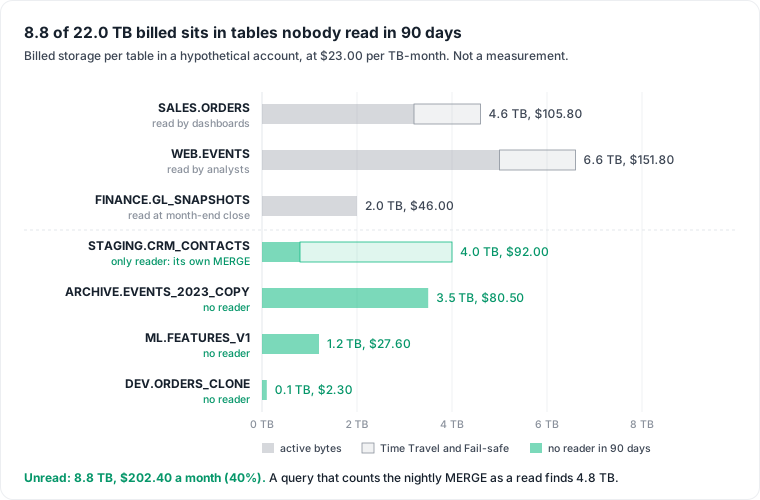
The unread tables hold 8.8 of 22.0 TB, $202.40 of $506.00 a month, or 40%. The naive query, counting the MERGE as a read, finds 4.8 TB and $110.40. The table it misses is the most expensive of the four.
DEV.ORDERS_CLONE shows the clone rule. "Storage bytes are always owned by, and therefore billed to, the table where the bytes were initially added", so a clone bills only the bytes it changed. Dropping it saves $2.30 a month once its Time Travel and Fail-safe days run out. Dropping the source while the clone lives keeps the shared bytes billed as retained for clones.
Price the load that writes nobody's data
Writes are not reads, and they cost credits. The nightly MERGE into STAGING.CRM_CONTACTS runs on a warehouse every day. Join the unread list to QUERY_ATTRIBUTION_HISTORY through objects_modified:
WITH writes AS (
  SELECT DISTINCT ah.query_id, w.value:"objectName"::STRING AS fq_name
  FROM   snowflake.account_usage.access_history ah,
         LATERAL FLATTEN(input => ah.objects_modified) w
  WHERE  ah.query_start_time >= DATEADD(day, -30, CURRENT_TIMESTAMP())
)
SELECT w.fq_name,
       COUNT(*)                          AS write_queries_30d,
       SUM(q.credits_attributed_compute) AS load_credits_30d
FROM   writes w
JOIN   snowflake.account_usage.query_attribution_history q
       ON q.query_id = w.query_id
WHERE  w.fq_name IN ('ANALYTICS.STAGING.CRM_CONTACTS')  -- fully qualified names from the first query
GROUP  BY 1
ORDER  BY load_credits_30d DESC;
If that MERGE were attributed 0.6 credits a run, it would cost 18 credits a month on top of the $92.00 of storage; multiply by your rate from Snowflake pricing. The number is a floor. The view "doesn't include warehouse idle time", leaves out queries of about 100 ms or less, and has up to eight hours of latency. A query that writes two tables is counted under both. The extraction tool that feeds the table bills outside Snowflake entirely, the part of the data pipeline cost a warehouse view never sees.
Before you drop it: shares, dependents, owners and the retention tail
The list is a candidate list. Work through these before any DROP:
- Check shares. Run
SHOW SHARES, thenSHOW GRANTS TO SHARE <name>for each outbound share. Consumer reads are not in your access history, so a shared table is not proven unread. - Check dependents.
OBJECT_DEPENDENCIESlists views that reference the table throughREFERENCED_OBJECT_NAME. A view nobody reads is not a reason to keep it; a view a dashboard reads is. - Find the owner.
TABLE_OWNERinACCOUNT_USAGE.TABLESnames the owning role. Ask before you drop. Snowflake's insights page gives the same warning: check whether a table exists "solely for disaster recovery purposes or for use by other Snowflake accounts through data sharing". - Quarantine for one reading cycle. Revoke
SELECTor rename the table and wait through a month-end. A broken report finds the owner faster than any query. The wait has a price: ARCHIVE.EVENTS_2023_COPY bills $80.50 for the month. - Set retention, then drop. The next section prices why.
Set retention before the drop, or pay for 97 more days
A dropped table stays billed. Per DROP TABLE, it is kept in Time Travel for the table's retention period, and "a permanent table moves into Fail-safe. In Fail-safe (7 days), a dropped table can be recovered, but only by Snowflake." The setting that counts is the table's own at drop time: "Changing the Time Travel retention period for the account or for a parent object (a database or a schema) after you drop a table doesn't change the Time Travel retention period for the dropped table."
On Enterprise Edition, Time Travel for permanent tables "can be set to any value from 0 up to 90 days". Suppose ARCHIVE.EVENTS_2023_COPY sits in a schema set to 90 days. With a 30-day month as the approximation:
| Before the drop | Days billed after the drop | Cost after the drop | UNDROP window |
|---|---|---|---|
| Schema default, 90 days | 90 + 7 = 97 | 3.5 × $23.00 × 97 / 30 = $260.28 | 90 days |
| Table set to 1 day | 1 + 7 = 8 | 3.5 × $23.00 × 8 / 30 = $21.47 | 1 day |
ALTER TABLE archive.events_2023_copy SET DATA_RETENTION_TIME_IN_DAYS = 1;
DROP TABLE archive.events_2023_copy;
Dropping a 3.5 TB table at 90 days of retention costs more than three months of keeping it. Shortening retention first trades away the recovery window. UNDROP works only while the table is in Time Travel, so the quarantine step is what makes a 1-day window safe. Check MIN_DATA_RETENTION_TIME_IN_DAYS too: when set at the account level, the effective period is "MAX(DATA_RETENTION_TIME_IN_DAYS, MIN_DATA_RETENTION_TIME_IN_DAYS)".
On Standard Edition, search QUERY_HISTORY and expect gaps
Without Enterprise Edition there is no ACCESS_HISTORY. The fallback is QUERY_HISTORY, which also keeps 365 days, matched on query text:
SELECT t.table_catalog || '.' || t.table_schema || '.' || t.table_name AS fq_name,
       MAX(q.start_time) AS last_mention
FROM   snowflake.account_usage.tables t
LEFT   JOIN snowflake.account_usage.query_history q
       ON  q.start_time >= DATEADD(day, -90, CURRENT_TIMESTAMP())
       AND q.query_type = 'SELECT'   -- check SELECT DISTINCT query_type first
       AND CONTAINS(UPPER(q.query_text), t.table_name)
WHERE  t.deleted IS NULL AND t.table_type = 'BASE TABLE'
GROUP  BY 1
HAVING MAX(q.start_time) IS NULL;
It is weaker in five ways. Espresso AI's version of this script lists two: "Tables accessed through views or stored procedures will not be detected", and "Tables mentioned in comments or unused CTEs might appear as 'used'". Short table names match across schemas. And without the query_type filter, the loader's own MERGE text matches too, the same trap as above. The query_type filter that hides the loader also hides pipeline reads such as INSERT ... SELECT and CREATE TABLE AS SELECT, so a table read only by another job shows as unused. Treat the output as a shortlist to check by hand.
The strongest objection: storage is cheap
Snowflake's own storage considerations say that "storage in Snowflake is inexpensive", and the example agrees: $202.40 a month is small next to a warehouse that never suspends. For many accounts, the unread-table audit is not the first lever.
Two things change that. The load costs credits every day the table is written, which can exceed its storage. And unread data spreads: a dead table feeds a dead view, which feeds a dashboard nobody opens, the same pattern Power BI usage metrics show on the BI side and S3 storage cost shows in the data lake. Run the query once a quarter, act on the few rows where the dollars are real, and leave the rest.
Datapace is building one map of your data estate with usage and cost attached, and agents that propose changes as pull requests your team reviews and merges. On that map, a table with no reader sits next to the pipeline that loads it and the bill it adds. To go through your own unread-table list, book a call.
Sources
- Snowflake, ACCESS_HISTORY view (365 days, 3-hour latency, read and write notes, data sharing notes).
- Snowflake, Access History (base vs direct objects, supported objects).
- Snowflake, TABLE_STORAGE_METRICS view (byte categories, versions, clone ownership).
- Snowflake, Using Optimization insights to save.
- Snowflake, Service Consumption Table, effective November 9, 2026 (Table 3(a), standard storage pricing).
- Snowflake, QUERY_ATTRIBUTION_HISTORY view.
- Snowflake, DROP TABLE and UNDROP TABLE.
- Snowflake, Understanding and using Time Travel.
- Snowflake, OBJECT_DEPENDENCIES view and SHOW GRANTS.
- Snowflake, QUERY_HISTORY view.
- Snowflake, Data storage considerations.
- Espresso AI, A script to find and delete unused Snowflake tables without Enterprise access history.