
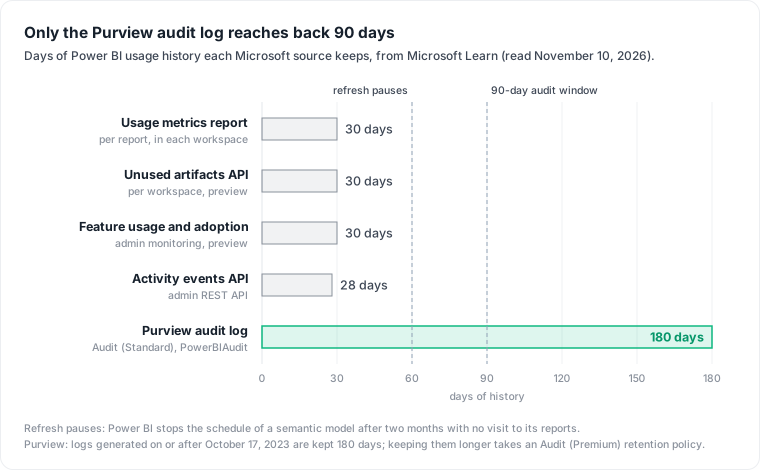
TL;DR. Power BI usage metrics cannot tell you which reports and seats went unused for 90 days: the usage metrics report keeps 30 days, the admin activity API accepts only the last 28, and the admin unused-items API looks back 30. The Purview audit log keeps Power BI events for 180 days, so a 90-day audit can run today instead of after 90 days of daily exports. This runbook pulls that log, finds reports nobody opened and Pro seats nobody used, and prices both: $14 a month per seat at list price, plus the warehouse queries an orphaned import model keeps running for up to two months.
Power BI usage metrics show who opened a report in the last 30 days, which is too short to call a seat or a report unused. For prices and plans, Power BI pricing covers Pro, PPU and Fabric. This post is the audit behind it: which source holds 90 days of history, the joins that turn events into a list of seats and reports, and what each item on that list costs.
Everything below comes from Microsoft's documentation, read November 10, 2026. The scripts follow the documented cmdlets and APIs but were not run against a live tenant, and the tenant numbers are a worked example, not a measurement.
What Power BI usage metrics show, and the 30-day limit
The usage metrics report answers one question per report: who opened it, how often, from where. Microsoft states the window plainly: "The Usage Metrics Report semantic model contains usage data for the last 30 days only. Data older than 30 days is automatically removed."
The report also hides the thing you are looking for. Microsoft's FAQ on the same page says the improved report "only includes reports that have been opened in the past 30 days." A report nobody opened does not appear as a zero; it is missing. You also need admin, member or contributor rights on each workspace to open it, and a Pro or PPU license.
The tenant-wide options have the same horizon:
| Source | History | Scope |
|---|---|---|
| Usage metrics report | 30 days | one workspace at a time |
| Get Unused Artifacts as Admin (preview) | 30 days, fixed | one workspace per call |
| Feature usage and adoption report (preview) | 30 days | tenant |
| Get Activity Events admin API | last 28 days, one UTC day per call | tenant |
| Purview unified audit log, Audit (Standard) | 180 days | tenant, all Microsoft 365 services |
Microsoft notes that the feature usage report "remains in preview, won't become GA, and won't be expanded with additional data."
Pull 180 days of Power BI activity from the Purview audit log
The usual advice is to start a daily export of the activity log and wait 90 days. That advice predates a change in Purview. Microsoft's audit overview says: "Audit (Standard) logs generated on or after October 17, 2023, follow the new default retention of 180 days." Power BI events land there as the PowerBIAudit record type (Management Activity API schema).
Microsoft's own Power BI auditing guide is out of date on this point. Its tenant-level auditing guidance still says "The most recent 90 days of history are available with Audit (Standard)." The Purview pages are the authority on Purview retention, and they say 180. If your tenant's audit search returns less, trust the search result over either page.
One more conflict to check: the same guide says Search-UnifiedAuditLog retrieves "a maximum of 90 days of history." Run the search for a single day 170 days ago first. If it returns records, you have the full 180 days; if not, you still have 90, which is enough for the audit below, just without the quarterly hold check.
There are two costs to this route. Searching the log needs the Audit Logs role in Exchange Online (Track user activities in Fabric), and the auditing guide warns that "By default, Power BI administrators don't have permission to access the unified audit log search." The Search-UnifiedAuditLog cmdlet also pages: ResultSize stops at 5,000 per call, and one session with ReturnLargeSet reaches "a maximum of 50,000 results." Searching one day per session usually stays under that cap; if a day returns 50,000 records, split it into shorter windows.
- Export 180 days, one UTC day per session, from Exchange Online PowerShell:
Connect-ExchangeOnline
$today = (Get-Date).ToUniversalTime().Date
$events = foreach ($d in 1..180) {
  $start = $today.AddDays(-$d)
  do {
    $page = Search-UnifiedAuditLog -StartDate $start -EndDate $start.AddDays(1) `
      -RecordType PowerBIAudit -SessionId "pbi-$d" `
      -SessionCommand ReturnLargeSet -ResultSize 5000
    $page | ForEach-Object { $_.AuditData | ConvertFrom-Json }
  } while ($page.Count -eq 5000)
}
$events | Select-Object CreationTime, UserId, Operation, WorkSpaceName, ReportName, ReportId, DatasetName, DatasetId |
  Export-Csv pbi-audit-180d.csv -NoTypeInformation
- Open one record and check which fields it carries. The Power BI schema for audit records documents
ReportName,DatasetNameandWorkSpaceName; the activity events API sample also showsReportIdandDatasetId. Join on the IDs when they are present, and on workspace plus name when they are not. - Keep the file. Rerun it monthly and append, and the next audit can look back further than 180 days.
Find reports nobody opened in 90 days
The audit log only lists events, so a report nobody opened leaves no trace in it. The inventory comes from the admin APIs: Get Reports As Admin returns every report in the organization with its datasetId, and Get Datasets As Admin returns each model's isRefreshable flag. Both allow "Maximum 50 requests per hour or 5 requests per minute, per tenant," so page with $top and $skip rather than calling per workspace.
- Pull both lists once and save them.
- From the audit file, take the latest
ViewReportevent per report. - Mark each report: opened in the last 90 days, opened between day 91 and day 180 (hold), or not opened in 180 days (candidate).
- Group the candidates by
datasetId. A model whose every report is a candidate and whoseisRefreshableis true is an import model nobody reads. Microsoft defines the flag as true when the model "is either recently refreshed or is configured for automatic refresh," in Import mode only. - For those models, read the schedule with Get Refresh Schedule In Group. If
enabledis true, the model is still refreshing, and thedaysandtimesarrays give you refreshes per week: this is the cost to stop. If it is false, nothing is refreshing now. Archive the model anyway, because the next visit restarts the schedule for another two months.
Do not open a candidate report to check it. Power BI pauses the schedule of a model nobody visits, and the data refresh docs say that "To resume scheduled refresh, visit a report or dashboard built using this semantic model." One look from the person running the audit restarts the refresh. Read the metadata instead, or ask the owner.
Find Pro seats nobody uses: count any activity, not only views
The license list comes from Microsoft Graph. The Power BI Pro SKU is POWER_BI_PRO, ID f8a1db68-be16-40ed-86d5-cb42ce701560, and Premium Per User is PBI_PREMIUM_PER_USER, ID c1d032e0-5619-4761-9b5c-75b6831e1711 (license service plan reference). Graph's list users call filters on assignedLicenses/any(u:u/skuId eq ...).
Connect-MgGraph -Scopes User.Read.All
$pro = Get-MgUser -All -Property UserPrincipalName `
  -Filter "assignedLicenses/any(x:x/skuId eq f8a1db68-be16-40ed-86d5-cb42ce701560)"
$audit = Import-Csv pbi-audit-180d.csv
$last = @{}
foreach ($e in $audit) {
  $t = [datetime]$e.CreationTime
  if (-not $last[$e.UserId] -or $t -gt $last[$e.UserId]) { $last[$e.UserId] = $t }
}
$cut90 = (Get-Date).AddDays(-90)
$pro | ForEach-Object {
  $seen = $last[$_.UserPrincipalName]
  [pscustomobject]@{ User = $_.UserPrincipalName; LastActivity = $seen
    Status = if (-not $seen) { 'reclaim' } elseif ($seen -lt $cut90) { 'hold' } else { 'active' } }
} | Export-Csv pro-seats.csv -NoTypeInformation
Last activity of any kind, not last view, decides a seat. The Fabric operation list logs AnalyzeInExcel when someone builds an Excel workbook on a model, ExportReport for exports, and CreateEmailSubscription for subscriptions. An analyst who works mostly through Excel may log few or no ViewReport events, and a views-only filter would flag them.
Two more checks before the list is final:
- E5 holders. Microsoft's licensing guide says "Power BI Pro is included in Microsoft 365 E5." A standalone Pro on an E5 user is a duplicate, whatever the activity.
- Readers on F64 or larger. Microsoft's Fabric licensing page says: "On F64 or larger, users with only a Free license and a viewer role can view Power BI content." A Pro holder who only views content there has a seat that is used but not needed. Power BI pricing works out when that capacity pays. The
CapacityIdfield shows where a view happened, but the operation list warns it "will return null if the report or dashboard is viewed from a Power BI app," so app views need a workspace lookup.
What an unused report still costs: $14 a seat and a refresh that runs for two months
Seats are the easy part to price. A Pro seat lists at "$14.00 user/month, paid yearly" on Microsoft's pricing page, and a Premium Per User seat at "$24.00 user/month, paid yearly".
Consider a hypothetical tenant with 400 Pro seats, no E5, and content on shared capacity. Assume the export splits it like this:
| Step | Users | Monthly list cost |
|---|---|---|
| Pro licenses in Graph | 400 | 400 x $14 = $5,600 |
| Any Power BI activity in the last 90 days | 352 | kept |
| No activity in 90 days | 48 | |
| ...but activity between day 91 and day 180 | 10 | held, likely quarterly |
| No activity in 180 days | 38 | 38 x $14 = $532 |
In this example, reclaiming the 38 seats saves $532 a month, $6,384 a year, 9.5% of the Pro bill. The split is an assumption; the arithmetic is the method.
The report side costs less per item but runs without anyone noticing. Consider an orphaned import model whose refresh query scans 150 GiB in BigQuery, scheduled eight times a day, the maximum on shared capacity. That is 1,200 GiB a day, or 1.17 TiB. At BigQuery's on-demand rate in US regions, "$6.25 / 1 tebibyte" (BigQuery pricing), it costs $7.32 a day.
Power BI caps that tail, but late. The data refresh docs say: "After two months, when no user has visited any dashboard or report (including via an app or embedded scenario) built on the semantic model, Power BI considers the semantic model inactive," and the service pauses the schedule. At $7.32 a day, 60 days of refreshes (about two months) cost $439.45 before the pause. On a Premium, PPU or Fabric capacity the schedule allows up to 48 refreshes a day, six times as many, and the same model would cost $43.95 a day on the warehouse, $2,636.72 over 60 days. Every stray visit restarts the clock.
These figures ignore BigQuery's free first TiB per month and assume every refresh scans the full 150 GiB. A model with one live report on it never pauses and is not waste; the audit only targets models whose reports are all unread. For how BI refreshes show up on the warehouse bill elsewhere, see cloud waste in data infrastructure and BigQuery on-demand vs editions.
Keep quarterly readers, Excel users and embedded reports
The strongest objection to this audit is that it costs more than it saves. The Audit Logs role is granted in Exchange Online, outside the Power BI admin portal, and the 38 seats in the example save $532 a month. For a 40-seat tenant the honest answer is often to skip it and review seats at renewal. The case for running it is that the script runs again every quarter at no extra cost, and the refresh tail does not show up on the Power BI bill at all; it shows up on the warehouse bill, where nobody connects it to a report.
What to hold back from any cut list:
- Quarterly and year-end readers. A 90-day window misses a reader who opens the Q4 pack once a year. The 180-day file catches quarterly use; yearly use needs your own archive.
- Excel and export users. Anyone with
AnalyzeInExcelorExportReportevents is a user, whatever the view count says. - Embedded reports. Visits through an app or an embedded scenario count as visits and keep the model's refresh running, and the usage metrics report splits views by platform (PowerBI.com, Mobile, Embedded). Check the platform before calling a report dead.
- Owners' notice. Send the list to report owners and managers before removing a license or a report.
Tableau pricing runs the same seat audit for Tableau, where Tableau Cloud suspends full extract refreshes that run more often than weekly once a workbook has been inactive for 32 days, and Looker pricing does it for Looker's unused content.
Datapace is building one map of your data estate with usage and cost attached, and agents that propose changes as pull requests your team reviews and merges. Each report, its semantic model, its refresh schedule and the warehouse queries behind it belong on that map, priced together. To price the seats first, start with Power BI pricing.
Sources
- Microsoft Learn, Monitor usage metrics in Power BI workspaces, read November 10, 2026.
- Microsoft Learn, Admin - Get Activity Events, Admin - Groups GetUnusedArtifactsAsAdmin, Get Reports As Admin, Get Datasets As Admin and Get Refresh Schedule In Group.
- Microsoft Learn, Feature usage and adoption report, Track user activities in Microsoft Fabric and Operation list.
- Microsoft Learn, Learn about auditing solutions in Microsoft Purview, Search-UnifiedAuditLog and Office 365 Management Activity API schema.
- Microsoft Learn, Power BI implementation planning: Tenant-level auditing.
- Microsoft Learn, Product names and service plan identifiers for licensing, List users (Microsoft Graph) and Power BI licensing guide for organizations.
- Microsoft Learn, Data refresh in Power BI.
- Microsoft, Power BI pricing, read November 10, 2026.
- Google Cloud, BigQuery pricing, read November 10, 2026.