
TL;DR. A Snowflake adaptive warehouse bills the queries it runs instead of the time a warehouse is up, so it removes idle credits and can charge more per query. Divide a standard warehouse's compute credits by its credits attributed to queries: that ratio is the per-query premium Adaptive can absorb before it costs more. Capital One measured a premium of 48% on sub-minute queries, so a warehouse of short queries needs about a third of its credits to be idle before Adaptive breaks even. Queries over a minute used 5% to 40% fewer credits per query, so they pass at any idle share.
A Snowflake adaptive warehouse costs less than a standard warehouse when the idle credits it removes are worth more than the extra credits it charges per query. Both numbers already sit in your ACCOUNT_USAGE views, so you can sort your warehouses before converting any of them. The test is one ratio: compute credits divided by the credits Snowflake attributes to queries. If Adaptive's per-query premium for that warehouse's mix is below the ratio, convert it; if not, keep it standard. The rest of this post derives the ratio, prices it with the public benchmarks, and gives the SQL.
Adaptive bills queries; standard warehouses bill uptime
Snowflake made Adaptive Warehouses generally available on Enterprise Edition and higher, in selected AWS, Azure and Google Cloud regions, per its Adaptive Compute documentation. You stop choosing a size, multi-cluster settings, Query Acceleration settings and "suspend and resume policies". The two dials left are MAX_QUERY_PERFORMANCE_LEVEL (default XLARGE) and QUERY_THROUGHPUT_MULTIPLIER (default 2).
The billing difference is in Snowflake's Service Consumption Table, effective November 20, 2026. A standard warehouse uses credits "while the applicable Virtual Warehouse or Compute Node is in operation", with a one-minute minimum at each start or resume, then per second. For Adaptive, "Platform Credits will be consumed when queries run on Adaptive Warehouse."
| Standard Gen1 | Standard Gen2 | Adaptive | |
|---|---|---|---|
| What you set | Size, clusters, auto-suspend | Same as Gen1 | Max performance level, throughput multiplier |
| What is billed | Uptime, per second, 60 s minimum per start | Same as Gen1 | Credits "when queries run" |
| Published rate | 1 credit an hour (X-Small), doubling per size | 1.35 an hour on AWS and GCP, 1.25 on Azure (X-Small) | None: Table 1(e) gives no rate |
| Per-query cost view | QUERY_ATTRIBUTION_HISTORY | Same as Gen1 | QUERY_METERING_HISTORY |
| Idle credits | Yes, until auto-suspend | Yes | Not billed as such |
The third row matters most. Table 1(e) says Adaptive consumption "scales based on factors like compute usage, software optimizations, and active queries" and publishes no number. You cannot price an adaptive warehouse in advance; you can only measure it. That is why the test below starts from your current bill.
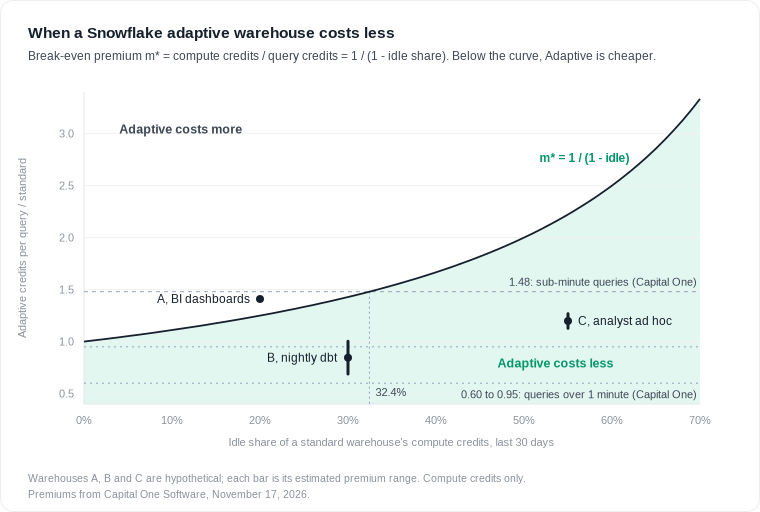
The break-even: Adaptive pays when compute credits divided by query credits beat its premium
Split a standard warehouse's monthly compute credits C into two parts. Q is what WAREHOUSE_METERING_HISTORY reports as CREDITS_ATTRIBUTED_COMPUTE_QUERIES, a column Snowflake says "doesn't include warehouse idle time usage". The rest, C minus Q, is idle: the auto-suspend tail, the 60-second minimums, and the minutes a cluster runs between queries.
Adaptive bills roughly Q times m, where m is its credits per query divided by the standard warehouse's attributed credits for the same query. It costs less when Q × m is below C, so:
- Break-even premium: m* = C / Q. A warehouse with 20% idle has m* = 1.25. One with 50% idle has m* = 2.
- Estimated premium: m, from the query mix. Weight each duration tier's measured premium by its share of Q.
- Convert only where m is below m*.
Snowflake's own QUERY_ATTRIBUTION_HISTORY notes explain what Q leaves out: "Time before the first query or after the last query in a minute, and minutes in which no queries run, are idle time and aren't attributed." That idle is what Adaptive removes, and it is the only thing that can pay for a premium.
What the public tests say the premium is
No one has published m for your queries, but four tests bound it. Their results differ by workload, and the differences line up with idle time and query length.
| Test | Workload | What it found on cost |
|---|---|---|
| Capital One Software, Nov 17, 2026 | Over 11 million production runs on each side | Sub-minute queries: "credit consumption per query increased by 48%". Over 1 minute: credits per query "dropped between 5% to 40%". Fleet: about 15% fewer credits per query |
| Altimate, one customer's 10-warehouse pilot | Ten warehouses in one customer's account, each compared to its own history | Three of nine measurable warehouses got cheaper; a dev sandbox cost "nearly 4x" |
| SELECT, May 2026, public preview | TPC-H, five workload shapes, Gen1 vs Adaptive | On a warehouse kept busy back to back, Gen1 was cheaper from X-Small through Large; on a pruned DML refresh, Adaptive stayed near Small cost even at an XLarge cap |
| Espresso AI, April 2026, public preview | Sparse queries on separate X-Small warehouses | Adaptive cost more; the authors saw "still some sort of billing minimum" |
All four authors sell Snowflake cost or optimization tools. Capital One measured its own production; the others tested a customer's account or a benchmark. Capital One gives the only tiered numbers, so the model below uses them: m = 1.48 for queries under a minute, and m between 0.60 and 0.95 for longer ones. Its post does not say whether its standard-side credits per query include idle time; the model assumes they do not, as attributed credits do not.
The consequence: a warehouse that runs only sub-minute queries needs 1 - 1/1.48 = 32.4% of its compute credits to be idle before Adaptive breaks even. A warehouse of long transformations has m below 1, so it pays at any idle share in that range. SELECT's busy-warehouse result fits the same line: with no idle to remove, nothing offsets a premium.
Find each warehouse's two numbers with one query
This query returns the break-even premium and an estimated range for every standard warehouse over the last 30 days. It uses the documented columns of WAREHOUSE_METERING_HISTORY, QUERY_ATTRIBUTION_HISTORY and QUERY_HISTORY; we checked it against Snowflake's documentation and did not run it on a live account, so test it on yours.
WITH metering AS (
  SELECT warehouse_name,
         SUM(credits_used_compute)               AS compute_credits,
         SUM(credits_attributed_compute_queries) AS query_credits
  FROM   snowflake.account_usage.warehouse_metering_history
  WHERE  start_time >= CURRENT_DATE() - 30
    AND  end_time   <  CURRENT_DATE()
  GROUP  BY 1
),
mix AS (
  SELECT a.warehouse_name,
         SUM(IFF(q.execution_time < 60000, a.credits_attributed_compute, 0))
           / NULLIF(SUM(a.credits_attributed_compute), 0) AS sub_minute_share
  FROM   snowflake.account_usage.query_attribution_history a
  JOIN   snowflake.account_usage.query_history q
         ON q.query_id = a.query_id
  WHERE  a.start_time >= CURRENT_DATE() - 30
    AND  a.start_time <  CURRENT_DATE()
    AND  q.start_time >= CURRENT_DATE() - 31
  GROUP  BY 1
)
SELECT m.warehouse_name,
       m.compute_credits,
       1 - m.query_credits / NULLIF(m.compute_credits, 0)        AS idle_share,
       m.compute_credits / NULLIF(m.query_credits, 0)            AS break_even_premium,
       x.sub_minute_share,
       x.sub_minute_share * 1.48 + (1 - x.sub_minute_share) * 0.60 AS premium_low,
       x.sub_minute_share * 1.48 + (1 - x.sub_minute_share) * 0.95 AS premium_high
FROM   metering m
JOIN   mix x ON x.warehouse_name = m.warehouse_name
ORDER  BY m.compute_credits DESC;
Read the result in three bands. Below premium_low on the break-even column: keep it standard. Above premium_high: a candidate. Between the two: the measured premium decides, so pilot it. Adaptive warehouses drop out of the result, since QUERY_ATTRIBUTION_HISTORY has no rows for them. Run it on a window before any conversion: for a warehouse converted mid-window, C would include adaptive credits that Q never counts.
A worked example: three hypothetical warehouses, one verdict each
Consider a team with three standard warehouses and these 30-day figures. They are invented to show the method, not measured.
| Warehouse | Compute credits C | Query credits Q | Idle share | Break-even m* | Sub-minute share of Q | Estimated m | Adaptive credits | Change |
|---|---|---|---|---|---|---|---|---|
| A, BI dashboards | 1,000 | 800 | 20% | 1.25 | 90% | 1.392 to 1.427 | 1,113.6 to 1,141.6 | +11.4% to +14.2% |
| B, nightly dbt, runs alone | 600 | 420 | 30% | 1.43 | 10% | 0.688 to 1.003 | 288.96 to 421.26 | -51.8% to -29.8% |
| C, analyst ad hoc | 400 | 180 | 55% | 2.22 | 60% | 1.128 to 1.268 | 203.04 to 228.24 | -49.2% to -42.9% |
Each estimated m is the sub-minute share times 1.48 plus the rest times 0.60 (low) or 0.95 (high). For A, that is 0.9 × 1.48 + 0.1 × 0.60 = 1.392, and 800 × 1.392 = 1,113.6 credits, against 1,000 today.
- A stays standard. Its dashboards keep the warehouse busy, so only 20% is idle, and 90% of its credits go to the query tier where Adaptive charges more.
- B is the first to convert. A nightly job on its own warehouse pays the auto-suspend tail every night, and its long
MERGEstatements sit in the tier where Capital One saw both speed and savings. - C passes on paper and needs a capped pilot. Sparse queries are where Espresso saw a billing minimum, and quick queries mixed with heavy ones are where Altimate's dev sandbox cost nearly four times as much, so pilot it with a lower
MAX_QUERY_PERFORMANCE_LEVEL.
Move one warehouse at a time, and measure cost per unit of work
Convert warehouses one at a time, measured before and after, never the whole account at once. Snowflake offers SYSTEM$BULK_UPDATE_WH to migrate many warehouses at once; use its DRY_RUN mode to list them, not to switch them together.
- Record the baseline. Save the query above, plus query count and total execution time, for the 30 days before the switch.
- Convert with
ALTER WAREHOUSE wh SET WAREHOUSE_TYPE = 'ADAPTIVE'. The docs say running queries finish on the old compute while new ones start on Adaptive, and "you're charged for both sets of compute resources" until they finish. - Read cost per query from
QUERY_METERING_HISTORY. It has one row per query per metering hour, with up to 1 hour of latency, and "queries with extremely low or zero credit usage might not be included". Sumcredits_used_computebyquery_parameterized_hashand compare with the same hashes before the switch. - Compare cost per unit of work, not daily spend. Altimate's bulk ETL warehouse looked cheaper until query volume grew by about three quarters; per unit of work, nothing had changed.
- Switch back if the premium beats the ratio.
SET WAREHOUSE_TYPE = 'STANDARD'reverses it online, and the docs warn the warehouse "doesn't automatically suspend" while old queries drain.
Budgets and resource monitors still apply to an adaptive warehouse: a resource monitor action can disable it, and a disabled warehouse rejects new jobs. Our Snowflake budgets post covers what each control stops.
The strongest objection: Snowflake says similar cost, and Capital One saved credits
Snowflake's documentation says Adaptive Warehouses "can run significantly more queries at a similar cost to Gen2", and Capital One's fleet used about 15% fewer credits per query. Why not convert everything?
Because both are averages, and the bill is paid per warehouse. Capital One's fleet total hides a sub-minute tier that it says made up "the vast majority" of its volume, where credits rose. Altimate's customer picked ten likely candidates, and three got cheaper. A fleet average says the feature can save; the ratio says where.
Limits of this test
- The premium comes from one company's workload. Capital One excluded stored procedures, bulk ingestion, unload jobs and cache-heavy queries, and it compared against what it calls "tuned static warehouses". Your m will differ; the method holds, the 1.48 may not.
- Q is understated for the shortest queries.
QUERY_ATTRIBUTION_HISTORYleaves out queries of about 100 ms or less. If the metering view's attributed column skips them too, their credits count as idle here and inflate the break-even for dashboard warehouses. Treat a high ratio on a BI warehouse with suspicion. - Query Acceleration sits in different places. On a standard warehouse it is a separate credit column; on Adaptive it is inside compute credits. If a warehouse uses it, sum
CREDITS_USED_QUERY_ACCELERATIONfromQUERY_ATTRIBUTION_HISTORYand add it to both C and Q before you take the ratio. - Speed is not priced here. A customer-facing warehouse may be worth a higher bill, as Altimate's chatbot was. The test tells you what Adaptive costs, not whether the speed is worth it.
The break-even is the same per-warehouse arithmetic as the idle tail in Snowflake warehouse size, and the idle query in Snowflake cost optimization gives you C minus Q. Warehouse compute is one line of a larger bill; data warehouse cost shows where it sits next to storage, ingestion and BI.
Datapace is building one map of your data estate with usage and cost attached, and agents that propose changes as pull requests your team reviews and merges. A per-warehouse switch to Adaptive, with its before and after measured, is the kind of change that map is meant to propose. If you want to run this test across your warehouses with us, book a call.